
HDMI Extender Over Ethernet HT202P
4.4Editor score
1080P 60Hz support
Up to 164 feet range
Power over Cable included
This guide compares the top 10 HDMI over Ethernet extenders for 2026, analyzing range, 4K support, and features to help you choose the right signal extension
Extending high-definition video signals over long distances often requires specialized hardware. HDMI over Ethernet extenders solve this by converting HDMI signals to travel over standard network cables. This technology ensures stable transmission without the signal degradation common in long copper cables.
We compared ten leading HDMI over Ethernet models based on resolution support, maximum range, and additional features like IR control. Each product was evaluated for build quality, ease of setup, and compatibility with common devices. Our goal is to provide a clear comparison for buyers seeking reliable extension solutions.
Each pick in this list highlights specific strengths such as budget affordability or premium 4K performance. Prices and availability can change frequently due to market dynamics. Always verify the current listing details before making your final purchase decision.
4.4Editor score

4.6Editor score
4.2Editor score
The following table provides a side-by-side comparison of all ten products featured in this guide. It highlights key specifications such as maximum range, supported resolutions, and unique features to help you quickly identify the best fit for your setup.


The OREI HDMI Extender Over Cat5 is a strong choice for users needing reliable signal extension up to 165 feet. It supports 4K resolution at 30Hz and includes essential features like IR control and loop out for local monitoring.
We may earn a commission when you buy through this link, at no additional cost to you.
Its ability to transmit over CAT5e, CAT6, or CAT7 cables ensures flexibility in existing network setups. The included IR cables allow you to control source devices from a remote location without physical access.
While it does not support HDMI ARC or network/IP systems, it excels at direct point-to-point connections. This limitation is acceptable for most home theater or professional display installations requiring stable HD signals.
We recommend this extender for anyone seeking a budget-friendly yet capable solution for extending HDMI signals. It balances performance with ease of use effectively.
Power over Cable technology means only the transmitter needs a power source, reducing clutter at the display end.
The HDMI Loop Out port allows simultaneous connection to a local display while extending the signal remotely.
We may earn a commission when you buy through this link, at no additional cost to you.
The HT202P HDMI Extender is an excellent budget option for users who primarily need 1080P resolution. It offers reliable extension up to 164 feet using a single Ethernet cable without requiring complex configuration.
We may earn a commission when you buy through this link, at no additional cost to you.
Its Power over Cable feature ensures clean installations by powering the receiver through the same cable that carries the video signal. This eliminates the need for extra power outlets near the display.
Although it lacks 4K capabilities, it maintains stable Full HD performance which is ideal for older monitors or non-critical display scenarios. The EDID copy function ensures compatibility with various display devices.
This product is best suited for classrooms, offices, or setups where 1080P is sufficient. Its ease of use makes it accessible for non-technical users.
The built-in EDID copy function helps the transmitter recognize the display capabilities for stable signal handshake.
Transmission over one Cat5e, Cat6, or Cat7 cable simplifies cabling requirements significantly.
We may earn a commission when you buy through this link, at no additional cost to you.
The OREI HDMI Over Ethernet Extender stands out as a top-rated solution for high-resolution content transmission. It supports 4K at 60Hz over distances up to 230 feet, making it ideal for professional AV setups.
We may earn a commission when you buy through this link, at no additional cost to you.
Its support for HDR10+ and Dolby Digital ensures that both visual fidelity and audio quality are preserved during transmission. The compact metal housing aids in heat dissipation for reliable long-term performance.
Power over Cable simplifies installation by requiring only one power adapter for the transmitter. While it requires high-quality cables for optimal performance, the investment yields significant benefits for clarity and stability.
We recommend this extender for home theater enthusiasts and professionals who demand premium video and audio quality. It effectively bridges the gap between source and display without compromising on specs.
Compatible with HDR10+ and Dolby Digital, ensuring immersive viewing experiences.
The rugged metal housing protects internal components and helps manage heat during operation.
We may earn a commission when you buy through this link, at no additional cost to you.
This splitter extender allows you to distribute a single HDMI source to four different displays simultaneously. It is perfect for environments needing identical content across multiple screens like retail or conference rooms.
We may earn a commission when you buy through this link, at no additional cost to you.
With a range of up to 230 feet, it ensures signal integrity over longer distances. Power over Cable on the receivers reduces cable clutter at the display locations.
The included IR cables enable remote control of the source device from any connected display location. This convenience is vital for inaccessible setups such as those behind walls or in high mounts.
Ideal for commercial or educational settings requiring multi-display synchronization, this device offers robust functionality. Ensure your cables meet the specifications for optimal performance across all outputs.
Transmits one HDMI input to four outputs for synchronized display setups.
IR remote capabilities allow control of the source from remote display locations.
We may earn a commission when you buy through this link, at no additional cost to you.
The OREI UHD-EX165H-K is designed for high-bandwidth needs, supporting up to 18Gbps. It maintains signal quality over 165 feet with robust compatibility for modern gaming consoles and media players.
We may earn a commission when you buy through this link, at no additional cost to you.
Support for HDMI 2.1 and HDCP 2.2 ensures it can handle protected content and high-resolution streaming. HDR support enhances contrast and color depth for a more realistic visual experience.
While its range is shorter than some competitors, its performance within that range is exceptional. It is a reliable choice for setups prioritizing bandwidth and resolution over extreme distance.
For users requiring precise 4K@60Hz transmission with minimal loss, this balun delivers consistent results. Its loop out feature is beneficial for monitoring without disturbing the remote display.
18Gbps bandwidth ensures support for 4K content and rich audio formats.
Fully compliant with HDCP 2.2 for playback of protected content.
We may earn a commission when you buy through this link, at no additional cost to you.
The HT275 HDMI Extender offers a cost-effective way to extend signals up to 230 feet at Full HD resolution. It supports 4K at 30Hz which is suitable for static displays or slow-moving content.
We may earn a commission when you buy through this link, at no additional cost to you.
Power over Cable technology minimizes the need for external power sources near the receiver. This feature is particularly useful in locations where wall outlets are scarce or inaccessible.
The included IR cables allow for control of source devices from the remote location. While 4K performance is limited to 30Hz, it is sufficient for most general viewing needs.
This unit is an excellent choice for budget-conscious buyers needing significant distance coverage. Its plug and play setup ensures quick installation with minimal technical expertise required.
IR remote cables enable control of devices from the remote display end.
HDMI Loop Out port supports connecting a local display simultaneously.
We may earn a commission when you buy through this link, at no additional cost to you.
This OREI KVM extender allows you to control a remote PC using local keyboard and mouse. It supports 4K@60Hz over 230 feet making it ideal for IT management or remote workstations.
We may earn a commission when you buy through this link, at no additional cost to you.
The audio output extraction port at the receiver allows direct connection to analog speakers. This provides flexibility in sound setups without routing audio through the display.
EDID pass-through ensures seamless resolution matching between source and display devices. While primarily designed for KVM use, it functions effectively as a high-performance video extender.
IT professionals or power users needing remote control capabilities will find this device indispensable. Its robust feature set ensures flexibility for advanced installations.
USB KVM extension enables keyboard and mouse control from remote locations.
3.5mm stereo output allows direct speaker connection at the receiver end.
We may earn a commission when you buy through this link, at no additional cost to you.
The KVZOO HDMI Extender supports transmission over various cable types including Cat5e to Cat7 up to 230 feet. It includes mounting holes for secure installation in professional environments.
We may earn a commission when you buy through this link, at no additional cost to you.
Power over Cable simplifies wiring by requiring only one power adapter for both units. IR support allows for convenient remote control of source devices.
While it does not support native HDR, it delivers stable 4K@30Hz which is suitable for static content or presentations. The mounting holes add professional value for permanent setups.
This extender is well-suited for commercial applications requiring secure cable management. Its versatility with different cables makes it a practical choice for diverse networking scenarios.
Patented mounting hole design facilitates easy and secure wall mounting.
Works with CAT5e, CAT6, and CAT7 cables to accommodate existing infrastructure.
We may earn a commission when you buy through this link, at no additional cost to you.
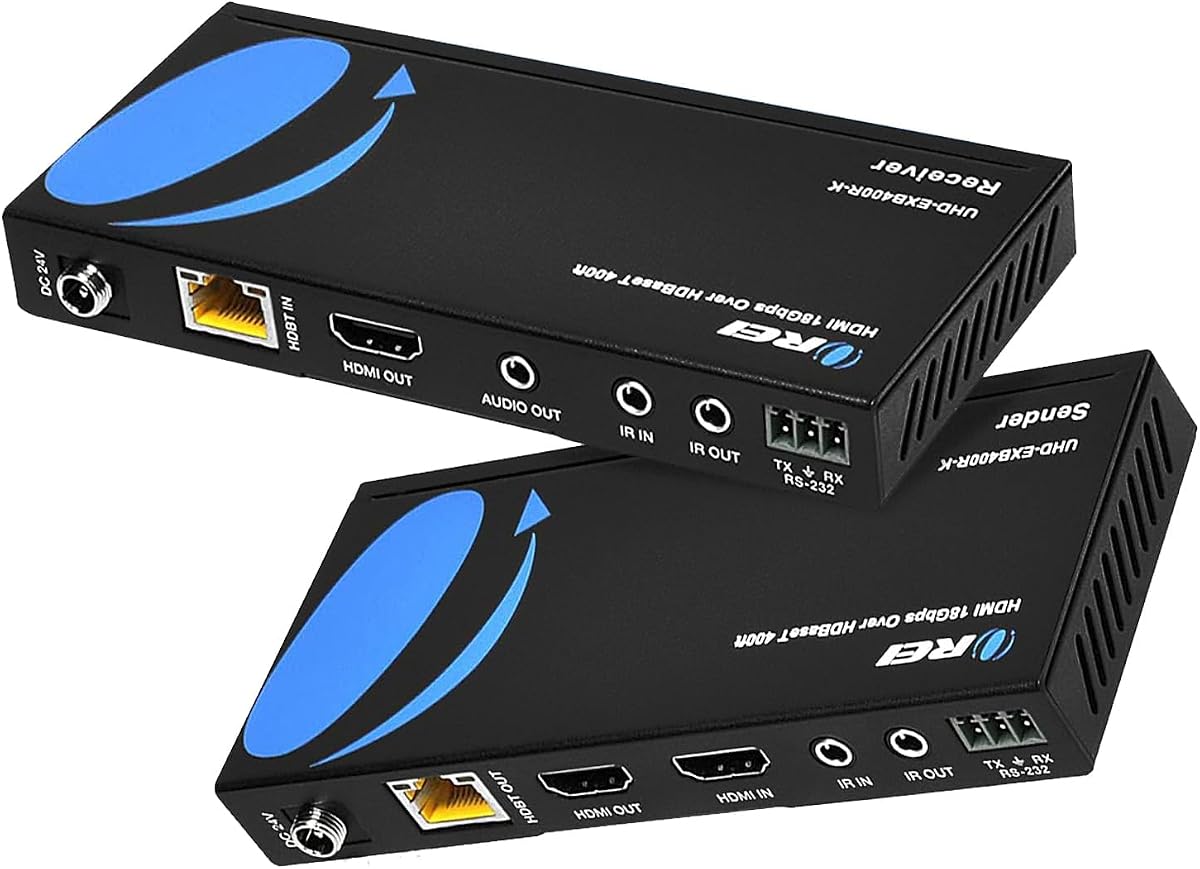
The OREI HDBaseT extender delivers professional grade performance with up to 400 feet of range. It supports 4K at 60Hz making it suitable for high-end home theaters and digital signage.
We may earn a commission when you buy through this link, at no additional cost to you.
Two-way IR control allows for flexible device control from either end. The RS-232 port enables advanced command control for professional automation systems.
Power over Cable reduces clutter while maintaining high bandwidth. It requires proprietary matching sets but this ensures optimal reliability and compatibility with HDBaseT standards.
This is the ideal choice for complex commercial installations requiring maximum distance and control. It offers superior performance for critical viewing environments.
Two-way IR and RS-232 ports support advanced automation and device control.
Supports up to 400 feet of reliable 4K signal transmission.
We may earn a commission when you buy through this link, at no additional cost to you.
The PWAY HDMI Extender offers a straightforward solution for extending HDMI signals over Cat5 to Cat7 cables. It supports 4K at 30Hz and includes features like loop out and IR control.
We may earn a commission when you buy through this link, at no additional cost to you.
Power over Cable ensures easy installation by powering the receiver through the same cable. Mounting holes facilitate secure placement in permanent setups.
It works well for home theaters or meetings where 30Hz performance is acceptable. The plug and play design makes it accessible for users with limited technical experience.
This product is a reliable choice for general extension needs requiring minimal setup. It balances performance with ease of use effectively for budget-conscious buyers.
Plug and play setup requires no software or technical configuration.
Holes on the device allow for secure wall or rack mounting.
We may earn a commission when you buy through this link, at no additional cost to you.
Selecting the right HDMI over Ethernet extender depends on your specific needs for resolution, distance, and features. Understanding key factors helps ensure compatibility and performance.
The maximum distance an extender can support varies significantly across models. Ensure the chosen device supports the required length without signal degradation.
Always match cable specifications to the model requirements for optimal performance.
Verify whether the extender supports your desired resolution such as 4K or 1080P. Some models limit 4K to 30Hz while others offer 60Hz.
Higher resolutions generally require more bandwidth and better quality cables.
Most extenders work with Cat5e, Cat6, or Cat7 cables. Check the requirements of the extender to ensure your cabling infrastructure is compatible.
Using higher quality cables can improve signal stability and distance capabilities.
Power over Cable technology allows the receiver to be powered through the Ethernet cable. This simplifies wiring and reduces the need for extra power outlets.
Confirm if the model includes an adapter and if it supports local voltages.
Infrared control allows you to operate source devices from remote locations. Look for models that include IR cables and support pass-through functionality.
This feature is essential for setups where devices are hidden or mounted high.
Look for features like HDMI Loop Out, EDID management, or KVM support if needed. These features add flexibility for professional or multi-screen environments.
Prioritize features that match your specific installation requirements and usage.
Metal housings and compact designs often indicate better durability and heat dissipation. Ensure the device is suitable for the environment where it will be used.
Robust construction contributes to reliable long-term performance.
Choose reputable brands that offer warranties and customer support. Reliable support ensures quick resolution of any technical issues that may arise.
Always check warranty terms and support availability before purchase.
Connect the HDMI source to the transmitter and plug it into a power outlet. Run a Cat5e, Cat6, or Cat7 cable to the receiver and connect it to your display.
Ensure the cables are securely plugged in and the IR cables are connected if using remote control. Verify that your display settings match the supported resolution of the extender.
Keep the devices in a cool, dry place to prevent overheating. Avoid bending the Ethernet cables sharply to maintain signal integrity over long distances.
HDMI over Ethernet uses network cables to transmit high-definition video and audio signals over longer distances than standard HDMI cables. It converts HDMI signals to digital data that travels over Cat5e or higher cables.
Standard Cat5e, Cat6, or Cat7 Ethernet cables are typically sufficient. Ensure the cables are high quality to minimize signal loss over long distances.
Yes many modern extenders support 4K resolution. However check the supported refresh rate as some may limit 4K to 30Hz instead of 60Hz.
Range varies by model but most support between 100 feet and 400 feet. Always check the specifications to ensure it meets your distance requirements.
No HDMI over Ethernet extenders are typically plug and play devices. They do not require software or drivers to function.
Power over Cable technology allows the receiver to be powered through the Ethernet cable. This eliminates the need for a separate power source at the display end.
Choosing the right HDMI over Ethernet extender requires balancing range resolution support and budget. Models like the OREI HDMI Over Ethernet Extender offer excellent 4K performance for most users.
Consider specific needs such as KVM support or long distance capabilities before making a decision. Ensure your installation environment matches the technical requirements of the chosen extender.
Always verify current product listings for the latest features and pricing. Investing in a reliable extender ensures stable and high quality signal transmission over time.