
AULA S99 Gaming Keyboard
4.2Editor score
Triple mode connectivity
Macro programmable keys
Ergonomic foldable stand
This guide compares ten top creamy keyboards for typing and gaming, highlighting sound, build, and features to help you choose the best model.
Creamy keyboards offer a smooth, satisfying typing experience that many users crave. These mechanical boards often feature lubed switches and gasket mounts to reduce noise and enhance comfort. They blend premium sound with practical features like wireless connectivity and customizable lighting.
We compared ten models based on switch quality, build construction, and user feedback. Our analysis focuses on how well each board delivers that desired creamy thock without excessive clack. We also considered connectivity options, battery life, and customization potential for diverse workflows.
Each pick in this list showcases specific strengths for different needs. Whether you seek budget-friendly options or premium builds, these boards deliver reliable performance. Keep in mind that availability and offers may change, so verify details before purchasing your next keyboard.
4.2Editor score

4.8Editor score

4.8Editor score
This side by side comparison highlights key specifications across all ten selected creamy keyboards. We evaluate layout, connectivity, switch type, and unique features to help you find the perfect match for your desk setup and typing preferences.


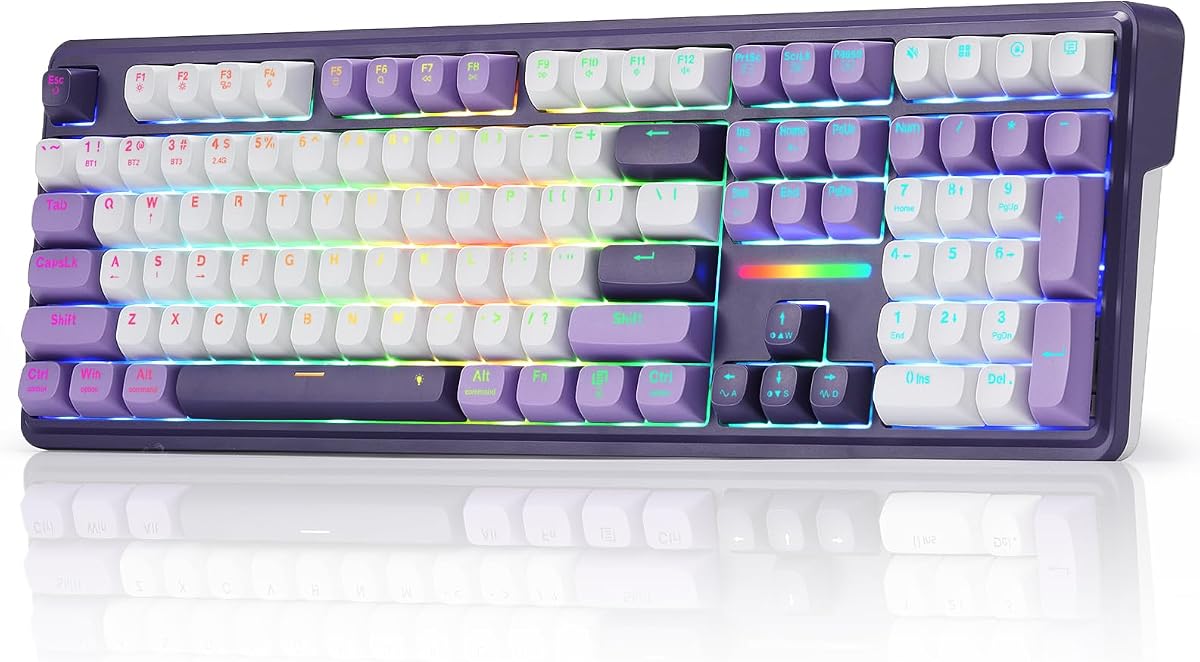


The AULA S99 stands out as a compelling option for budget conscious buyers seeking a creamy typing experience. It offers a unique retro design with a 96 percent layout that retains full functionality while saving space. Its wireless capabilities and knob controls add convenience to everyday use.
We may earn a commission when you buy through this link, at no additional cost to you.
Users appreciate the dual-mode rotary knob which simplifies volume and lighting adjustments. The keyboard supports macro customization for gaming scenarios, allowing complex actions to be programmed into single keys. Compatibility across Windows and Mac systems ensures broad usability for different work environments.
While it uses a membrane switch instead of mechanical, the design prioritizes a quiet and smooth feel. The absence of hot-swapping means you cannot modify switches later, but the provided experience is sufficient for casual typists. It balances features well for its price range.
If you need a reliable, compact keyboard with wireless freedom and retro style, this model delivers. It suits office workers or gamers who value ergonomics and macro functions without investing heavily. Check availability before purchasing to ensure the latest version is in stock.
Tri-mode connectivity lets you switch between Bluetooth, 2.4GHz wireless, and wired USB-C seamlessly.
The foldable two-stage stand allows angle adjustment to reduce wrist pressure during long typing sessions.
We may earn a commission when you buy through this link, at no additional cost to you.
The AULA F75 delivers a solid creamy feel with pre-lubed linear switches that produce a pleasant sound. Its hot-swappable base invites experimentation without soldering, making it ideal for enthusiasts on a budget. The compact 75 percent layout balances space-saving with necessary keys for gaming.
We may earn a commission when you buy through this link, at no additional cost to you.
RGB lighting and a multi-function knob enhance user control over ambiance and media playback. Connectivity options include Bluetooth 5.0, 2.4GHz wireless, and USB-C wired for maximum flexibility across devices. The 4000mAh battery supports extended use without frequent charging interruptions.
Users enjoy the smooth typing feel thanks to internal filling and gasket optimization. However, accessing full macro programming requires software, which may be a hurdle for some. The keyboard remains a strong contender for daily work and casual gaming alike.
For those seeking a wireless mechanical board that sounds creamy and feels smooth, this is a top pick. It offers versatility and quality without breaking the bank. Ensure you have a charged cable before first use to activate all features properly.
Swap 3-pin or 5-pin switches easily with the hot-swap base to tailor your typing signature.
A large battery and three connection modes ensure you stay connected and powered throughout long sessions.
We may earn a commission when you buy through this link, at no additional cost to you.
This keyboard prioritizes sound quality with a gasket structure and five layers of sound-absorbing foams. Users report a significant reduction in hollow noise, resulting in a rich, creamy thock with each keystroke. It offers a 99 key layout that maintains efficiency while reducing footprint.
We may earn a commission when you buy through this link, at no additional cost to you.
Hot-swapping capability allows for future switch upgrades without soldering, adding longevity to the investment. The PBT keycaps prevent shine over time, ensuring durability and consistent texture. RGB backlighting provides 15 effects and adjustable brightness to match your workspace aesthetic.
While it lacks wireless connectivity, the wired design ensures stable performance during critical tasks. The USB-C cable is pluggable, which aids in maintenance and portability. This model suits those who value auditory feedback over portability in a desktop setup.
If you want a board that sounds premium and feels soft without wireless distractions, consider this option. It balances customization and sound isolation well. Verify stock status to ensure you receive the correct color variant you desire.
Five layers of foam eliminate cavity noise for a smooth, consistent sound profile.
Replace 3-pin or 5-pin switches freely to tailor the tactile experience to your preference.
We may earn a commission when you buy through this link, at no additional cost to you.
The YUNZII B98 PRO combines a compact 96 percent layout with deep customization through open-source QMK/VIA firmware. Its gasket mount and five-layer filling create a plush, creamy typing feel that rivals expensive boards. Users can swap knobs to match their style preferences instantly.
We may earn a commission when you buy through this link, at no additional cost to you.
Battery life is exceptional with an 8000mAh cell, supporting long days without charging interruptions. Tri-mode connectivity allows seamless switching across up to five devices, making it ideal for multi-system workflows. The LED indicator on the cat logo shows battery status at a glance.
Advanced features like phrase typing and multiple layers enable complex shortcuts for power users. However, mastering these tools may require time and patience. For those willing to learn, the keyboard offers unmatched flexibility and performance.
If you seek a premium wireless board with endless potential, this is a top recommendation. It suits creators and power users who value both sound and function. Ensure you have a charged cable before initial setup to activate all settings properly.
QMK/VIA allows remapping keys and creating layers for complex tasks beyond standard keyboards.
The dual-stage adjustable stand and Cherry Profile keycaps optimize wrist angles for comfort.
We may earn a commission when you buy through this link, at no additional cost to you.
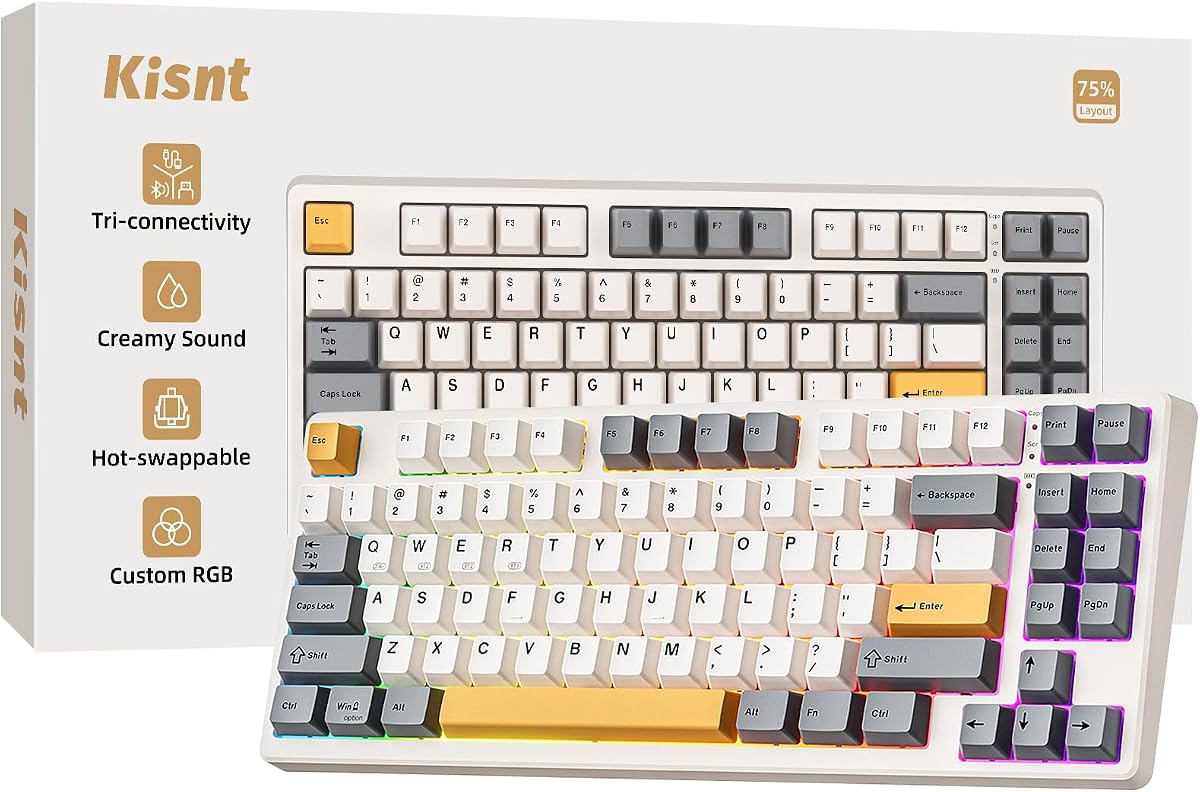
The Kisnt KN85 saves desk space with a 75 percent layout while maintaining a creamy, thocky sound profile. Its gasket mount reduces harsh vibrations, delivering a soft cushioned feel. The warm ambient RGB lighting creates a calm desk vibe without being distracting.
We may earn a commission when you buy through this link, at no additional cost to you.
Hot-swapping allows for tailored sound and tactile profiles without soldering. A 4000mAh battery ensures stable wireless performance even during charging. The company offers strong support with a 2-year warranty and 30-day returns, adding confidence to the purchase.
Users appreciate the simplicity of controls and the ability to connect up to three channels via Bluetooth. However, advanced programming requires a Windows-only driver, which might limit Mac users. Still, it remains a reliable choice for hybrid workers and gamers.
For minimalists who want wireless flexibility and custom sound, this board fits well. Ensure static effects are used to save power. Check stock availability to confirm your preferred color variant is in ready for shipment.
Pre-lubed linear switches and gasket mount produce a soft, marble-like thock on every press.
Use static RGB modes to extend battery life significantly during long work sessions.
We may earn a commission when you buy through this link, at no additional cost to you.
This keyboard bridges office efficiency and gaming comfort with a full-size layout and gasket-mounted feel. It includes four extra hotkeys for shortcuts like mute and calculator, improving daily workflow speed. The see-through PBT keycaps let RGB shine without losing texture over time.
We may earn a commission when you buy through this link, at no additional cost to you.
Tri-mode connectivity ensures seamless switching between PC, laptop, and tablet without re-pairing. The zero-lag design maintains speed across connections. Soft typing feel reduces fatigue during long typing sessions. This makes it suitable for both work and play environments.
Customization via software unlocks deeper macros and lighting effects. However, the interface may require a brief learning curve. For users needing a full numpad with creamy sound, this model delivers practical benefits without excessive weight.
If you want a board that balances office functionality with wireless comfort, consider this option. Ensure you update drivers to access all features. Check stock status before purchase to confirm your preferred color is available.
Four dedicated hotkeys speed up daily tasks like volume control and calculator access.
PBT caps resist greasy shine, keeping your keyboard looking new for longer.
We may earn a commission when you buy through this link, at no additional cost to you.
The SOLAKAKA A99 Pro features a unique LCD screen showing date, time, and battery status. This visualization adds convenience without needing software. The metal knob provides intuitive control over volume and lighting, enhancing usability. It uses a gasket structure for a soft, creamy feel.
We may earn a commission when you buy through this link, at no additional cost to you.
Tri-mode connectivity supports up to five devices, making it ideal for multi-system workflows. The web driver allows deep customization without downloads, though it requires a wired connection. Hot-swapping enables future modifications, extending the board's lifespan.
Side RGB lights add immersive ambiance beyond standard backlighting. However, mastering all features may take time. For users who value visibility and control on the keyboard itself, this is a standout option.
If you want a board with built-in visual feedback and strong customization, check this model. Ensure you have a cable ready for driver access. Verify stock to confirm color availability before ordering your unit.
The LCD screen displays critical info, reducing the need to check other apps.
Store multiple devices simultaneously and switch quickly without interrupting your workflow.
We may earn a commission when you buy through this link, at no additional cost to you.
This keyboard stands out with a vibrant pink design and 99 key layout. It supports macros and RGB lighting, blending gaming features with a playful look. The rotary knob simplifies volume and lighting control without extra key combos. It fits well for users who value aesthetics.
We may earn a commission when you buy through this link, at no additional cost to you.
Tri-mode connectivity ensures seamless switching across devices. The foldable stand improves ergonomics for long sessions. While it uses membrane switches, the design aims for a creamy typing feel. It suits those who prefer style alongside utility in a compact package.
Note that this model does not support hot-swapping. Therefore, customization is limited to macros and lighting. However, for users seeking an affordable, cute option with full functionality, it delivers solid value for daily use.
If you want a pink-themed keyboard with wireless freedom and gaming macros, this is a great choice. Ensure you pair it correctly with your system. Check stock to confirm color availability before finalizing your order.
A pink aesthetic meets macro capabilities for a personalized setup experience.
The foldable stand provides adjustable angles to reduce wrist strain during long use.
We may earn a commission when you buy through this link, at no additional cost to you.
This AULA F75 variant uses LEOBOG reaper switches for rapid response in games. The 75 percent layout saves space while retaining essential arrow keys. It features a multi-function knob for media and lighting control. Its RGB includes music rhythm effects for a dynamic setup.
We may earn a commission when you buy through this link, at no additional cost to you.
Tri-mode connectivity and N-key rollover ensure precise input during intense gaming. The battery supports extended play without frequent charges. Full-key macro programmability helps automate complex in-game actions. This makes it suitable for gamers who value speed and customization.
Users note the smooth feel from pre-lubricated stabilizers. However, accessing full driver features requires software installation. For those who prioritize performance and look, this board delivers competitive value in its category.
If you need a wireless gaming board with fast switches and macro support, this fits well. Ensure drivers are installed for full functionality. Check availability to confirm color options before making your purchase.
Fast linear switches and N-key rollover prevent missed inputs during intense matches.
Music rhythm lighting effects sync with audio for an immersive gaming atmosphere.
We may earn a commission when you buy through this link, at no additional cost to you.
The Redragon K768 PRO offers an 8000mAh battery for extended wireless use without charging. It features a gasket covered design for a soft, silky bounce. PBT keycaps resist fade and grease, maintaining texture over time. A single knob simplifies backlight and media control.
We may earn a commission when you buy through this link, at no additional cost to you.
Tri-mode connectivity ensures zero lag when switching between devices. The board allows advanced macros and custom lighting via software. It suits users who prioritize battery life and reliability. The gasket structure enhances typing comfort for long sessions.
While control options are simpler, the focus on power and comfort is clear. Users appreciate the reduced maintenance due to PBT durability. This model delivers strong performance for daily tasks and casual gaming alike.
If you want a wireless keyboard with exceptional battery and comfort, consider this board. Ensure you update software for best features. Check stock to confirm availability before finalizing your purchase.
A massive battery supports days of use between charges for uninterrupted work.
Fade-resistant PBT keycaps keep your keyboard looking new for years.
We may earn a commission when you buy through this link, at no additional cost to you.
Choosing the right creamy keyboard involves balancing sound, connectivity, and customization. This guide highlights key factors to help you find the perfect match.
Creamy keyboards often use linear switches that are pre-lubed for smooth travel. These reduce friction and create a quieter, consistent sound profile ideal for typing and gaming.
Look for pre-lubed or lubed switches to ensure the desired creamy feel without extra effort.
Gasket mounts allow the PCB to float on pads, absorbing vibrations and enhancing sound. This structure creates a softer, more elastic typing experience compared to traditional rigid mounts.
A gasket mount structure helps deliver that creamy thock and reduces finger fatigue over time.
Tri-mode connectivity including Bluetooth, 2.4GHz, and USB-C offers flexibility across devices. Wireless options free up desk space, while wired modes ensure zero lag when needed.
Choose a board with multiple connection modes to fit your specific workflow and setup needs.
Compact layouts like 75% or 96% save desk space while retaining essential keys. Full-size boards offer numpads but take more room. Pick based on how much mouse space you need.
Select a layout that balances functionality with available desk space for better ergonomics.
Hot-swappable boards let you change switches without soldering, offering long-term flexibility. Software support enables macros and lighting control for personalized workflows.
Prioritize hot-swap and robust software if you plan to tailor your keyboard experience.
Wireless boards vary in battery capacity. Larger cells like 8000mAh support days of use, while smaller ones need frequent charging. Consider your usage frequency.
Ensure the battery matches your daily needs to avoid frequent interruptions during work.
PBT keycaps resist shine and feel more textured over time compared to ABS. They ensure durability and consistent feel for long-term use.
Choose PBT keycaps to maintain texture and avoid greasy shine over months of use.
Multiple foam layers and sound-absorbing pads eliminate hollow noise inside the case. This results in a smoother, more premium sound profile during typing.
Look for boards with layered dampening to enhance sound quality and reduce echo.
Start by charging the keyboard fully via USB-C. Pair Bluetooth devices through your system settings, or plug in wired for zero lag performance.
Use software tools to program macros and lighting effects. Adjust brightness to save battery if needed for long sessions.
Clean regularly with compressed air and a soft cloth. Avoid liquids and replace keycaps as needed to maintain freshness.
A creamy sound comes from pre-lubed linear switches, gasket mounts, and internal dampening foams. These elements reduce friction and hollow echoes, resulting in a smooth, consistent thock with each press.
Yes, modern 2.4GHz wireless offers low latency comparable to wired. Most models support N-key rollover and macros, making them suitable for gaming without compromising performance.
Use manufacturer software to map keys and set lighting. For deep customization, look for QMK/VIA support. This lets you create layers and macros tailored to your tasks.
Hot-swappable boards let you swap switches without soldering. Simply use a puller tool to remove old switches and insert new ones. This is great for experimenting with different feels.
Some features like macros require software. Others work out of the box. Web drivers allow configuration without downloads, but may need wired access for initial setup.
Use compressed air to remove dust from gaps. Wipe keycaps with a dry cloth. Avoid liquids near the PCB. Remove caps gently for deep cleaning if needed.
We explored ten creamy keyboards offering distinct strengths in sound, layout, and connectivity. Whether you prioritize budget, battery, or customization, there is a fit for every need.
Consider your primary use—gaming, typing, or hybrid workflows—to narrow down options. Features like hot-swapping and gasket mounts add value if you plan to keep your board long-term.
Prices and availability change often. Check current listings before buying to ensure you get the latest model with full warranty support.