
OCuLink eGPU Dock
5.0Editor score
PCIe 4.0 x4 64Gbps
Open-frame ATX PSU support
Includes 50cm OCuLink cable
This guide compares the top external GPUs for Mini PCs using OCuLink, Thunderbolt, and USB4 to help you choose the right graphics solution for your system.
External GPUs transform compact Mini PCs into powerful workstations by adding desktop-class graphics performance. They connect via high-bandwidth ports like OCuLink or Thunderbolt to deliver smooth gaming and creative workflows without compromising portability.
We evaluated ten leading eGPU solutions based on interface speed, power delivery, build quality, and compatibility with various Mini PC models. Our analysis focuses on real-world performance potential and ease of integration for different user needs.
Each pick highlights specific strengths such as open-frame flexibility, all-in-one convenience, or dual-interface support. Prices and availability fluctuate frequently so verify current details on the product pages before making your final purchasing decision.
5.0Editor score

4.7Editor score

4.0Editor score
The following comparison table provides a side-by-side overview of all ten eGPU solutions. It highlights their core interface specifications and unique design features to help you quickly identify the right match for your Mini PC.


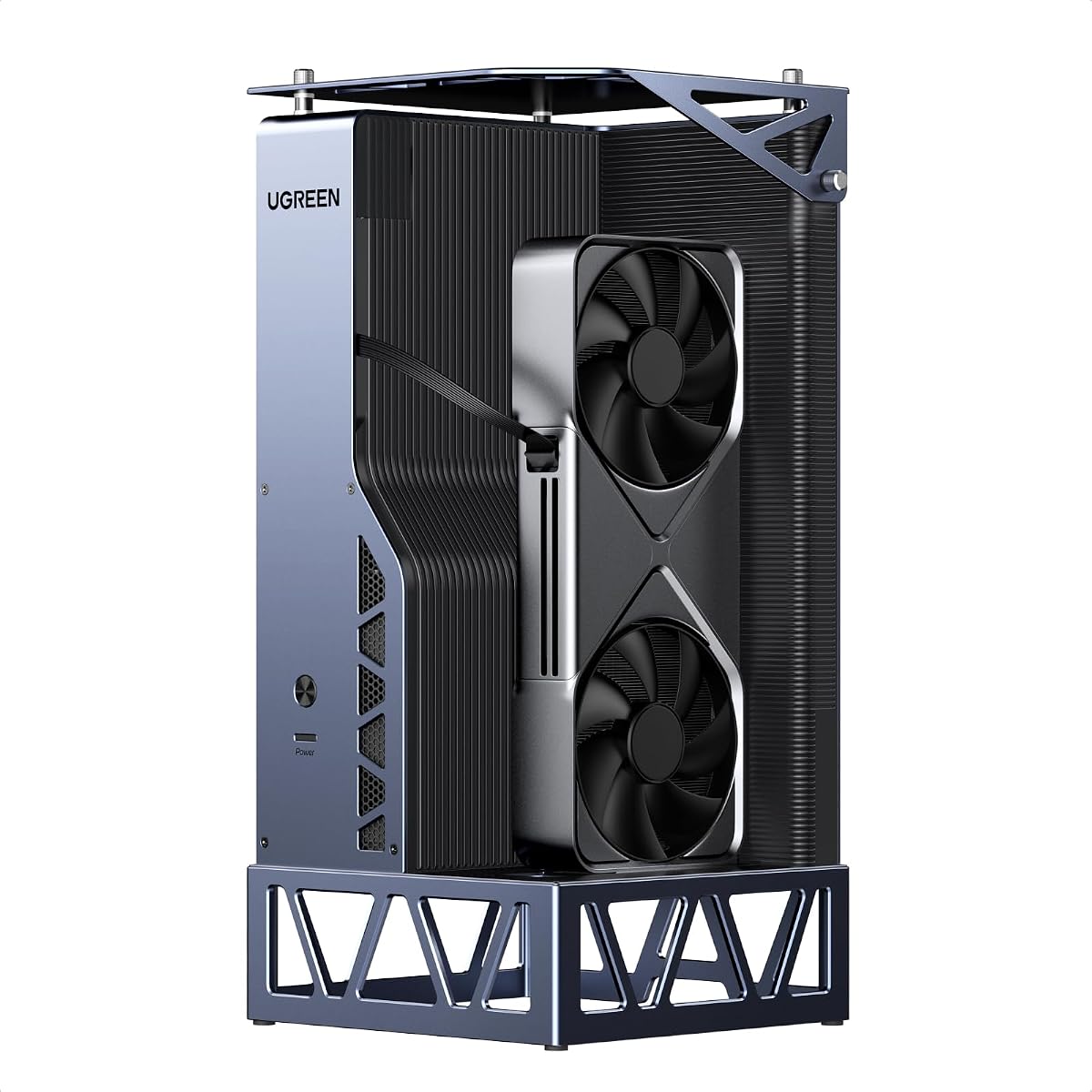


The PCIe 4.0 eGPU DOCK ranks first for its exceptional value in the budget OCuLink category. It offers a full PCIe x16 connection with 64Gbps bandwidth for demanding graphics workloads without expensive proprietary cables.
We may earn a commission when you buy through this link, at no additional cost to you.
Its detachable enclosure design and flexible thin cable simplify storage and transport. The gold-plated contacts and EMI shielding ensure stable signal transmission even during intensive gaming or rendering tasks.
Users must note that hot-plugging is not supported so power down before connecting. You also need to provide your own GPU and ATX power supply which adds to initial setup cost and complexity.
This dock is ideal for cost-conscious users who already own compatible components and want maximum flexibility without overspending on branded enclosures or pre-installed graphics cards.
The open-frame build supports virtually any standard ATX power supply and GPU length giving you complete freedom to choose components based on your specific performance needs.
The included flat 0.5mm thick OCuLink cable reduces port damage risks while maintaining high-speed data transfer for reliable graphics performance.
We may earn a commission when you buy through this link, at no additional cost to you.
The OCuLink eGPU Dock earns top honors for value with a perfect user rating and straightforward open-frame design. It delivers full PCIe 4.0 x4 bandwidth without restricting your choice of graphics cards or power supplies.
We may earn a commission when you buy through this link, at no additional cost to you.
Its enhanced shielded cable with metal layers and EMI polymers ensures interference-free high-speed connections. The manual guides new users through driver installation and hardware setup to avoid detection issues.
This dock lacks hot-plugging capability so power cycling is required before connection changes. You must supply your own GPU and standard ATX power supply making it better for users with existing parts.
Choose this dock if you prioritize maximum compatibility and simplicity while keeping initial costs low for building your own Mini PC graphics expansion setup.
The open-frame design supports NVIDIA AMD and Intel graphics cards without length limits allowing you to use any standard desktop GPU you already own.
The included OCuLink cable features metal shielding and EMI-shielded conductive polymer to maintain stable high-speed data transfer without interference.
We may earn a commission when you buy through this link, at no additional cost to you.
The MINISFORUM MGA1 stands out as a complete all-in-one solution featuring a built-in AMD Radeon 7600M XT graphics card. It eliminates DIY assembly by integrating a 240W GaN power supply and multiple video outputs.
We may earn a commission when you buy through this link, at no additional cost to you.
This dock offers 1x HDMI 2.1 and 2x DisplayPort 2.0 outputs for triple-monitor setups. The built-in power delivers 120W to the GPU and 65W for display output simplifying cable management.
Users must note follow-start functionality works only with MINISFORUM Mini PCs using original wires. The higher price includes all components but reduces flexibility for custom GPU upgrades later.
Select this dock if you want immediate plug-and-play performance without sourcing separate GPU or power components and value a compact integrated design.
Connect up to three external displays using HDMI 2.1 and dual DisplayPort 2.0 outputs for expanded workspace and multi-monitor productivity.
The built-in 240W GaN power supply provides stable power directly to the GPU without needing bulky external adapters.
We may earn a commission when you buy through this link, at no additional cost to you.
The MINISFORUM DEG1 Docking Station is engineered for portability with a footprint small enough for backpacks. It provides full PCIe 4.0 x4 bandwidth through a reliable OCuLink interface with locking mechanisms.
We may earn a commission when you buy through this link, at no additional cost to you.
It supports both ATX and SFX standard power supplies offering flexible power solutions. The Force Power On LED simplifies startup between forced and follow-up modes for better system stability.
Like most OCuLink docks hot-plugging is not supported so power down before connecting. Follow-start requires original MINISFORUM wires limiting compatibility for non-brand mini PCs.
Ideal for mobile users who need reliable portable graphics expansion without sacrificing speed or wanting compact storage for travel and remote work.
Measuring only 14cm long this dock fits easily in backpacks for upgrading graphics performance anywhere without bulky hardware.
High-quality chips ensure stable signal transmission while the locked connector prevents accidental disconnections during transport.
We may earn a commission when you buy through this link, at no additional cost to you.
The MINISFORUM DEG1 eGPU Dock focuses on power supply flexibility by supporting both ATX and SFX standards. This allows users to match power needs precisely without unnecessary bulk or constraints.
We may earn a commission when you buy through this link, at no additional cost to you.
It delivers full PCIe 4.0 x4 bandwidth via OCuLink for high-performance gaming and professional rendering. The follow-start function aids stability but requires original wires for MINISFORUM Mini PCs.
Hot-plugging is not supported so power cycling is mandatory before connection changes. Lack of Thunderbolt limits compatibility to OCuLink-enabled devices only.
Choose this dock if you want a compact enclosure with maximum power supply choice and need reliable OCuLink performance for high-end graphics cards.
Supports both ATX and SFX power standards giving you flexibility to use existing power supplies or choose efficient low-profile options.
One-click switching between startup modes ensures stable system operation without manual setting adjustments at every boot.
We may earn a commission when you buy through this link, at no additional cost to you.
The Razer Core X V2 delivers premium performance via Thunderbolt 5 support offering up to 80Gbps bandwidth. It accommodates large desktop graphics cards up to four slots wide with robust active cooling.
We may earn a commission when you buy through this link, at no additional cost to you.
Its steel chassis includes a 120mm fan that ramps up under heavy loads maintaining optimal GPU temperatures. Tool-free thumbscrews simplify GPU swaps for enthusiasts upgrading hardware frequently.
Mac devices with M1 chips or later do not support eGPUs limiting compatibility. The high bandwidth comes at a higher cost compared to OCuLink-only docks.
Best suited for Windows users needing maximum bandwidth and chassis durability to handle powerful GPUs and demanding creative workloads.
Enjoy ultra-fast bandwidth up to 80Gbps enabling smooth AAA gaming and creative app performance without bottlenecks.
Built-in 120mm fan automatically adjusts to sustain performance under heavy loads preventing overheating.
We may earn a commission when you buy through this link, at no additional cost to you.
The NIMO External GPU Docking Station offers rare dual-interface support combining USB4 and OCuLink for maximum compatibility. It includes a powerful AMD Radeon RX 7600M XT GPU plus built-in 240W PSU.
We may earn a commission when you buy through this link, at no additional cost to you.
Its 0.8L footprint fits on desks or in bags while active cooling ensures stable performance. The USB4 connection also delivers up to 65W PD to charge the host device simultaneously.
Users must place the dock horizontally on well-ventilated surfaces for proper airflow. The compact size requires careful thermal management during extended high-load sessions.
Choose this dock for versatile connectivity and ready-to-use convenience without managing separate GPU or power supply components.
Switch between USB4 for universal compatibility or OCuLink for near-zero latency based on your host device requirements.
Delivers power to compatible devices through the USB4 interface reducing cable clutter during use.
We may earn a commission when you buy through this link, at no additional cost to you.
The UGREEN LinkStation eGPU Dock combines OCuLink and USB4 interfaces for future-proof performance. Its removable top cover allows installation of GPUs up to 370mm and four slots thick.
We may earn a commission when you buy through this link, at no additional cost to you.
It includes a quiet ATX 3.1 PSU fan and cable storage to keep workspaces tidy. Signal boosters maintain stability for 4K gaming and AI workloads across supported platforms.
OCuLink lacks hot-plugging support requiring power cycling. Higher cost reflects premium build quality and flexible GPU accommodation for enthusiasts.
Select this dock if you plan to use top-tier GPUs and want robust chassis design with dual interface versatility.
Extends compatibility for oversized GPUs up to 370mm length without requiring adapters or custom modifications.
Compartments keep cables organized to maintain a clean and clutter-free desktop setup.
We may earn a commission when you buy through this link, at no additional cost to you.
The BOSGAME eGPU Graphic Card Dock includes an integrated AMD Radeon RX 7600M XT GPU and M.2 SSD expansion slot. It supports up to four external displays for immersive visual setups.
We may earn a commission when you buy through this link, at no additional cost to you.
Users can boost performance from 100W to 120W TDP via the Turbo Button. The lightweight aluminum alloy enclosure weighs only 1.92lb for portable use.
Premium pricing covers built-in GPU and additional I/O ports. Lack of SFX PSU support limits power supply choices for custom configurations.
Ideal for mobile workstations needing extra storage and display headcount alongside reliable portable graphics acceleration.
Adds up to 4TB PCIe 3.0 SSD storage for extra game libraries or project files without host device constraints.
Quickly switch GPU TDP to 120W for maximum performance when power limits allow.
We may earn a commission when you buy through this link, at no additional cost to you.
The Nimo eGPU External Graphics Card Enclosure offers a plug-and-play all-in-one solution with integrated GPU and power supply. Its 0.8L footprint is among the smallest for desktop-class performance.
We may earn a commission when you buy through this link, at no additional cost to you.
It features both USB4 and Oculink ports for flexible connectivity plus 65W PD reverse charging. Dual display outputs support up to two 8K or 4K monitors.
Lower user ratings reflect thermal constraints or setup complexity. The compact size requires careful placement on well-ventilated surfaces for stable operation.
Choose this dock if maximum portability and ready-to-use convenience matter most while accepting trade-offs in thermal performance.
At 0.8L this dock fits in backpacks making it easy to carry for business trips or travel.
Charges compatible devices while in use reducing the need for separate laptop power bricks.
We may earn a commission when you buy through this link, at no additional cost to you.
Selecting the right external GPU involves evaluating interface options power requirements and your specific workload needs. This guide outlines essential factors to consider before purchasing.
Choose OCuLink for maximum bandwidth and low latency or Thunderbolt/USB4 for broader compatibility and hot-plug convenience. OCuLink delivers near full desktop performance while Thunderbolt adds universal support.
Prioritize OCuLink if your Mini PC supports it for best performance otherwise choose Thunderbolt or USB4 for flexibility.
Open-frame docks require you to supply ATX or SFX power supplies adding setup complexity but lowering cost. All-in-one units include integrated PSUs simplifying deployment at higher prices.
Select integrated PSUs for portability and ease or open-frame for customization and component reuse.
Verify the enclosure supports your desired graphics card size and slot width. Most docks allow full-size desktop GPUs but check height and length limits before buying.
Ensure the dock matches your GPU slot width and length to avoid fit issues.
If you travel frequently choose compact docks that fit in backpacks. Larger chassis offer better cooling but reduce transport convenience.
Pick smaller enclosures for mobility or larger ones for stationary performance.
Some docks include HDMI or DisplayPort for external monitors while others rely on host outputs. Multi-monitor workflows benefit from docks with built-in video ports.
Select docks with video outputs if you plan to connect multiple displays directly.
Thunderbolt and USB4 interfaces support hot-swapping but OCuLink does not. Power cycling is required for OCuLink connections so plan workflow interruptions.
Choose Thunderbolt or USB4 if frequent connection changes are necessary.
Certain docks feature startup automation or proprietary cables limited to specific Mini PC brands. Check compatibility notes if you use specialized models.
Verify brand-specific features align with your Mini PC before purchasing.
Look for aluminum or steel chassis with effective cooling fans to maintain thermal stability during long sessions. Quality materials extend durability and reduce noise.
Invest in robust build quality for reliable performance and long-term use.
Connect the eGPU dock to your Mini PC via OCuLink Thunderbolt or USB4 before powering on. Ensure both devices are off during connection to prevent port damage especially with OCuLink.
Install the latest GPU drivers from the manufacturer after connecting the dock. Restart your system to apply changes and verify the GPU is recognized in device settings.
Maintain stable performance by placing the dock on a level well-ventilated surface. Keep vents clear and avoid enclosed spaces to reduce heat buildup during long sessions.
No OCuLink does not support hot-plugging. You must power off your Mini PC before connecting or disconnecting the cable to prevent hardware damage. Always verify this requirement in your dock manual.
Most open-frame docks support standard desktop GPUs but check height length and slot width limits. All-in-one docks come with integrated GPUs so customization is not possible.
Open-frame docks usually require ATX or SFX power supplies depending on model. All-in-one units include built-in PSUs so no additional hardware is necessary.
Yes for Mini PCs needing desktop-level graphics. They enable AAA gaming and creative workloads while preserving portability. Performance gains vary based on interface and GPU choice.
Some models require proprietary cables for follow-start features. Check if your Mini PC supports generic OCuLink cables to avoid extra costs.
Compare GPU dimensions and slot width with dock specifications before buying. Verify power connector types match your chosen PSU or built-in supply.
OCuLink offers highest bandwidth and lowest latency for performance. Thunderbolt or USB4 provides hot-plug convenience and broader compatibility.
Mac with M1 or later chips do not support external GPUs. Older Intel Macs may work but check official compatibility lists before purchasing.
The top picks balance performance price and flexibility for different Mini PC setups. Budget open-frame docks suit DIY users while all-in-one models offer plug-and-play convenience.
Prioritize interface speed and power compatibility to ensure your chosen dock meets your performance goals without bottlenecks.
Always verify current prices and availability before purchasing as these details change regularly across online retailers.