
Elderly Keyboard Large Print Computer Keyboard
4.5Editor score
High contrast black and white keys
Full size 104 key layout
Durable ABS material construction
This guide compares the best large print keyboards for seniors and visually impaired users, evaluating contrast, backlighting, ergonomics, and durability to
Finding a keyboard with large print is essential for anyone struggling to see standard keys. High contrast lettering and oversized fonts reduce eye strain and typing errors significantly. These tools empower users with low vision to type with confidence and speed in any environment.
We evaluated ten top-rated large print keyboards based on user feedback and technical specifications. Our comparison focuses on key visibility, backlighting options, ergonomic features, and overall build quality. Each model offers unique benefits tailored to different needs and preferences for comfortable typing.
Every pick highlights specific strengths like spill resistance, multi-color lighting, or budget-friendly pricing. We explain what makes each keyboard stand out so you can choose the right fit. Keep in mind that availability and features may change over time as manufacturers update their products.
4.5Editor score

4.5Editor score

4.9Editor score
Below is a side-by-side comparison of all ten large print keyboards analyzed in this guide. Each row details the core specifications and unique features to help you quickly identify the best match for your specific typing needs and visual requirements.


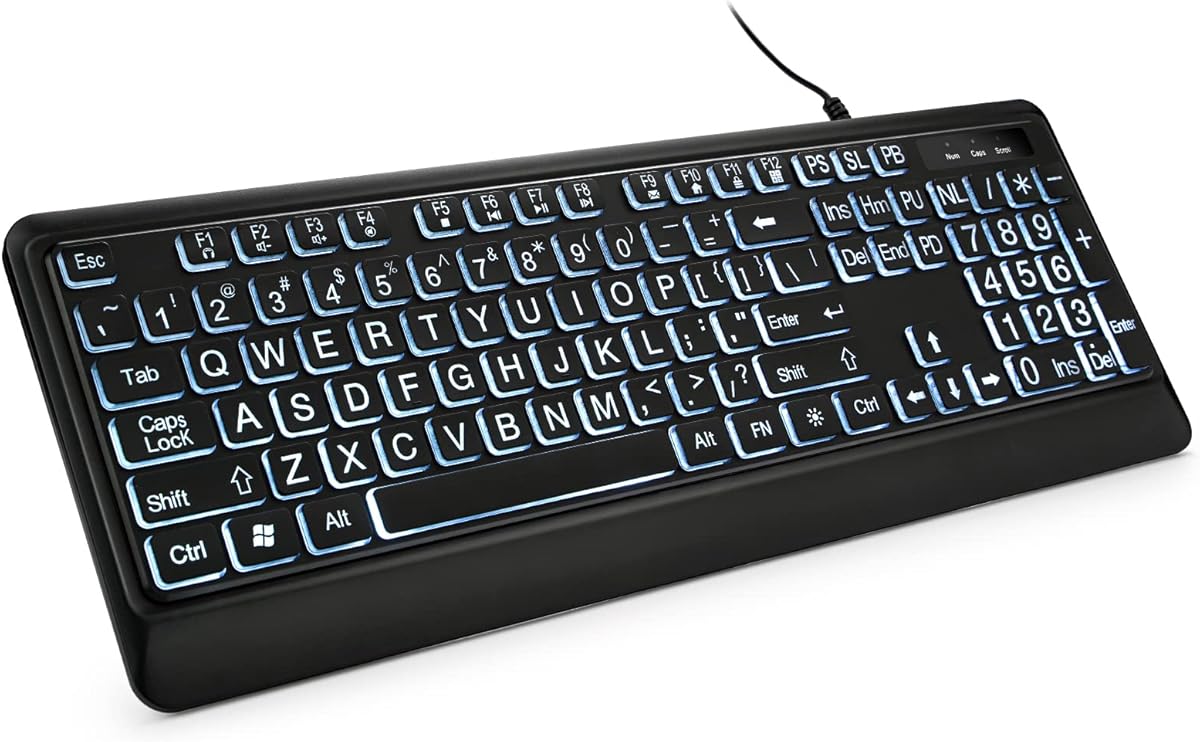


This keyboard stands out as an affordable option designed specifically for those with vision challenges. It boasts a 4.5 star rating from users who appreciate its clear visibility. The high contrast keys ensure that every character is easy to distinguish even in dim lighting conditions.
We may earn a commission when you buy through this link, at no additional cost to you.
The key feature here is the oversized font size which is significantly larger than standard keyboards. This design choice reduces eye strain and minimizes typing errors for seniors or beginners. The white key caps with black letters provide a stark contrast that is universally recognized for readability.
While it lacks modern backlighting features, the focus remains on core functionality and durability. The membrane switches offer a quiet experience suitable for shared spaces. However, users accustomed to mechanical feedback might find the typing feel slightly mushy compared to higher-end models.
Anyone looking for a reliable no-fuss keyboard at an accessible price point should consider this model. It is ideal for home use or office settings where budget is a primary concern. The plug and play setup means you can start typing immediately without technical hurdles.
The large print font is designed to be the largest available on a full-size keyboard ensuring maximum legibility for users with visual impairments.
Constructed with ABS material this keyboard resists wear and tear while providing a quiet typing experience that does not disturb others.
We may earn a commission when you buy through this link, at no additional cost to you.
This model combines large print readability with versatile backlighting options making it a top choice for diverse environments. Users rate it highly for its ability to function well in both bright and dark settings. The combination of bold lettering and LED lights ensures keys are never hard to find.
We may earn a commission when you buy through this link, at no additional cost to you.
The standout feature is the seven-color backlight system which allows personalization of the typing environment. You can adjust brightness levels to suit your eyes comfort without straining during late-night sessions. This flexibility makes it suitable for students and professionals alike who work irregular hours.
Although it requires a USB connection it offers reliable performance without battery anxiety. The full-size layout includes a number pad which is essential for data entry tasks. Some users might prefer wireless options but the stable wired connection ensures zero latency during critical work.
If you need a keyboard that adapts to changing light conditions while maintaining high readability this is an excellent pick. It balances functionality with modern aesthetic touches that enhance desk setups. The ease of use makes it accessible for anyone needing clear key visibility.
With seven distinct colors and multiple brightness settings this keyboard allows you to customize the lighting to match your mood or workspace needs.
The full-size design includes a number pad and shortcut keys enabling faster navigation and smoother workflows for efficient daily computing tasks.
We may earn a commission when you buy through this link, at no additional cost to you.
Leading the pack with an impressive 4.9 rating this keyboard delivers premium quality and exceptional user satisfaction. It addresses the needs of low vision users with oversized letters and a modern design. The inclusion of both USB and Type C connectors sets it apart from many competitors in this category.
We may earn a commission when you buy through this link, at no additional cost to you.
Key strengths include the silent membrane structure which makes it ideal for shared offices or quiet study rooms. The dedicated multimedia keys allow quick control over media without interrupting your workflow. High contrast printing ensures that every keystroke is visible and confident in various lighting scenarios.
While it comes at a higher price point the build quality and feature set justify the investment for many users. The dual connectivity ensures compatibility with newer devices that may lack standard USB ports. Some users might miss multi-color backlighting but the brightness adjustability is sufficient for most needs.
This keyboard is recommended for those who prioritize reliability and comfort above all else. It is perfect for professionals who type extensively and need a device that reduces fatigue. The combination of silent typing and high visibility makes it a superior choice for daily use.
Featuring both USB and Type C plugs this keyboard ensures you can connect to a wide range of modern and traditional devices seamlessly.
The soft membrane keys produce minimal noise allowing for a peaceful typing environment that is respectful of shared spaces and quiet zones.
We may earn a commission when you buy through this link, at no additional cost to you.
This keyboard offers a distinct yellow and black color scheme that provides excellent contrast for users struggling with standard white keys. Rated at 4.4 stars it is favored for its robust build and spill resistant capabilities. The large lettering ensures that characters are easily identified by those with reduced visual acuity.
We may earn a commission when you buy through this link, at no additional cost to you.
The spill resistant design is a significant advantage for environments where beverages are common near the workspace. This protection gives peace of mind and extends the life of the device significantly. Additionally the lifetime after-sales service adds a layer of trust that few other budget options provide.
Despite lacking backlighting the high visibility of the keys makes it effective in well-lit rooms. The foldable feet allow for an ergonomic typing angle which reduces wrist strain over time. However users who require low-light functionality might need to consider options with LED features.
Ideal for schools libraries or offices this keyboard balances cost and functionality effectively. It is a practical choice for users who value durability and service support. The unique color contrast helps distinguish it from generic models offering a tailored solution for specific needs.
Designed with water-resistant protection this keyboard guards against accidental spills ensuring the internal components remain safe and functional.
The manufacturer offers lifetime after-sales service providing users with long-term assurance and reliable support for any issues that may arise.
We may earn a commission when you buy through this link, at no additional cost to you.
This keyboard stands out by including a protective cover and wrist support which are often extra accessories. The white backlight ensures that keys are visible without the distraction of multiple colors. Users appreciate the thoughtful additions that protect the device and enhance comfort during long typing sessions.
We may earn a commission when you buy through this link, at no additional cost to you.
The protective cover prevents dust and liquids from entering the keyboard gaps extending its usability in busy environments. Multimedia shortcuts allow quick access to volume and email functions improving workflow efficiency. The large print font is four times larger than standard ensuring maximum readability for seniors.
A minor drawback is that the backlight cannot be turned off in standby mode which might be distracting for some. The wrist support is foldable but might not suit every desk size. However the overall value proposition remains strong due to the included accessories and solid build quality.
Recommend this model for users who want an all-in-one solution with extra protection and comfort features. It suits office workers and seniors who need reliable visibility and device longevity. The included accessories make it a convenient choice that requires no extra purchases.
The original cover prevents dust and liquid splashes significantly extending the service life and keeping the keys clean from debris.
Foldable tripod and wrist support reduce hand fatigue allowing for long hours of typing without physical discomfort or strain.
We may earn a commission when you buy through this link, at no additional cost to you.
This keyboard offers a vibrant typing experience with seven interchangeable backlight colors and adjustable brightness. It holds a strong 4.6 rating from users who value its customizable lighting and large print clarity. The spill proof design ensures durability against accidental coffee spills making it suitable for active workspaces.
We may earn a commission when you buy through this link, at no additional cost to you.
The large font design offers excellent comfort with letters that are four times larger than standard keyboards. This feature is ideal for elderly users who need quick key recognition without squinting. The foldable stands allow for an ergonomic angle that reduces wrist strain during prolonged use.
While it is a wired model the stability of the connection ensures no input lag during typing. The plug and play functionality means you do not need to install any drivers before using it. Some users might prefer more modern connectivity options but the USB link is reliable and consistent.
If you want a keyboard that combines visual accessibility with personal style this is a great option. The variety of colors allows you to match your keyboard to your desk setup. It balances practical features with aesthetic choices effectively for a wide range of users.
Choose from seven colors and three brightness levels to create a typing environment that suits your visual preferences and desk aesthetics.
Built with a spill-resistant design this keyboard protects internal components from water or coffee ensuring long-term reliability.
We may earn a commission when you buy through this link, at no additional cost to you.
This model focuses on delivering clear white illumination combined with oversized large print fonts. It is rated highly for its ability to provide even light distribution across the keys. The spill proof construction adds a layer of protection that is essential for daily use in various environments.
We may earn a commission when you buy through this link, at no additional cost to you.
The full-size layout includes all standard keys plus a number pad for comprehensive functionality. Large print keys provide superior comfort without forcing you to relearn how to type. Users appreciate the ergonomic design that allows for a natural typing posture to reduce fatigue.
While it lacks the color variety of other models the white backlight is often preferred for its clarity. The adjustable brightness ensures you can find a comfortable setting for your room lighting. Some users may find the cord length standard but it is sufficient for most desktop setups.
Choose this keyboard if you prefer a clean professional look with reliable backlighting. It is a solid choice for gamers or typists who need visibility without distracting colors. The combination of spill resistance and large print makes it durable and accessible.
Bright and evenly distributed backlight keys make typing easy in lower light environments for focused productivity and accuracy.
Unfoldable feet at the back reduce hand fatigue providing superior comfort during long hours of typing or gaming sessions.
We may earn a commission when you buy through this link, at no additional cost to you.
This keyboard emphasizes ergonomic comfort with a built-in wrist rest to alleviate fatigue. It features seven backlight colors allowing personalization of your workspace lighting. The inclusion of a phone and tablet holder adds convenience for multitasking while typing or reading.
We may earn a commission when you buy through this link, at no additional cost to you.
The oversized font keys are designed to reduce typing errors for seniors and those with visual impairments. Users like the automatic sleep mode which saves energy when the keyboard is not in use. The wrist support ensures a neutral hand position reducing strain during long workdays.
One notable limitation is that the backlight does not have a memory function requiring you to adjust settings each time. The rating is slightly lower than others which may indicate variability in quality or satisfaction. However the feature set remains attractive for its price point.
Ideal for students or office workers this keyboard offers a balance of comfort and visual accessibility. The holder feature makes it unique among standard keyboards by integrating device viewing. It is a practical choice for those who need extra comfort and utility features.
The bottom support palm rest reduces wrist fatigue and discomfort ensuring a neutral relaxed hand position during prolonged typing.
A built-in phone and tablet holder allows you to watch videos or read materials while using your computer effectively.
We may earn a commission when you buy through this link, at no additional cost to you.
Adesso offers a classic solution with fluorescent yellow keys that provide excellent contrast. The four times larger black print ensures characters are easy to read for those with vision issues. It includes multimedia hotkeys which are rarely found on budget large print keyboards.
We may earn a commission when you buy through this link, at no additional cost to you.
The one-touch controls for Windows applications allow quick access to tools like calculator or mail. Membrane switches offer a quieter typing experience compared to mechanical alternatives. The build quality is durable with a life cycle of five million keystrokes ensuring long-term reliability.
While the design might feel less modern compared to LED models it focuses on essential functionality. The high contrast keys are effective even in low light without the need for power. Some users might find the yellow color too bright for certain office environments.
This keyboard is a great choice for those who prefer proven technology over flashy lights. It suits users who need immediate access to common functions without navigating menus. The strong contrast and durability make it a reliable tool for daily computing tasks.
Built-in multimedia hotkeys allow you to control volume and media playback with a single touch for efficient entertainment management.
One-touch controls open favorite Windows applications like My Computer or Calculator instantly to speed up your workflow.
We may earn a commission when you buy through this link, at no additional cost to you.
This keyboard focuses on simplicity and clarity making it perfect for beginners and seniors. It features high contrast black and white keys that are easy to read for anyone with visual impairments. The design is sleek and keeps hands in a relaxed neutral position for effortless typing.
We may earn a commission when you buy through this link, at no additional cost to you.
The soft keys provide a quiet comfortable experience that is suitable for shared environments. No installation is required so you can connect and start typing immediately without technical barriers. The satisfaction guarantee ensures that you are protected if the product does not meet your expectations.
While it lacks advanced features like backlighting or multimedia keys it excels in core readability. The high visibility keys reduce the effort needed to find letters and numbers quickly. Some users looking for more features might find it basic but it serves its primary purpose well.
Choose this model if you want a straightforward device that is easy to use. It is ideal for learning to type or for users who prefer minimal distractions on their desk. The guarantee adds peace of mind to the purchase process ensuring customer satisfaction.
The keyboard is completely plug and play requiring no drivers or software installation for immediate setup.
Large lettering saves time and effort by making it much easier to find numbers and letters for new typists.
We may earn a commission when you buy through this link, at no additional cost to you.
Selecting the right large print keyboard involves considering several key factors to ensure comfort and usability.
High contrast between keys and lettering is the most critical factor for visually impaired users. Look for models with black letters on white or yellow keys as these provide the sharpest difference. This distinction helps reduce eye strain and ensures every keystroke is clearly visible without needing to squint.
Prioritize keyboards with high contrast colors to guarantee maximum readability in various lighting conditions.
The size of the printed characters determines how easily you can identify keys from a distance. Ideally choose a keyboard with letters that are at least four times larger than standard fonts. A full-size layout including a number pad is beneficial if you frequently enter numerical data or spreadsheets.
Opt for oversized fonts and a complete layout to maintain typing efficiency and accuracy.
Backlighting can significantly improve usability in low light environments such as evening work. Consider whether you prefer white light for clarity or multiple colors for personalization. Adjustable brightness levels are essential to prevent glare and ensure the light remains comfortable for your eyes over time.
Select a keyboard with adjustable backlighting to maintain visibility in dark settings without causing eye fatigue.
Prolonged typing can lead to hand fatigue if the keyboard is not designed with ergonomics in mind. Look for features like foldable feet or built-in wrist rests that help maintain a neutral hand position. These design elements reduce strain on your wrists and prevent discomfort during extended use.
Choose a model with ergonomic supports to ensure comfort and prevent physical strain during long sessions.
A durable keyboard withstands daily use and accidental spills which can damage internal components. Models with spill-resistant designs or included protective covers offer extra peace of mind for home or office settings. Checking the key switch life rating helps ensure the keyboard will last for millions of keystrokes.
Invest in spill-resistant models or those with covers to extend the lifespan of your device significantly.
Ensure the keyboard connects easily to your computer system without requiring complex setup. USB wired models are reliable and do not need batteries but some modern devices might require Type C connectors. Check compatibility with your operating system to ensure all shortcut keys function as expected.
Verify connectivity types and OS compatibility to avoid setup issues and ensure full functionality with your system.
If you work in a shared space or quiet home office the noise level of the keyboard matters. Membrane switches generally produce less noise compared to mechanical switches making them preferable for quiet environments. A silent typing experience helps maintain focus for yourself and does not disturb others nearby.
Prefer membrane switches or silent designs to keep typing noise low in quiet or shared workspaces.
Large print keyboards are available at various price points so determine your budget before buying. While some models offer advanced lighting or multimedia features simpler options can provide all necessary visibility functions. Evaluate the overall value by comparing features like durability and ergonomics against the price point.
Assess the balance of features and cost to find a keyboard that offers the best value for your specific needs.
To get started connect the USB cable to your computer and allow the system to recognize the device automatically. Most large print keyboards are plug and play so you do not need to install any drivers before typing. If you have a backlight feature look for a light button or key combination to turn the illumination on.
Keep your keyboard clean by wiping the keys with a soft cloth and mild cleaner regularly. Dust and debris can accumulate between keys so using a can of compressed air helps clear out particles without damaging components. If your model has a protective cover use it when not in use to prevent dust buildup.
Adjust the feet or wrist rest to ensure your hands are at a comfortable angle while typing. Proper ergonomics reduce strain and help you type for longer periods without discomfort. If you experience any connectivity issues try disconnecting and reconnecting the USB cable to a different port.
Yes most large print keyboards work with Mac computers using a standard USB connection. However some specialized multimedia keys may not function correctly on macOS as they are often designed for Windows. Always check the product specifications to ensure full compatibility before purchasing for a Mac setup.
Most wired large print keyboards do not require batteries as they draw power directly from the USB port. This eliminates the need to swap batteries and ensures continuous operation. If you choose a wireless model you will need to check its power requirements and battery life.
If you spill liquid immediately unplug the keyboard and turn it upside down to drain excess fluid. Let it air dry completely for at least twenty four hours before attempting to use it again. Only use the keyboard once you are certain it is fully dry to avoid damaging internal electronics.
Some models allow you to change backlight colors using a dedicated key combination or software utility. Check your product manual for specific instructions on cycling through color modes or adjusting brightness. If your keyboard is a basic model it may have fixed white light without color options.
Yes large print keyboards can be used for gaming as they offer high visibility and responsive keys. While they may not have gaming-specific features like anti-ghosting they are effective for casual and standard gameplay. Ensure the model you choose has a fast response time for better performance.
A standard large print keyboard typically lasts for around five million keystrokes under normal usage conditions. Proper care such as keeping it clean and avoiding spills can extend its life significantly. Regular cleaning and gentle use ensure the keys remain responsive over many years.
No you do not need special software to use a standard large print keyboard as they work plug and play. The keys function immediately once connected to a compatible computer system via USB. Only advanced models with custom lighting or macro features might require driver installation.
Choosing the right large print keyboard can transform your computing experience by improving visibility and comfort. We highlighted top picks like the Elderly Keyboard for budget needs and the TECURS model for premium features. Each option provides clear large letters and high contrast to support users with visual challenges.
Prioritize factors like backlighting and ergonomics based on your specific daily environment and usage patterns. A comfortable typing angle and clear keys will reduce strain and improve productivity over time. Consider whether you need additional features like spill resistance or multimedia controls when making your decision.
Remember to check current availability and prices before purchasing as these details change frequently. We hope this guide helps you find a reliable keyboard that meets your accessibility needs. Selecting the right model ensures you can work or study with confidence and ease.