
Corsair K70 CORE RGB
4.0Editor score
Pre-lubed MLX Red switches
Durable aluminum top plate
Magnetic detachable palm rest
This guide compares the top ten Corsair mechanical keyboards to help you choose the right model for gaming, typing, and productivity needs in 2026.
Choosing the right mechanical keyboard can transform your computing experience. Corsair offers a wide range of models designed for gamers and professionals alike. Each keyboard features unique switches, layouts, and software integration to meet specific user demands.
We evaluated ten distinct Corsair keyboards based on build quality, performance, and value. Our analysis covers full-size, tenkeyless, and compact layouts. We also considered software features like iCUE and streaming integration for a complete picture.
Each pick highlights key strengths and potential trade-offs to aid your decision. Prices and availability may change over time so check current listings before buying. This guide aims to simplify your search for the perfect Corsair mechanical keyboard.
4.0Editor score

4.5Editor score

3.8Editor score
The following table provides a side by side comparison of all ten Corsair mechanical keyboards evaluated in this guide. Use this overview to quickly identify key specifications and features across different models and price points.


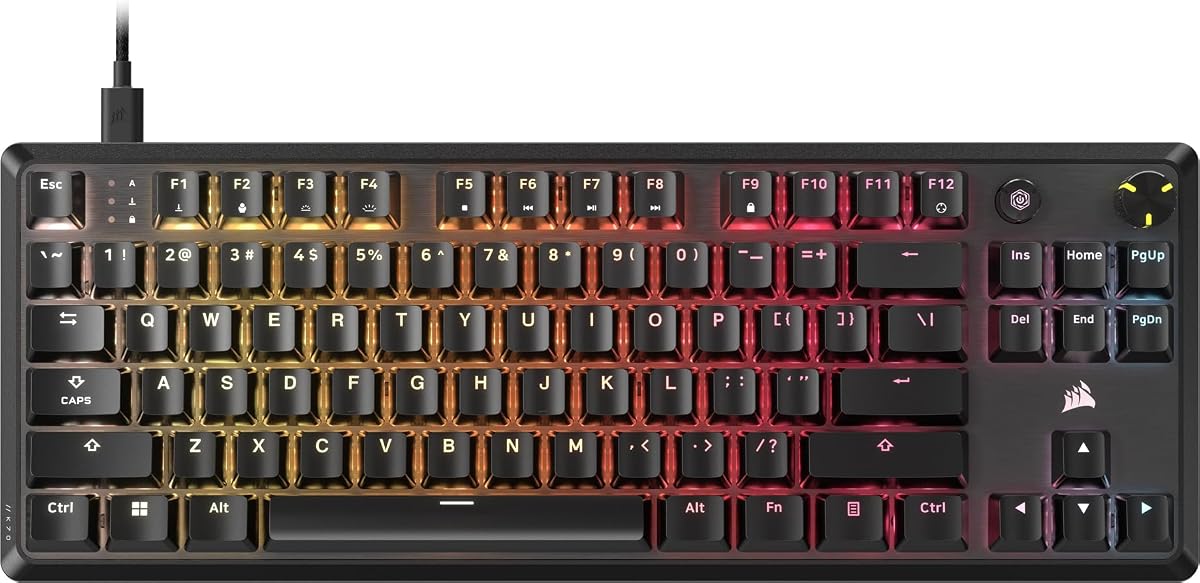


The Corsair K70 CORE RGB offers a compelling entry point into mechanical keyboards. It carries a solid rating and delivers smooth MLX Red linear switches that feel responsive right out of the box. This model balances performance and affordability effectively.
We may earn a commission when you buy through this link, at no additional cost to you.
Key strengths include the pre-lubed switches which reduce scratchiness and ensure quiet operation. The aluminum top plate provides rigidity while the magnetic palm rest adds comfort during long sessions. Media controls are accessible via a dedicated rotary dial.
Trade-offs involve the use of ABS keycaps which can develop shine over time compared to PBT. Additionally it lacks some advanced features found in higher end models like onboard profile storage. These are acceptable given the price point.
This keyboard is ideal for gamers and typists seeking quality without breaking the bank. It suits those who value smooth keystrokes and media convenience. We recommend it for first time mechanical keyboard buyers on a budget.
Pre-lubed MLX Red switches provide consistent linear travel with minimal friction for satisfying typing and gaming.
The magnetic soft touch palm rest and multi-function rotary dial enhance ergonomics and media management ease.
We may earn a commission when you buy through this link, at no additional cost to you.
The Corsair K100 RGB stands out as a premium powerhouse with its OPX optical mechanical switches. It earns a high rating for speed and durability. This keyboard is built for serious gamers who demand top tier performance and customization.
We may earn a commission when you buy through this link, at no additional cost to you.
Strengths include the OPX switches offering one millimeter actuation for incredibly fast response times. The PBT keycaps resist wear and shine better than ABS. Integration with Elgato Stream Deck allows complex macro and streaming control directly from the board.
Cons involve the cost which is significantly higher than entry level models. The full size layout with LightEdge takes up considerable desk space. These factors are reasonable for users prioritizing speed and advanced features.
We recommend this keyboard for enthusiasts and streamers who need reliable high speed input. It excels in competitive gaming scenarios. If budget allows this is a top choice for a long term setup.
OPX optical switches deliver hyper-fast registration with reduced actuation distance for competitive gaming advantages.
Six dedicated macro keys work with Elgato Stream Deck software for seamless command execution during broadcasts.
We may earn a commission when you buy through this link, at no additional cost to you.
The Corsair Vanguard 96 RGB brings future tech with a built in LCD screen and 96 percent layout. It earns a strong rating for innovation and productivity. This keyboard merges compact design with advanced features for power users.
We may earn a commission when you buy through this link, at no additional cost to you.
Key strengths include the luminous LCD screen displaying custom animations or system stats. The 96 percent layout saves space while keeping numpad and arrow keys. Eight thousand Hz polling ensures minimal input lag for responsive gameplay.
Trade-offs include the complexity of customizing the LCD via software which may require patience. The price reflects these premium features. These are acceptable for users wanting a unique functional desk aesthetic.
This keyboard suits streamers and professionals needing screen real estate without sacrificing numpad utility. It is a great choice for those who value customization. We recommend it for modern setups craving visual flair.
The integrated one point nine inch LCD allows you to show widgets or animations for a personalized look.
Optimized 96 percent footprint offers full keyboard functionality in a TKL sized frame for more mouse space.
We may earn a commission when you buy through this link, at no additional cost to you.
This Corsair K70 CORE variant provides a reliable mechanical experience with consistent build quality. It holds a steady rating for everyday gaming and typing tasks. The design focuses on durability and smooth performance without extra bulk.
We may earn a commission when you buy through this link, at no additional cost to you.
Strengths include the robust aluminum top plate ensuring stability during intense use. The sound dampening layers reduce noise for a quieter environment. Onboard storage allows you to save profiles without relying constantly on software.
Trade-offs involve ABS keycaps that may wear faster than PBT alternatives. While functional it lacks some premium lighting features found in other models. These are minor for users prioritizing function over form.
We recommend this for gamers seeking a sturdy workhorse keyboard. It fits well in setups needing consistent input. Consider this if you value reliability and straightforward media control.
A durable aluminum top plate provides rigidity preventing flex during fast gaming sessions or typing bursts.
Store up to five profiles onboard allowing easy switching between different game configurations without software.
We may earn a commission when you buy through this link, at no additional cost to you.
The Corsair K70 CORE TKL offers a balanced tenkeyless design ideal for compact setups. It earns a high rating for comfort and performance. This model removes the numpad to free up space for mouse movements while keeping essential keys.
We may earn a commission when you buy through this link, at no additional cost to you.
Strengths include the MLX Red v2 switches providing smooth reliable linear travel. Two layers of sound dampening minimize unwanted clacks for quieter typing. The included media dial offers convenient volume control without reaching away.
Trade-offs involve the absence of a number pad which might hinder data entry tasks. It is still larger than 60 percent layouts but fits most desks well. These are acceptable for gamers prioritizing space efficiency.
We recommend this keyboard for competitive gamers and typists who value ergonomics. It suits those needing room for mouse sweeps. Consider this if you want a clean streamlined desk setup.
Tenkeyless footprint saves desk space while retaining arrow keys and essential navigation for efficient workflow.
Premium foam layers and pre-lubricated stabilizers ensure subdued acoustics during extended work or gaming sessions.
We may earn a commission when you buy through this link, at no additional cost to you.
The Corsair Galleon 100 SD is a specialized tool for streamers needing quick access to commands. It holds a moderate rating due to its niche appeal. This keyboard combines mechanical switches with Stream Deck functionality for efficient broadcast control.
We may earn a commission when you buy through this link, at no additional cost to you.
Key strengths include the five inch full color LCD for real time app monitoring. Dedicated Stream Deck keys and dials replace the need for separate devices. Eight thousand Hz polling ensures inputs remain responsive during complex scenarios.
Trade-offs include the cost which reflects specialized streaming features rather than pure gaming performance. The LCD customization requires software familiarity. These are minor for users deeply integrated into streaming workflows.
This keyboard is best for streamers wanting an all in one control solution. It eliminates desk clutter effectively. We recommend it for those who frequently manage apps and alerts during broadcasts.
Customizable keys and dials allow precise control over apps like Discord without leaving your game window.
The five inch display shows hardware metrics or Twitch updates ensuring you stay informed while playing.
We may earn a commission when you buy through this link, at no additional cost to you.
The Corsair K55 RGB PRO offers an accessible entry into gaming peripherals without mechanical switches. It maintains a strong rating for reliability and price. This membrane keyboard delivers solid performance for casual gamers and budget conscious users.
We may earn a commission when you buy through this link, at no additional cost to you.
Strengths include IP42 spill resistance protecting against accidental drinks. Six dedicated macro keys enhance productivity through easy programmable shortcuts. The detachable palm rest adds comfort for longer usage sessions without adding bulk.
Trade-offs involve membrane technology which lacks the tactile feedback of mechanical switches. Customization is limited to preset lighting zones compared to full RGB control. These are reasonable for the low cost and durability.
We recommend this for beginners or office users needing spill protection. It suits families sharing a setup due to durability. Consider this if mechanical switches are not a strict requirement.
IP42 rated design guards against accidental spills ensuring uninterrupted gameplay even after minor accidents occur.
Textured detachable palm rest reduces hand fatigue allowing you to play comfortably for extended periods.
We may earn a commission when you buy through this link, at no additional cost to you.
This renewed Corsair K70 CORE RGB offers significant savings while maintaining core mechanical performance. It holds an impressive rating for customer satisfaction. Buying renewed allows access to premium features at a lower entry cost.
We may earn a commission when you buy through this link, at no additional cost to you.
Key strengths include the smooth pre-lubed MLX Red switches ensuring satisfying typing. The aluminum frame provides durability similar to new units. Media control dial remains functional for quick volume adjustments during use.
Trade-offs involve the exclusion of the palm rest and potential cosmetic signs of prior use. Renewed items may show minor imperfections. These are acceptable given the cost savings and performance retention.
We recommend this for bargain hunters willing to inspect hardware upon arrival. It suits users needing specific keyboard features without the new price. Consider this if minor wear is not a major concern.
Renewed units often come with full mechanical functionality at a fraction of the original retail price point.
Pre-lubed switches deliver consistent travel and actuation ensuring a reliable typing experience for daily tasks.
We may earn a commission when you buy through this link, at no additional cost to you.
The renewed Corsair Vanguard 96 brings advanced features at a more accessible price point. It holds a strong rating for performance retention. This compact mechanical keyboard delivers speed and customization without the full retail cost.
We may earn a commission when you buy through this link, at no additional cost to you.
Key strengths include the MLX Quantum switches supporting eight thousand Hz polling for minimal input lag. The LCD display allows system monitoring and custom visuals. This layout saves desk space while retaining arrow keys and numpad.
Trade-offs involve the absence of a wrist rest and the need to verify all features work upon arrival. Software setup may take time. These are reasonable for the performance and aesthetic value offered.
We recommend this for gamers seeking high polling rates on a budget. It suits those wanting a modern compact design. Consider this if you can tolerate minor cosmetic variations.
Eight thousand Hz polling ensures your inputs register instantly during competitive matches for smoother gameplay.
The dual tone finish gives a professional look that blends well with modern gaming or office setups.
We may earn a commission when you buy through this link, at no additional cost to you.
The Corsair K60 RGB TKL combines optical speed with a compact tenkeyless design. It carries a high rating for responsiveness and portability. This model uses light based switches to ensure durability and faster actuation than standard mechanical.
We may earn a commission when you buy through this link, at no additional cost to you.
Strengths include the OPX switches offering one millimeter actuation for quick gaming input. The aluminum frame adds durability while keeping weight low for travel. A detachable USB C cable simplifies transport and cable management.
Trade-offs involve polycarbonate keycaps which feel different from standard ABS or PBT materials. Some users may find them less comfortable initially. These are minor for users prioritizing speed and sleek aesthetics.
We recommend this for competitive gamers who need to travel or switch setups. It suits those wanting optical tech without a full size board. Consider this for modern minimal desk setups.
OPX optical-mechanical switches use light actuation for instant response and longer switch lifespan.
Detachable USB C cable allows you to easily pack the keyboard for LAN parties or travel.
We may earn a commission when you buy through this link, at no additional cost to you.
Selecting the right Corsair mechanical keyboard requires evaluating switches, layout, and software features. This guide outlines key factors to consider before making your purchase.
Corsair offers linear switches like MLX Red and optical switches like OPX. Linear switches provide smooth travel without tactile bumps ideal for gaming. Optical switches use light for actuation which can be faster and more durable.
Choose linear for fast-paced gaming or tactile if you prefer feedback for typing. Verify switch lifespan and actuation distance to ensure it matches your usage style.
Layouts range from full-size with numpad to tenkeyless and 96 percent compact. Full-size suits data entry while TKL saves desk space for mouse movement. Compact layouts reduce footprint significantly but may omit keys.
Assess your desk space and usage needs. Gamers often prefer TKL while typists may need full-size numpads for efficiency.
Polling rate determines how often the keyboard sends input to your PC. Corsair offers models with 1000Hz to 8000Hz polling. Higher rates reduce latency and improve responsiveness for competitive gaming.
Prioritize 4000Hz or 8000Hz models if latency is a concern. Standard 1000Hz suffices for casual use and office work.
Keycaps can be made from ABS or PBT plastic. ABS is common and smooth but may develop shine over time. PBT is more durable and textured resisting wear and shine better.
Look for PBT keycaps if you type heavily. ABS is acceptable for casual users prioritizing budget over long-term aesthetics.
Corsair uses iCUE software for customization of lighting and macros. Some models integrate with Elgato Stream Deck for streaming control. Ensure the software meets your macro and lighting needs.
Check if the model supports Elgato plugins if you stream. iCUE integration allows deep customization of RGB and key functions.
Aluminum frames offer rigidity preventing wobble during intense use. Plastic frames may feel lighter but less sturdy. A durable top plate extends keyboard life.
Choose aluminum if stability is a priority. Heavier keyboards stay in place during fast gaming sessions better.
Dedicated media dials or keys allow volume control without alt-tabbing. Palm rests add comfort but may limit space. Detachable rests offer flexibility.
Prioritize models with rotary dials for convenience. Ensure the keyboard sits at a comfortable angle to reduce wrist strain.
Prices vary widely based on features like optical switches or LCDs. Budget models like the K55 offer value while premium ones like Galleon offer specialized features.
Balance your needs against cost. A mid-range K70 CORE often offers the best value for general gaming.
To install your new Corsair mechanical keyboard plug the USB cable directly into your PC. If you have a detachable cable ensure it is securely connected before powering on your machine.
Install or update the Corsair iCUE software to unlock full customization features. This allows you to adjust RGB lighting create macros and update firmware for better performance.
Clean your keyboard regularly with compressed air to remove dust and debris. Avoid liquid cleaners near switches. Replace worn keycaps if shine develops for consistent tactile feel.
Most Corsair mechanical keyboards work with Mac using standard USB connectivity. Some advanced features may require Windows iCUE software but basic typing and RGB work without it.
MLX switches are traditional mechanical with metal contacts while OPX switches are optical using light for actuation. OPX generally offers faster response and higher durability than MLX.
Not all Corsair keyboards include a wrist rest. Models like K70 CORE include magnetic rests while K60 and K100 usually do not. Check product details before purchasing.
Most Corsair keyboards listed here are wired but some models support wireless connectivity via separate modules. Verify product specs as this guide focuses on wired variants for stability.
Install iCUE software and select your keyboard model. Navigate to the macros tab record your key presses and assign them to keys. You can also set up complex sequences.
Some models like K70 CORE offer onboard memory for saving profiles. Higher end models may store more profiles. Check specific product specs for profile storage capabilities.
We reviewed ten Corsair mechanical keyboards ranging from budget friendly to premium streaming options. The K70 CORE provides value while the K100 RGB leads in performance for serious gamers.
Prioritize switch type and layout size based on your specific needs. Optical switches suit competitive play while compact layouts maximize desk space effectively for mouse use.
Check current prices and availability before buying since features can vary by region. Your ideal keyboard depends on balancing speed comfort and customization within your budget.