
HP 14 Laptop Computer
4.3Editor score
Affordable entry level price
Lightweight portable design
Wi-Fi 6 connectivity
This guide compares the best laptops with Microsoft Office installed for students and professionals, evaluating performance, storage, and pre-installed
Finding a laptop with Microsoft Office installed simplifies your setup process significantly. You avoid the hassle of purchasing separate licenses or struggling with activation codes. This convenience is essential for students and professionals who need to start working immediately.
We evaluated ten top-rated models based on performance, storage capacity, and included software features. Our analysis focuses on devices that come with lifetime licenses or comprehensive suites pre-installed. This ensures you receive genuine value and long-term usability for your daily tasks.
Each pick highlights specific strengths like processing power, display quality, and portability. Prices may vary due to sales or regional differences. Always verify the current configuration before purchasing to ensure it meets your specific productivity requirements.
4.3Editor score

4.0Editor score

5.0Editor score
This table provides a side-by-side comparison of all ten laptops to help you identify the best fit for your needs based on key specifications.

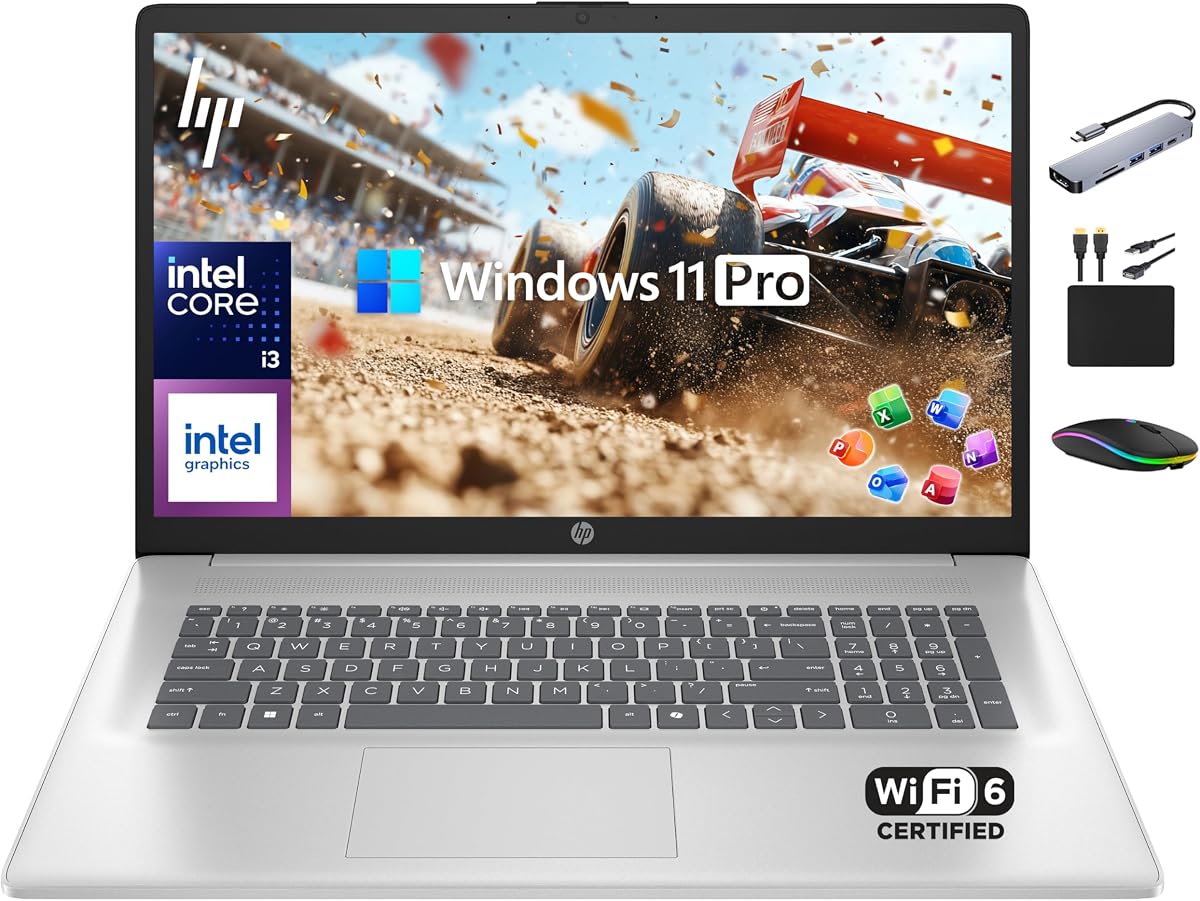


This HP model stands out as a top contender for professionals needing immediate productivity tools. It ships with a lifetime license for Microsoft Office 2024 ensuring you have access to Word and Excel without subscription fees. The inclusion of Copilot AI adds a modern layer of assistance for drafting documents and analyzing data.
We may earn a commission when you buy through this link, at no additional cost to you.
Performance is driven by a 12th Gen Intel Core i3 processor with six cores which handles multitasking efficiently. With 16GB of RAM you can keep multiple browser tabs and applications open simultaneously without significant slowdowns. The 1TB SSD provides ample space for storing large files and ensures fast boot times for quick start.
While the display resolution is standard HD the touchscreen feature adds versatility for presentations and note taking. The Windows 11 Pro operating system offers enhanced security features suitable for business environments. Some users might prefer a higher resolution screen but the touch functionality compensates for this limitation in many workflows.
This laptop is ideal for students and small business owners who prioritize software value and long term usability. The comprehensive bundle of hardware and software makes it a strong recommendation for those seeking an all-in-one solution. Verify the specific configuration before purchase to ensure it aligns with your performance needs.
The permanent license for Office 2024 eliminates recurring subscription costs which is a significant long-term benefit for budget-conscious users.
Copilot AI helps streamline routine tasks like summarizing text or generating ideas allowing you to focus on core work activities.
We may earn a commission when you buy through this link, at no additional cost to you.
This laptop offers an accessible entry point for students and casual users needing essential productivity tools. It comes pre-installed with Microsoft Office and Windows 11 Pro making it ready for school or remote work immediately. The use of DDR5 RAM is a modern touch that improves power efficiency compared to older memory standards.
We may earn a commission when you buy through this link, at no additional cost to you.
The quad-core Intel N150 processor handles everyday tasks like web browsing and document editing with ease. Storage is a combination of fast UFS internal drive and an external USB drive allowing flexibility for file management. The green color design adds a unique aesthetic touch to the professional look.
While 4GB RAM may limit heavy multitasking it is sufficient for basic office work and streaming media. The anti-glare display helps reduce eye strain during long study sessions. Users should be aware that the external drive is separate from the main system storage which affects portability slightly.
Best suited for budget-conscious buyers who need a reliable machine for light tasks and educational purposes. The bundle of accessories like wireless mouse and earbuds adds immediate value to the purchase. Consider upgrading memory if you plan to run more demanding applications in the future.
DDR5 RAM provides better power efficiency and faster data transfer rates than previous generations improving overall system responsiveness.
Included accessories like wireless earbuds and a mouse save you from buying separate peripherals right after unboxing the device.
We may earn a commission when you buy through this link, at no additional cost to you.
This premium model delivers a larger viewing experience ideal for users who work with spreadsheets or multiple windows. The 17.3 inch display provides significantly more screen real estate compared to standard 14 inch laptops. A lifetime license for Office 2024 is included ensuring you have professional tools without subscription anxiety.
We may earn a commission when you buy through this link, at no additional cost to you.
Powered by the latest Intel Core i3-N305 processor with eight cores this laptop excels at multitasking and general productivity. The 16GB of RAM supports running multiple applications simultaneously without lag. The PCIe SSD ensures that data transfer and boot times are fast and efficient for daily workflows.
The silver finish gives the device a sleek and professional appearance suitable for business settings. While it is heavier than ultrabooks the trade-off provides better screen space for productivity tasks. This device is perfect for users who prioritize screen size and performance over extreme portability.
Ideal for professionals and students who need a desktop replacement laptop with powerful specs and reliable software. The combination of hardware features and included software makes it a strong value proposition. Ensure you have space to carry it regularly if you plan to travel with it often.
The 17.3 inch display allows for comfortable viewing of complex documents and spreadsheets without constant scrolling or zooming.
The 8-core processor handles complex calculations and multitasking with ease ensuring smooth performance during intensive work sessions.
We may earn a commission when you buy through this link, at no additional cost to you.
This business laptop focuses on providing a large workspace with its 17.3 inch display. The hybrid storage solution combines a fast SSD with an external drive offering both speed and capacity for large files. A lifetime license for Microsoft Office ensures you have the tools needed for professional work immediately.
We may earn a commission when you buy through this link, at no additional cost to you.
The 8-core Intel i3 processor delivers robust performance for handling multiple applications at once. With 16GB of RAM you can manage complex tasks like video editing or extensive data analysis efficiently. The Windows 11 Pro operating system provides advanced security features to protect your business data.
While the large screen is great for productivity the device may be cumbersome for frequent travel. The non-reflective screen helps reduce glare in bright environments but may limit contrast compared to premium panels. This makes it a solid choice for stationary use rather than mobile scenarios.
Best for users who need a stationary workstation with high capacity and reliable software support. The inclusion of accessories like docking hubs adds to the value of the bundle. Consider the weight and size before purchasing if you plan to use it on the go.
The combination of internal SSD and external drive balances speed and capacity allowing efficient storage of large data sets.
Windows 11 Pro includes hardware-based isolation and encryption to keep sensitive business information secure from threats.
We may earn a commission when you buy through this link, at no additional cost to you.
This laptop balances performance and portability with its Full HD display and spacious storage. The 1TB SSD ensures you have plenty of room for files while maintaining fast access speeds. Pre-installed with Windows 11 Pro and Office it is ready for immediate professional use without extra setup.
We may earn a commission when you buy through this link, at no additional cost to you.
The Intel 8 Core i3 processor supports efficient multitasking and general productivity tasks. 16GB of RAM allows for smooth switching between applications and browser tabs. The lightweight design makes it easy to carry between home and office environments throughout the day.
While it lacks a touch screen the high resolution display provides sharp visuals for work and media. The battery life supports all-day usage for most typical workloads. Some users might need an external hub for additional connectivity options which is included in the bundle.
Ideal for users seeking a reliable balance of features and value for daily tasks. The comprehensive software and hardware package makes it a strong choice for home office setups. Verify the specific ports available before purchasing to ensure they meet your connectivity needs.
The Full HD resolution provides crisp text and vibrant colors essential for detailed work and media consumption.
Included Copilot AI helps optimize workflows by offering suggestions and automating routine tasks efficiently.
We may earn a commission when you buy through this link, at no additional cost to you.
This laptop is designed for students who need a portable and durable device for daily use. It comes with Microsoft Office 365 and Copilot AI to assist with assignments and research projects. The lightweight chassis allows it to slip easily into backpacks without adding significant weight.
We may earn a commission when you buy through this link, at no additional cost to you.
The UFS storage ensures fast boot times and quick application launches for immediate productivity. With Wi-Fi 6 connectivity you get faster downloads and streaming compared to older standards. The military-grade drop resistance adds durability for users who move around campus frequently.
While the internal storage is limited the device supports expansion via SD card. The 4GB RAM is sufficient for basic tasks but may struggle with heavy multitasking. This makes it an ideal choice for lighter workloads and focused study sessions.
Best for students prioritizing mobility and durability over raw performance. The included accessories like the 5ave Kit add value to the package. Consider external storage needs before purchasing to accommodate media and large project files.
Military-grade drop resistance protects the device against accidental drops ensuring longevity in active environments.
Wi-Fi 6 support provides faster and more reliable internet connections for streaming and research tasks.
We may earn a commission when you buy through this link, at no additional cost to you.
This model focuses on providing a complete productivity solution with essential software and hardware. It includes Microsoft Office and Windows 11 to ensure you have the tools needed for work immediately. The upgraded 8GB RAM allows for better multitasking performance than lower-end models.
We may earn a commission when you buy through this link, at no additional cost to you.
The Intel N100 processor handles everyday tasks efficiently while maintaining low power consumption. Storage is expanded via an SD card providing ample space for documents and media files. The silver design adds a modern and stylish look suitable for various environments.
While the internal storage is modest the external SD card compensates for file needs. The HD display is clear enough for standard documents but may lack detail for high-resolution work. This makes it a practical choice for general productivity and light media consumption.
Ideal for users who need a lightweight and reliable device for basic office tasks. The combination of features offers good value for those who do not require high-end specs. Ensure the SD card slot meets your storage expectations before purchasing.
Upgraded to 8GB RAM improves multitasking efficiency allowing smoother switching between multiple applications and browser tabs.
The inclusion of a 512GB SD card provides significant extra space for storing files without internal constraints.
We may earn a commission when you buy through this link, at no additional cost to you.
This laptop is designed for modern workflows that rely on cloud storage and remote access. It includes Microsoft Office 365 and substantial cloud storage to keep files accessible anywhere. The dedicated Copilot key provides quick access to AI tools for productivity boosts.
We may earn a commission when you buy through this link, at no additional cost to you.
The 14-inch display with anti-glare technology ensures comfortable viewing in various lighting conditions. Fast charge capabilities allow you to quickly regain battery power during short breaks. The snowflake white design offers a unique and elegant aesthetic for a clean workspace setup.
While internal storage is limited the cloud integration ensures you never run out of space for documents. The battery life supports extended usage for travel or work on the go. This device is ideal for users who prioritize digital storage over local drive capacity.
Best for students and professionals who work across devices and need seamless file access. The lightweight design and long battery life make it a great travel companion. Ensure you have a stable internet connection to maximize the benefits of cloud storage.
Integrated cloud storage ensures files are accessible from any device without relying solely on local drive capacity.
Fast charge technology allows the battery to reach 50 percent quickly minimizing downtime during busy schedules.
We may earn a commission when you buy through this link, at no additional cost to you.
This laptop delivers solid value with its focus on battery life and cloud integration. It includes Microsoft 365 Office and offers a TB of cloud storage to handle large file needs. The design supports everyday tasks like browsing and document editing efficiently.
We may earn a commission when you buy through this link, at no additional cost to you.
The high performance CPU ensures responsive operation for general productivity tasks. With an 11-hour battery life you can work throughout the day without needing to search for a power outlet. The SD card reader adds versatility for transferring photos and data from cameras.
While local storage is limited the cloud integration allows for flexible file management. The 4GB RAM is adequate for standard usage but may limit heavy multitasking. This makes it a good choice for users who prefer online storage solutions.
Ideal for travelers and students who need reliable power and access to files from anywhere. The affordable pricing makes it a strong candidate for budget-conscious buyers. Consider your internet dependency for cloud storage before making a final decision.
Extended battery life ensures uninterrupted productivity during travel or long study sessions without frequent recharging.
Combining local and cloud storage provides a balanced approach to managing large files and daily documents.
We may earn a commission when you buy through this link, at no additional cost to you.
This laptop is a strong option for basic productivity needs with essential software included. The high performance CPU supports everyday tasks smoothly while the included Office suite saves on licensing costs. Its design prioritizes ease of use and straightforward functionality for most users.
We may earn a commission when you buy through this link, at no additional cost to you.
Connectivity is enhanced by WiFi 6 which provides faster speeds and reliable connection for home networks. The 1TB cloud storage allows for significant file management without relying on internal storage. This makes it a practical device for users who work primarily online.
While the specs are entry-level they are sufficient for students and casual users. The SD card reader adds utility for those who need to access media from other devices. It is a practical tool for general computing without excessive complexity or cost.
Best for users who want a simple reliable device for school or home office tasks. The combination of cloud storage and included software offers good value for the price. Check specific requirements before purchasing to ensure the hardware matches your workflow.
WiFi 6 support ensures faster downloads and stable streaming which improves overall productivity in home settings.
Pre-installed Microsoft 365 Office saves time and money by providing essential tools immediately upon setup.
We may earn a commission when you buy through this link, at no additional cost to you.
Choosing the right laptop with Microsoft Office installed requires evaluating several key factors to ensure it meets your productivity needs.
Look for a device that clearly states whether it includes a lifetime license or a subscription-based version of Office. Lifetime licenses are valuable for long-term savings while subscription versions often receive updates sooner.
Prioritize devices with clear documentation about Office activation to avoid issues with invalid keys or software limitations.
Select a processor with enough cores to handle multitasking smoothly. Modern Intel N-series or Core i3 processors are generally sufficient for everyday office tasks like document editing and web browsing.
Ensure the processor supports your typical workflow whether it involves heavy data analysis or basic administrative work.
Minimum 8GB of RAM is recommended for smooth multitasking with modern operating systems. 16GB is ideal if you run multiple applications simultaneously or use resource-intensive browser tabs.
Choose higher RAM capacity if you plan to use the laptop for longer periods without upgrading hardware later.
Solid State Drives are preferred for faster boot times and application loading. Ensure the storage capacity is sufficient for your files or offers expansion options like SD cards or USB hubs.
Hybrid storage solutions combining SSDs with external drives provide a balance of speed and capacity for diverse needs.
A Full HD or higher resolution display ensures sharp text and comfortable viewing. Look for anti-glare technology if you work in bright environments to reduce eye strain.
Touchscreen capabilities can be a bonus for presentations or navigation flexibility depending on your usage style.
Windows 11 Pro offers advanced security features suitable for business environments while Home is sufficient for casual users. Ensure the OS version aligns with your security and management needs.
Verify that the laptop supports the latest Windows features like Copilot AI for enhanced productivity.
Consider the weight and size if you plan to travel with the device regularly. A lightweight chassis makes it easier to carry in a backpack or laptop bag.
Look for a battery life that supports at least a full workday to avoid frequent charging interruptions.
Bundled items like wireless mice or hubs add immediate value to the purchase. Verify that the included accessories meet your connectivity requirements.
Prioritize bundles that offer practical tools to set up your workspace quickly without extra costs.
Start by activating your Office software immediately to ensure full access to features. Follow the on-screen instructions to sign in with your Microsoft account if prompted.
Keep your operating system updated to maintain security and performance. Regularly check for Windows updates and install them when available.
Protect your device by using a sleeve and avoiding extreme temperatures to ensure longevity.
Most models in this guide include a lifetime license for Office 2024 which does not require a subscription. However always verify the specific listing before purchasing to ensure it matches your preferences for software updates and access.
Many of these models allow RAM upgrades but some have soldered memory. Check the technical specifications for your chosen model to confirm whether the memory is user-upgradeable before purchasing.
Windows 11 Pro offers advanced security features which can be useful for business users. For students Home version is often sufficient but Pro provides added protection for sensitive data and network management.
Some models in this list feature touchscreen displays which add versatility for presentations and navigation. Review the display specifications of each product to confirm if this feature is included.
Battery life varies by model but many offer all-day usage for typical workloads. Consider your daily usage patterns when selecting a laptop to ensure it meets your portability needs.
Activation typically happens automatically upon first use. Follow the setup wizard to sign in with your Microsoft account or enter the provided product key if needed.
These ten laptops offer excellent options for those needing Microsoft Office immediately without additional setup. The mix of performance and software included ensures you can start working right away.
Prioritize storage and RAM if you have heavy multitasking needs while screen size matters for detailed work. Consider your typical usage environment to make the best choice.
Always verify current pricing and configuration before buying as deals may change frequently.