
GOLDENMATE 2000VA
4.4Editor score
LiFePO4 battery chemistry
High 1600W output
Ten year battery lifespan
This guide compares the top battery backup units for workstation PCs, evaluating output wave types, runtime capacity, outlet counts, and advanced features to
When your workstation PC powers critical business operations or creative workflows, unexpected power outages can lead to catastrophic data loss and hardware damage. A reliable battery backup ensures your system stays online long enough to save progress or shut down safely, protecting your investment in high-performance computing equipment.
We evaluated ten leading UPS models based on waveform quality, capacity, outlet configuration, and smart features. Our analysis focuses on pure sine wave compatibility for active PFC power supplies, runtime estimates under load, and robust surge protection ratings suitable for demanding workstation environments.
Each pick highlights specific strengths like eco modes, LCD panels, or lithium batteries. Note that prices and availability fluctuate, so check current listings before purchasing. This list helps you match power protection to your specific hardware needs and budget constraints.
4.4Editor score

4.5Editor score

4.7Editor score
This side-by-side comparison summarizes the key specifications and capabilities of each model to help you quickly identify the right unit for your workstation setup.




This unit leads our list due to its pure sine wave output, essential for active PFC workstation power supplies. It offers robust 1500VA capacity with AVR support for voltage stabilization and a detailed color LCD panel for real-time monitoring.
We may earn a commission when you buy through this link, at no additional cost to you.
The PFC Sinewave technology ensures compatibility with sensitive workstation hardware, preventing harmonic distortion issues. With 12 outlets split between battery and surge protection, you can power the PC, monitor, and peripherals safely. The USB ports add convenience for mobile devices.
While the weight and price are higher than simulated sine alternatives, the technical benefits justify the investment for mission-critical workstations. The unit does not offer the advanced software features found in rackmount units, which may matter for enterprise settings.
Buy this if your workstation uses high-end power supplies requiring pure sine wave input. It balances performance, capacity, and manageability for prosumers and small businesses needing reliable uptime without complex infrastructure.
Active power factor corrected supplies in modern workstations often fail or operate poorly with modified sine waves. This unit delivers true sine wave output matching utility power, ensuring stable performance and preventing potential hardware stress.
The color display provides immediate insight into load levels, battery health, and input voltage. Tilting screen design improves visibility, and alerts help you anticipate issues before they cause downtime or data loss.
We may earn a commission when you buy through this link, at no additional cost to you.
This Lithium unit stands out for its advanced LiFePO4 battery, offering over 3000 charge cycles and ten years lifespan. It delivers strong 2000VA/1600W output with pure sine wave, making it a high-capacity budget-friendly option for powerful workstations.
We may earn a commission when you buy through this link, at no additional cost to you.
The LiFePO4 technology reduces total cost of ownership by minimizing battery replacements. The high wattage supports multiple high-power components like GPUs and drives. The unit includes eight outlets with ample spacing and front panel USB charging for convenience.
Its larger size and weight come from the transformer needed for lithium compatibility. While it lacks advanced management cards, the basic LCD and shutdown software integration cover most home and office needs effectively for the price.
Choose this if you want long-term reliability without frequent battery swaps. It suits users needing high power capacity and modern battery tech without paying premium prices for brand-name rackmount systems.
Lithium Iron Phosphate chemistry provides higher energy density and safety compared to lead-acid. This results in fewer replacements over time, lower maintenance, and consistent performance even as the battery ages.
With 1600W continuous power, this UPS handles power hungry systems including multi-monitor setups and gaming rigs. The high VA rating ensures sufficient runtime even under heavy loads for productive shutdowns.
We may earn a commission when you buy through this link, at no additional cost to you.
This model tops the premium category with a five year warranty including the battery, signaling strong confidence in its durability. It offers 1500VA capacity with intelligent LCD monitoring and optional remote management cards for centralized control.
We may earn a commission when you buy through this link, at no additional cost to you.
The five year coverage is rare and valuable for expensive workstations, reducing long term risk. The color LCD displays critical metrics clearly. USB charging ports and ample outlets support a full office setup. AVR helps correct voltage fluctuations automatically.
It uses simulated sine wave instead of pure, which may limit compatibility with sensitive PFC supplies. Remote management requires separate cards, increasing initial cost. These tradeoffs are acceptable given the warranty and build quality.
Invest here if warranty length and remote monitoring are priorities. It fits businesses that need reliable power protection with minimal maintenance oversight and long term support commitments.
Most UPS units offer three year coverage. The five year plan reduces replacement costs and provides peace of mind for critical infrastructure. It reflects the manufacturer's trust in the product's longevity.
Optional management cards enable network monitoring and alerts. This is essential for managing multiple units remotely, tracking power events, and integrating with IT management systems without physical access.
We may earn a commission when you buy through this link, at no additional cost to you.
This unit offers strong 1500VA capacity with intelligent LCD features and AVR voltage regulation. It uses simulated sine wave output, which works for many but not all workstation power supplies. The color panel provides clear status updates.
We may earn a commission when you buy through this link, at no additional cost to you.
The 900W real power supports multi component setups. Twelve outlets allow connecting PC, monitor, printers, and networking gear. USB ports offer convenient charging. AVR extends battery life by correcting minor fluctuations automatically.
Simulated sine wave may not suit active PFC supplies found in high-end workstations. It shares features with more expensive pure sine models but at lower cost. Check compatibility before purchasing for sensitive systems.
Select this if you need high capacity with modern display features. It serves general office workstations well where sine wave purity is not critical and budget is moderate.
High VA ratings provide longer runtime under load. However, simulated sine wave restricts use with some premium PSUs. Verify your power supply requirements before committing to this unit.
The color panel improves visibility of alerts and battery status compared to basic displays. It helps users respond quickly to power events without confusion.
We may earn a commission when you buy through this link, at no additional cost to you.
This unit brings pure sine wave support at a mid-tier capacity suitable for modest workstation setups. The color LCD offers detailed monitoring. Ten outlets cover essentials with USB charging included. AVR stabilizes input voltage.
We may earn a commission when you buy through this link, at no additional cost to you.
Active PFC compatibility ensures safe operation with modern workstation PSUs. The 600W limit suits single GPU setups. It is lighter and more compact than higher capacity models. Useful for tight spaces.
The 600W output may limit multi-GPU or heavy render workstations. Price per watt is higher compared to higher VA units. This tradeoff is acceptable for users prioritizing sine wave compatibility over total runtime.
Opt for this if you need pure sine wave without premium capacity costs. It fits small workstations needing reliable protection with display feedback and USB charging convenience.
Many modern power supplies require pure sine wave for efficient operation. This unit meets that requirement, ensuring stable power delivery and protecting expensive hardware from waveform distortion issues.
Lower capacity allows a smaller footprint. This helps when desk space is limited. The tilting LCD ensures visibility even in tight setups.
We may earn a commission when you buy through this link, at no additional cost to you.
This unit offers 900VA capacity with built-in data line protection to safeguard modems and phones. Simulated sine wave works for general workstations. It includes AVR and USB ports. High user rating reflects reliability.
We may earn a commission when you buy through this link, at no additional cost to you.
Data line protection prevents surges from reaching connected devices. This adds value for setups using broadband or fax lines. The 480W limit suits basic office machines. Good value given surge coverage.
Limited capacity means short runtimes for power-heavy workstations. Simulated sine may not match high-end PFC PSUs. It is better suited for general office needs than heavy compute loads.
Choose this if you need surge protection for data lines alongside power backup. Ideal for small offices needing broad coverage for computers and communication gear.
Surges can travel through phone and network lines. This UPS shields connected devices like modems and routers from damage. It is a cost effective way to protect communication infrastructure.
The 480W capacity is adequate for standard desktops without graphics cards. It provides sufficient runtime to close files safely. Perfect for routine office tasks.
We may earn a commission when you buy through this link, at no additional cost to you.
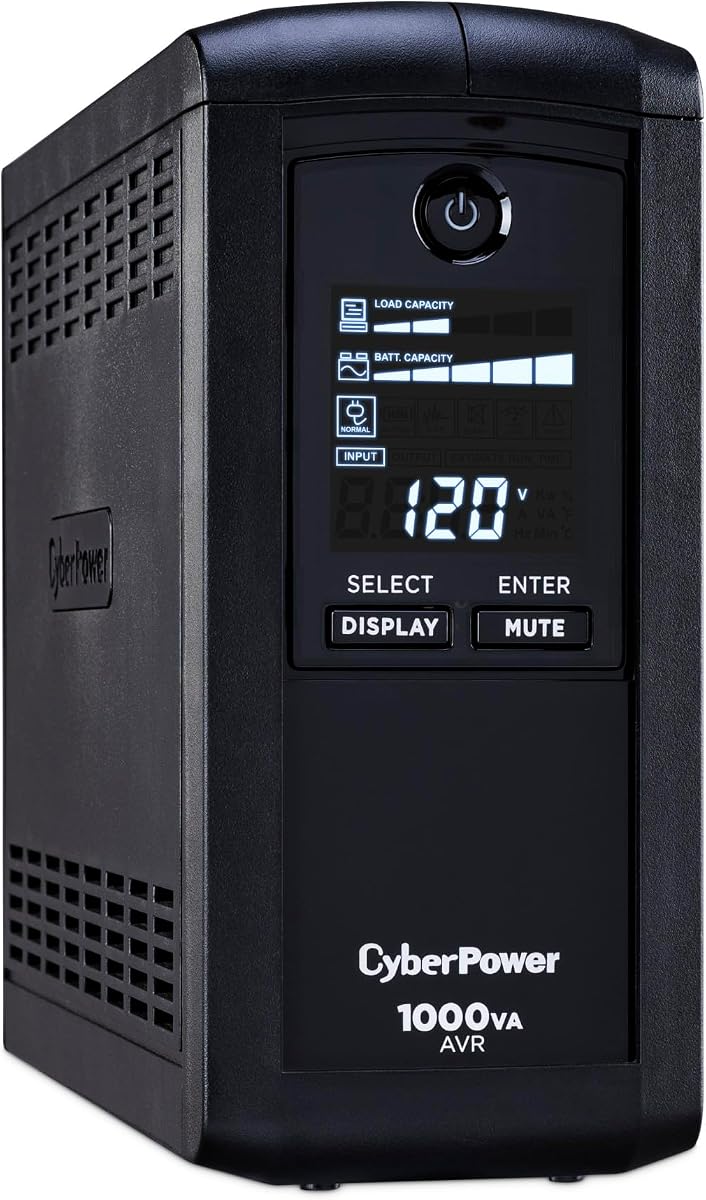
This model provides 1000VA capacity with intelligent LCD showing runtime and load details. Simulated sine wave output covers many workstations. Nine outlets allow full setup. AVR stabilizes input voltage.
We may earn a commission when you buy through this link, at no additional cost to you.
The display shows estimated runtime, which helps plan shutdown procedures. No USB ports mean separate charging solutions. AVR extends battery life by reducing unnecessary switching. Solid choice for general office use.
Lack of USB charging limits convenience for mobile devices. Simulated sine wave may not fit PFC PSUs. It is reliable but lacks modern features found in newer models.
Buy this if you prioritize runtime visibility and basic protection. It suits workstations needing simple monitoring and solid capacity without premium costs.
Displaying estimated runtime lets users gauge how much time remains during an outage. This supports better decision-making about saving work and shutting down safely.
Focus on core power protection features without added extras. This model delivers reliable surge protection and battery backup for essential hardware at a reasonable price.
We may earn a commission when you buy through this link, at no additional cost to you.
This slim unit fits neatly under desks. It provides 900VA capacity with simulated sine wave. Twelve outlets give plenty of options. High efficiency design lowers power consumption during normal operation.
We may earn a commission when you buy through this link, at no additional cost to you.
Slim form factor saves space in crowded setups. The 500W output suits basic workstations. Green power design reduces energy use. Wide outlet spacing accommodates large plugs easily.
As a standby UPS, it has no AVR. This limits voltage correction. Simulated sine may not suit PFC PSUs. Suitable for non-critical environments with tight space constraints.
Pick this if desk space is tight and basic protection suffices. Ideal for small home offices needing multiple outlets and compact design.
The low profile fits under most desks. This clears desk space for monitors and keyboards. Practical for environments where every inch matters.
Efficient charging reduces heat and energy costs. This helps keep the environment cool and lowers utility bills over time.
We may earn a commission when you buy through this link, at no additional cost to you.
This unit delivers 850VA capacity with intelligent LCD monitoring. Simulated sine wave serves many workstations. Nine outlets cover essentials. AVR stabilizes voltage to protect hardware.
We may earn a commission when you buy through this link, at no additional cost to you.
Compact size suits small spaces. LCD shows battery status clearly. AVR extends battery life by preventing unnecessary discharges. A reliable choice for standard setups.
Limited capacity means shorter runtimes for power-intensive systems. No USB ports require separate charging. Ideal for non-critical use or backup power for essential devices only.
Choose this if compactness and cost matter. It serves small home offices needing basic protection with clear monitoring features.
Small size fits under desks or shelves easily. This keeps workspace organized. Good for users with limited power space needs.
LCD provides clear visibility of battery and load status. Simple interface makes it easy to check power conditions without complexity.
We may earn a commission when you buy through this link, at no additional cost to you.
This model offers ECO mode to save energy by cutting power to idle peripherals. It provides 850VA capacity with twelve outlets and LCD monitoring. AVR is absent but surge protection is included.
We may earn a commission when you buy through this link, at no additional cost to you.
ECO mode reduces power waste from monitors and printers when the PC sleeps. This saves costs over time. Twelve outlets provide flexibility. LCD displays essential status clearly.
Capacity is limited for heavy workloads. Absence of AVR means no voltage correction. Best for light duty systems focused on energy efficiency and cost savings.
Buy if you want to lower energy usage. Ideal for small setups where idle power reduction is a priority.
When the computer sleeps, connected devices like monitors turn off automatically. This reduces idle energy consumption significantly, saving money and helping the environment.
The system intelligently manages connected loads. This feature is useful for users looking to optimize power usage without manual intervention.
We may earn a commission when you buy through this link, at no additional cost to you.
Selecting the right battery backup requires weighing capacity, waveform, and features to match your workstation hardware and needs.
Pure sine wave output matches utility power and is necessary for active PFC power supplies common in modern workstations. Simulated sine wave may cause instability or shutdowns with sensitive hardware. Always check your PSU requirements before buying.
Prioritize pure sine wave for high-end workstations to ensure stability and compatibility.
Capacity measured in VA and real power in Watts must exceed your total load. High-performance PCs with GPUs require higher wattage for sufficient runtime. Oversize capacity to allow margin for growth.
Ensure VA and Watt ratings support your connected devices comfortably for safe shutdowns.
AVR corrects minor voltage fluctuations without switching to battery. This preserves battery life during frequent brownouts and provides stable power. Units without AVR may cycle batteries more often.
Choose models with AVR to extend battery lifespan and protect sensitive electronics.
Count outlets to match your PC, monitors, peripherals, and networking gear. Split between battery backup and surge protected outlets. USB ports add convenience for mobile charging.
Ensure enough outlets exist to avoid daisy-chaining or overloading.
Lead-acid batteries are common but need replacement every 3-5 years. LiFePO4 batteries last longer and offer better performance. Lithium units reduce total cost of ownership over time.
Consider lithium for long-term reliability and lower maintenance.
Warranty lengths vary from 3 to 5 years including battery coverage. Longer warranties indicate confidence in product durability. Check connected equipment guarantee amounts for hardware protection.
Prefer extended warranties to minimize replacement costs.
LCD panels display load and runtime. Software enables safe shutdowns. Remote management cards support centralized monitoring for multiple units. Evaluate management needs for your environment.
Select monitoring options matching your management complexity.
Units range from slim desktop to large tower designs. Noise levels vary but are usually minimal. Consider where the UPS will reside relative to your workspace.
Ensure the physical footprint fits your available space.
Connect the UPS to a grounded outlet and plug your equipment into battery-backed outlets. Avoid overloading by summing wattages before adding devices. Ensure the LCD or app shows normal charging status.
Test the backup by unplugging the unit during normal operation to confirm it switches to battery and shuts down safely. Perform this test quarterly to verify reliability and battery health.
Keep the UPS in a cool, dry place away from sunlight. Replace the battery every three to five years or when runtime drops significantly. Proper maintenance ensures consistent protection.
Pure sine wave produces clean utility-like AC power suitable for all electronics including active PFC supplies. Simulated sine wave approximates a sine wave and may cause issues with sensitive hardware. Choose pure sine for workstations with modern power supplies.
Battery life depends on chemistry and usage. Lead-acid batteries typically last three to five years before needing replacement. Lithium batteries can last ten years with many cycles. Regular testing helps track degradation.
Yes if the UPS capacity exceeds your system wattage. High-end gaming rigs require 600W or more. Ensure the UPS supports the required wattage to sustain runtime for saving progress and shutdown.
Software connects the UPS to your OS for automatic shutdown during prolonged outages. It prevents data loss by initiating a controlled shutdown. Most units include free download options for Windows.
Without a UPS, sudden power loss can corrupt files and operating systems. A battery backup provides time to save work and shut down safely, protecting data integrity and hardware components.
Check your PSU label for active PFC designation. Most high-end workstations use these and require pure sine wave. Review manufacturer documentation or online specs to confirm compatibility requirements.
We highlighted the CyberPower CP1500PFCLCD for its pure sine wave support, the GOLDENMATE 2000VA for long-lasting lithium tech, and the CyberPower BRG1500AVRLCD2 for extended warranty benefits.
Prioritize waveform compatibility and capacity to match your hardware. For most workstations, pure sine wave ensures stability while capacity ensures enough runtime for safe shutdowns.
Prices change often, so confirm current offers before purchasing. Choosing the right unit safeguards your data and equipment from unpredictable power interruptions.