
Wireless Digital Microscope Skybasic 50X-1000X
4.2Editor score
Wireless WiFi connectivity
1080P HD imaging
Portable handheld design
Microscope cameras transform traditional viewing into documented records. These devices allow users to capture high resolution images and videos of tiny specimens without needing complex setup or advanced photography skills.
We evaluated ten top rated models based on resolution, ease of use, connectivity options, and overall value. Our analysis covers handheld units, digital microscopes with screens, and dedicated eyepiece cameras for compound microscopes.
Each pick highlights specific strengths for different needs like coin collecting, soldering, or biological study. Remember that prices fluctuate frequently so check current listings before making your final purchase decision today.
4.2Editor score

4.4Editor score

4.6Editor score
As an Amazon Associate we earn from qualifying purchases.
The following table provides a side by side overview of all ten selected microscopes. It highlights key specifications to help you quickly identify which device matches your specific documentation and viewing requirements.



The Elikliv EM4K-AF stands out as the top choice for serious documentation tasks. With a 4.4 rating, it offers stunning 4K video and AI driven auto focus that keeps moving samples sharp without constant manual adjustment.
We may earn a commission when you buy through this link, at no additional cost to you.
Its advanced TOF sensor measures distance in seconds to ensure accurate focusing every time. The 8 inch screen delivers vibrant colors and clear details, while the tri screen support lets you view simultaneously on a larger monitor.
While the price is higher than basic models, the productivity gains from auto focus and split screen comparison features justify the investment. The built-in battery also means you can work outdoors without being tethered to a power outlet.
Professionals in electronics repair or coin collecting will appreciate the precision and documentation tools. If you need high fidelity images and video with minimal fuss, this model is the strongest recommendation.
The system continuously assesses image clarity to refocus automatically, which is crucial for inspecting moving parts or uneven surfaces.
Capturing 4K video and 52MP images ensures that every tiny detail is preserved for future reference or client presentation.
We may earn a commission when you buy through this link, at no additional cost to you.
For those seeking an affordable entry into digital documentation, the Skybasic microscope delivers reliable performance. Its 4.2 rating reflects strong value for hobbyists and educators who need to capture images without breaking the bank.
We may earn a commission when you buy through this link, at no additional cost to you.
The WiFi hotspot feature allows you to stream directly to your smartphone, making it easy to share findings instantly. Eight adjustable LED lights help illuminate samples properly, ensuring decent clarity at 1080P resolution.
Keep in mind that this unit has a fixed focus range of 3 to 60 mm, which might require patience to position the sample correctly. Older software versions may also have connectivity issues so ensure you download the latest app.
This model is perfect for students studying insects or casual collectors inspecting rocks. If your priority is cost effectiveness and portability over professional grade optics, this is an excellent starting point.
Connecting via WiFi allows users to control the camera and view results directly on their mobile devices without extra cables.
Its small size and light weight make it easy to carry for field trips or outdoor exploration activities.
We may earn a commission when you buy through this link, at no additional cost to you.
The Trinocular Microscope with 5000X magnification is designed for advanced users who need top tier optical performance. Its 4.6 rating highlights its quality for professional or serious educational applications requiring precise documentation.
We may earn a commission when you buy through this link, at no additional cost to you.
A double layer mechanical stage ensures stable and accurate movement of slides, which is essential when working at high magnifications. The included USB camera allows you to capture images directly to a computer for detailed analysis.
The achromatic objectives reduce imaging defects and provide sharper images than standard lenses. While the price is substantial, the durability and optical clarity make it suitable for clinical research or high level biology work.
If you need to document cellular structures or tiny samples with extreme precision, this system is unmatched in this comparison. It represents a long term investment for those committed to serious microscopy.
The double layer metal table provides precise XY axis movement, ensuring samples stay stable during high magnification observation.
These specialized lenses correct color aberrations, resulting in clearer and sharper images across the entire field of view.
We may earn a commission when you buy through this link, at no additional cost to you.
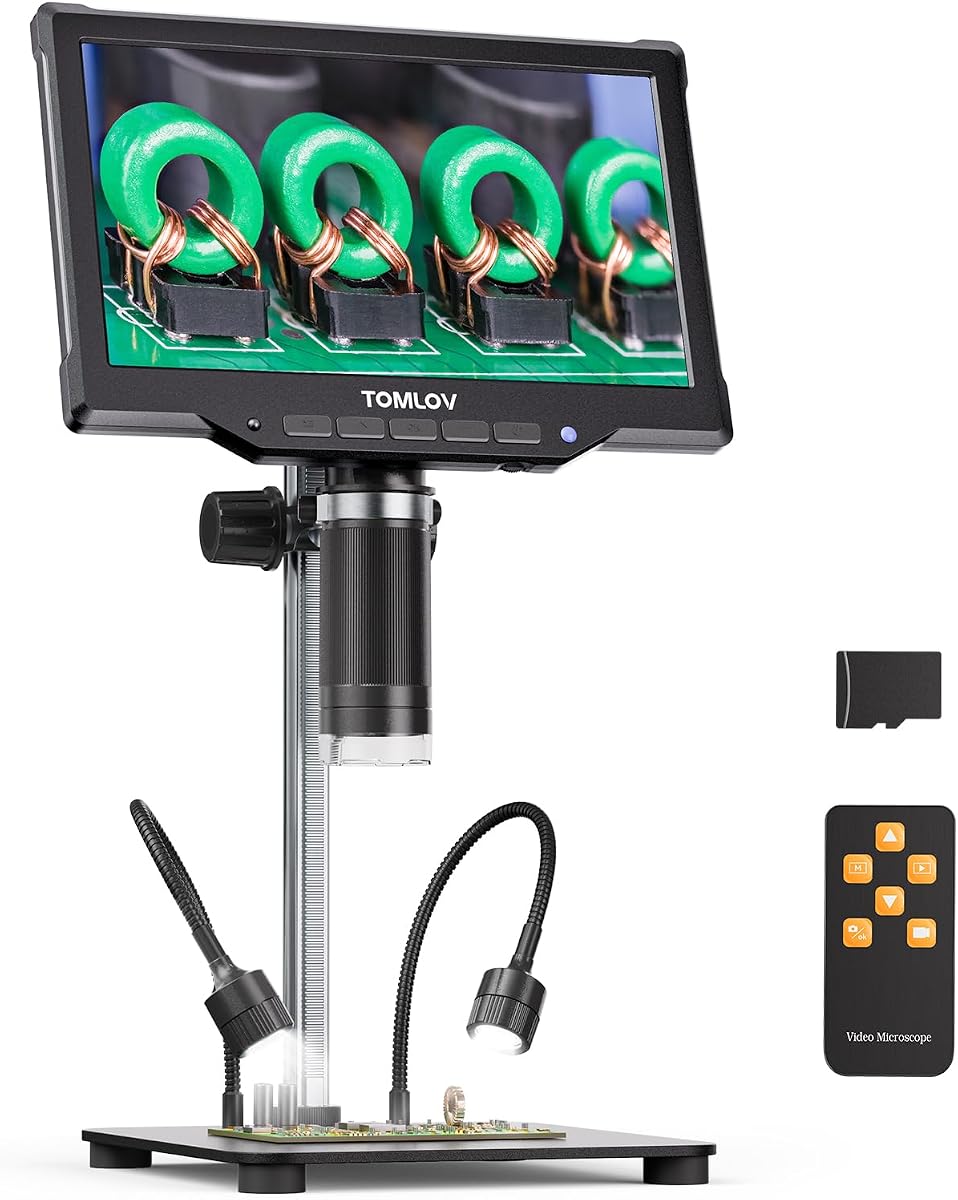
The TOMLOV DM9 is engineered specifically for detailed examination of coins and small components. With a 4.4 rating, it offers a 7 inch screen for comfortable viewing and a 12MP camera to capture intricate details clearly.
We may earn a commission when you buy through this link, at no additional cost to you.
It comes with a 16GB memory card so you can save photos and videos directly on the device. The solid metal base and stand reduce shaking during soldering or inspection tasks, ensuring stable images.
Eight LED lights and two flexible gooseneck lights help eliminate shadows, which is crucial for seeing texture on coins or circuit boards. You can also connect to a PC for a larger real-time view if needed.
Hobbyists who collect coins or work with electronics will find this unit practical and easy to use. Its combination of storage and lighting options makes it a solid choice for documentation without extra accessories.
Including a pre-installed memory card allows immediate recording of findings without needing additional hardware.
Fixed and flexible lights allow you to illuminate samples from multiple angles to reduce glare and reveal details.
We may earn a commission when you buy through this link, at no additional cost to you.
The TOMLOV DM10 offers a larger 10.1 inch IPS screen for more immersive viewing compared to other models in its class. It maintains a 4.4 rating and delivers up to 16MP photos with clear color reproduction.
We may earn a commission when you buy through this link, at no additional cost to you.
A wireless remote control helps you capture images without touching the microscope, which reduces vibration and movement during recording. The battery supports up to three hours of use, making it suitable for longer sessions.
You can adjust photo and video resolution settings to balance quality and storage space. Connecting to a computer via USB allows for live viewing on a bigger monitor for team collaboration or classroom demonstrations.
Collectors and students who need a shared view will appreciate the large screen and remote features. If comfortable viewing and flexibility are priorities, this model is a strong candidate for your next upgrade.
The remote allows hands-free photo and video capture to maintain steady images and prevent accidental movement.
Multiple photo resolution settings let you optimize file size and quality based on your storage needs.
We may earn a commission when you buy through this link, at no additional cost to you.
The Swift 5MP camera is designed for compound and stereo microscopes rather than standalone use. Its 3.9 rating reflects solid performance for educators and clinicians who need to share images with larger audiences.
We may earn a commission when you buy through this link, at no additional cost to you.
The Sony back-illuminated sensor ensures high sensitivity and clear display even in lower light conditions. It supports up to 30 frames per second for smooth live display and video recording without stutter.
It fits standard eyepiece tubes with included adapters, making installation straightforward. USB 2.0 connectivity works on Mac and Windows systems for flexible use across different classrooms or labs.
If you already own a quality microscope and just need digital capture capabilities, this camera is a practical choice. It transforms manual viewing into documented sessions for teaching or professional records.
The Sony back-illuminated sensor boosts signal-to-noise ratio for better image quality in varied lighting.
Connecting via USB allows for easy installation without complex configuration on most modern computers.
We may earn a commission when you buy through this link, at no additional cost to you.
The Andonstar AD246S-M stands out with three interchangeable lenses for soldering, coin inspection, and biological slides. With a 4.5 rating, it provides versatile tools for users who want one system for multiple tasks.
We may earn a commission when you buy through this link, at no additional cost to you.
It records 2160P video via HDMI to external monitors for shared viewing. The upgraded boom arm stand offers flexibility to position the camera over larger workspaces, which is helpful for electronics repair.
Included measurement software on PC helps you calculate sizes and areas of objects precisely. A wireless remote allows you to take photos from a distance to minimize shaking during detailed work.
This kit is great for adults and kids exploring different hobbies without needing separate microscopes. If versatility and high definition video are your goals, this model offers excellent value.
Three specialized lenses adapt the scope for electronics, coins, and biological slides in a single package.
PC software lets you measure lengths and areas digitally for precise documentation and analysis.
We may earn a commission when you buy through this link, at no additional cost to you.
This binocular microscope blends traditional optics with digital capture via a USB eyepiece. With a 4.1 rating, it appeals to users who prefer manual viewing but still need to record samples for documentation.
We may earn a commission when you buy through this link, at no additional cost to you.
The coaxial and fine focus knobs allow precise control over image sharpness. Two light sources ensure adequate illumination for different sample types, helping to reveal details in biological tissues.
Because it is a compound microscope, you need prepared slides for high magnification work. The USB camera allows you to view results on a PC for analysis or sharing with others.
Educators and science enthusiasts will find this a reliable tool for classroom or home lab use. If you value classic optical performance with modern recording capability, this unit is a balanced choice.
The binocular design allows comfortable viewing without screens, preserving the classic microscopy experience.
A USB eyepiece enables capturing images and videos on your computer without extra hardware.
We may earn a commission when you buy through this link, at no additional cost to you.
The SWIFT SW320T is a comprehensive trinocular microscope kit designed for schools or home studies. While it has a 3.3 rating, it includes a carrying case, camera, and essential accessories for immediate use.
We may earn a commission when you buy through this link, at no additional cost to you.
It offers magnification up to 5000X with a 2X Barlow lens and multiple eyepieces. The trinocular head allows simultaneous viewing for a second observer and digital capture with the included camera.
Mechanical features like coarse and fine focus knobs help maintain stability during observation. However, users may notice some optical limitations compared to higher rated professional models.
This set is practical for students needing a portable and complete solution. If you need an all-in-one package for education or hobby work, it provides decent functionality at a moderate price.
Included slides, camera, and case make this ready to use right out of the box.
The third port enables sharing the image digitally or with another viewer simultaneously.
We may earn a commission when you buy through this link, at no additional cost to you.
The Swiftcam 25MP camera offers exceptional resolution for detailed documentation when paired with a microscope. With a 3.8 rating, it targets professionals who need large image files for analysis or archival.
We may earn a commission when you buy through this link, at no additional cost to you.
Its 25 megapixel sensor captures extremely fine details that lower resolution cameras might miss. USB 3.0 connectivity ensures fast data transfer speeds, saving time when handling large images.
The reduction lens ensures the camera view matches the microscope's magnification accurately. Calibration tools help standardize measurements, and adapters allow mounting on different tube sizes.
If you need maximum image detail and speed for professional work, this camera is a strong option. Keep in mind it requires a compatible microscope to function, but delivers high fidelity results.
High pixel count captures minute details for precise analysis and high quality prints.
Fast data transfer allows quick saving of large files for efficient workflow.
We may earn a commission when you buy through this link, at no additional cost to you.
Selecting the right microscope camera depends on your intended use and technical needs. Consider factors like resolution, connectivity, screen size, and sample types to find the best fit.
Higher resolution cameras like 4K or 12MP provide clearer details essential for documenting tiny samples. Look for models with good sensors such as Sony CMOS to ensure low noise and sharp images.
Prioritize at least 1080P video for most documentation tasks to maintain quality without excessive file sizes.
Check if the device supports WiFi for wireless streaming to smartphones or USB for direct computer connection. HDMI outputs are useful for connecting to larger monitors for group viewing or presentations.
Choose connectivity that matches your workflow whether you need mobile sharing or desktop analysis software.
Models with built-in screens like 7 inch or 10 inch displays offer independent viewing without a computer. IPS screens provide better color accuracy and wider viewing angles for detailed inspection.
If you already have a PC, a screen-less camera may save money and rely on your monitor for viewing.
Magnification ranges vary from 50X to 5000X depending on whether the device is handheld or a compound microscope. Auto focus features help keep samples sharp especially when working with moving objects.
Ensure the focal range suits your sample thickness and working distance to avoid constant manual adjustments.
Adjustable LED lights reduce glare and shadows which is vital for viewing coins or circuit boards. Look for flexible gooseneck lights that allow you to position illumination from different angles.
Good lighting improves contrast and helps document fine surface textures more effectively.
Built-in memory cards or SD card slots allow you to save photos and videos directly without a computer. Check storage capacity and supported file formats to ensure they meet your documentation needs.
External storage options provide flexibility for archiving large collections of images over time.
Handheld models are easy to carry for field work while desktop units with metal stands offer stability for precision tasks. A sturdy base reduces vibration and improves image clarity.
Consider where you will use the microscope most often to balance portability with stability requirements.
Ensure the camera software works with your operating system whether Windows Mac or Linux. Some models include measurement tools for calculating object sizes which aids scientific documentation.
Download the latest drivers and apps to avoid connectivity issues and unlock all available features.
Begin by assembling the stand and securing the camera unit firmly. Adjust the lighting to reduce shadows and position your sample on the stage or holder according to the recommended distance.
Connect the device to your computer or smartphone via USB or WiFi. Launch the software or app to view the live feed and use focus knobs to sharpen the image.
Capture photos or videos using the camera button or software interface. Store files securely and clean the lens with a soft cloth to maintain clarity for future use.
For most documentation tasks a resolution of 1080P video and 5MP or higher photos is sufficient. If you need extreme detail for professional or scientific analysis consider models with 4K or 12MP capabilities.
Yes some cameras are designed to attach to standard eyepiece or trinocular ports. Check the tube size compatibility and included adapters to ensure a secure fit with your current microscope setup.
Enable the microscope's WiFi hotspot and connect your phone to the network using the provided SSID. Open the official app and follow prompts to start streaming the live feed on your screen.
Most models save images as JPG and videos as MP4 which are compatible with most viewing software. Check the specifications for support of raw formats if you need to edit files later.
While some cameras work with basic viewing programs like Photo Booth on Mac a dedicated app provides more control. Installing the latest software ensures compatibility and access to all camera features.
Portable units typically offer 2 to 4 hours of continuous use depending on brightness settings. Keep a power bank handy for field work to avoid interruption during extended documentation sessions.
Several models include measurement software or tools that allow you to calculate length and area. Connect to a PC and use the included application for precise measurements on digital images.
This guide reviewed ten top microscope cameras ranging from affordable handheld units to premium research grade systems. The Elikliv Autofocus 4K DM best overall for its advanced features while the Skybasic offers great value for budget buyers.
When choosing prioritize resolution and connectivity that match your workflow needs. Whether you are a collector hobbyist or professional ensure the model supports your required magnification and storage options.
Prices for these devices change frequently so check the latest listings before purchasing. Investing in the right camera will help you capture clear and detailed images of your samples for years to come.