
Integral 4GB Crypto-197
4.1Editor score
FIPS 197 Certified Security
Durable Dual Layer Design
Zero Footprint Software
This guide compares the top encrypted USB flash drives for security and performance. We evaluate hardware encryption, FIPS compliance, and durability to help
Secure data storage is more critical than ever in our digital world. Encrypted USB flash drives offer a reliable way to protect sensitive files from unauthorized access. These devices use advanced encryption standards to ensure your information remains safe wherever you go.
We evaluated ten top-rated models based on encryption strength, build quality, and ease of use. Our analysis focuses on hardware-based security, FIPS validation, and real-world performance. Each product was chosen for its ability to safeguard data against modern threats and physical damage.
Every pick in this list highlights specific strengths for different users and scenarios. From budget-friendly options to enterprise-grade solutions, there is a drive for every need. Keep in mind that product availability and pricing can change, so verify details before purchasing.
4.1Editor score
4.6Editor score

4.2Editor score
This side-by-side comparison highlights the key specifications and security features of each drive. Use this table to quickly identify which model aligns with your capacity needs and protection requirements.


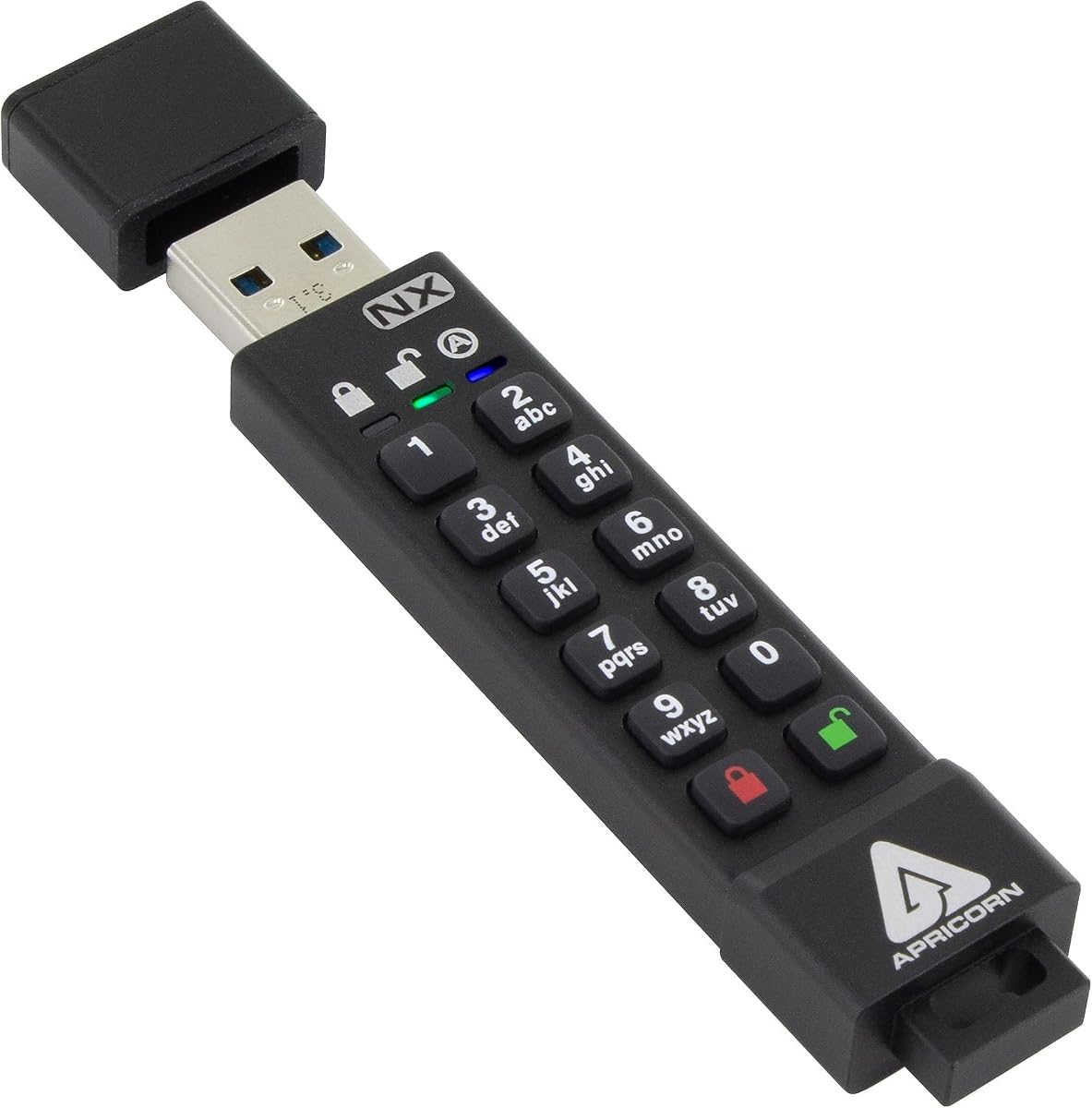
The Apricorn Aegis Secure Key 3 NX stands out as a top choice for secure data storage. It holds a high rating for its robust FIPS 140-2 Level 3 validation. This drive ensures your data remains protected through advanced hardware encryption methods.
We may earn a commission when you buy through this link, at no additional cost to you.
Its standout features include separate admin and user modes which allow for controlled access. The device supports two read-only modes and includes data recovery PINs for added safety. Users can configure settings without needing extra software installation.
While the capacity is limited to 8GB, the security features justify the trade-off for sensitive documents. The price point reflects the enterprise-grade protection it offers compared to standard drives. This makes it ideal for compliance-driven environments.
If you need reliable security for critical files, this drive is a strong recommendation. It balances ease of use with rigorous standards required by many organizations. Verify current availability before making your final selection.
This certification ensures the drive meets strict government security standards for data protection.
Admins can manage settings while users access data securely without configuration risks.
We may earn a commission when you buy through this link, at no additional cost to you.
The Kingston IronKey Vault Privacy 50 offers substantial 256GB storage with enterprise-grade security. Its FIPS 197 with XTS-AES 256-bit encryption provides strong protection for sensitive business data. This model is designed for organizations requiring high security standards.
We may earn a commission when you buy through this link, at no additional cost to you.
Features include brute force and BadUSB attack protection to safeguard against unauthorized access. The new passphrase mode allows users to create longer, more memorable passwords easily. Dual read-only settings prevent accidental data modification during use.
While the setup might be complex for casual users, it meets strict procurement standards like TAA. The high price aligns with the advanced security features and large storage capacity. It is best suited for corporate or government use cases.
Consider this drive if you need high capacity with rigorous security protocols. The flexibility in password configuration adds user convenience without compromising protection. Ensure it fits your specific compliance requirements before purchasing.
Digitally-signed firmware safeguards the drive from malicious USB attack vectors.
Users can create longer passwords for better security and easier recall.
We may earn a commission when you buy through this link, at no additional cost to you.
The Apricorn Aegis Secure Key 3 NXC brings robust security to USB 3.2 Type C ports. It is FIPS 140-2 Level 3 Validated ensuring enterprise-grade protection. With 128GB capacity, it offers ample space for secure file transfers.
We may earn a commission when you buy through this link, at no additional cost to you.
It uses 256-Bit AES-XTS hardware encryption to protect data without needing software. Separate admin and user modes allow for flexible management and access control. The drive relies on the USB port or internal battery for power supply.
The Type C design makes it compatible with modern devices but adds to the cost. Users might find the internal battery requirement a minor inconvenience compared to standard drives. However, the security benefits outweigh these limitations.
This drive is ideal for professionals using Type C laptops or tablets. The software-free authentication simplifies access while maintaining strong security protocols. Verify device compatibility before purchase to ensure seamless operation.
Connects to modern devices with Type C ports for fast secure transfers.
Access data directly without installing drivers or configuration software.
We may earn a commission when you buy through this link, at no additional cost to you.
The Integral Crypto-197 provides affordable security for basic data protection needs. It is certified to FIPS 197 and protects against brute force password attacks. Data erases after six unsuccessful access attempts to prevent unauthorized intrusion.
We may earn a commission when you buy through this link, at no additional cost to you.
Its durable dual-layer waterproof design protects the drive from water and physical damage. Auto-lock functionality ensures data is encrypted when the drive is removed. Secure Entry requires an alphanumeric password to access stored files.
While the 4GB capacity limits large file storage, it is ideal for small critical documents. The zero footprint software makes it easy to set up without license fees. This affordability makes it accessible for budget-conscious users.
Choose this drive if you need basic encryption without spending too much. The auto-lock and waterproof features add practical value for everyday use. Confirm capacity needs match your typical file sizes.
Data is erased automatically after repeated failed password attempts to secure info.
No software installation is required before use for simplicity and speed.
We may earn a commission when you buy through this link, at no additional cost to you.
The iStorage datAshur PRO offers PIN authenticated hardware encryption without requiring software. It is FIPS 140-2 Level 3 Certified and compliant with regulations like GDPR. This drive ensures compliance with data protection laws in business environments.
We may earn a commission when you buy through this link, at no additional cost to you.
It features an IP57 dust and water resistant build for rugged portability. All data transferred is encrypted in real time to protect against theft. It works with most operating systems without extra installation steps.
The 4GB capacity limits it to smaller files but fits specific use cases. Transfer speeds reach up to 169MB/s read for efficient data handling. The PIN authentication simplifies access while maintaining security standards.
This model is suitable for users needing compliance and ruggedness. Its compatibility with various systems makes it versatile for cross-platform use. Check if the capacity meets your storage requirements.
Enter a simple PIN to unlock and use the drive like any standard USB.
Certified for security standards required by government and enterprise clients.
We may earn a commission when you buy through this link, at no additional cost to you.
This USB drive offers hardware password protection with AES256-bit encryption. It includes an independent key design that resets after ten incorrect inputs. This prevents brute force cracking and information theft at a hardware level.
We may earn a commission when you buy through this link, at no additional cost to you.
Automatic lock ensures data is safe if the device is unplugged or idle. The 64GB capacity allows for reasonable file storage compared to smaller models. It is built with an aluminum alloy shell for durability.
The FAT32 file system may limit support for files larger than 4GB. Transfer speeds are faster thanks to USB 3.0 protocols. It is a practical choice for those seeking auto-lock convenience.
Choose this drive for its automatic security features and decent capacity. The reset and wipe function adds an extra layer of data safety. Ensure compatibility with your systems before use.
The drive locks after 30 seconds of inactivity or unplugging to secure data.
Wrong passwords wipe all data after ten attempts to prevent unauthorized access.
We may earn a commission when you buy through this link, at no additional cost to you.
The Lexar JumpDrive F35 PRO uses fingerprint authentication for secure access. It saves up to 10 fingerprints with ultra-fast recognition in under one second. This adds an extra layer of security without typing complex passwords.
We may earn a commission when you buy through this link, at no additional cost to you.
With 256-bit AES encryption, files are well protected from unauthorized access. The USB 3.2 Gen 1 interface supports read speeds up to 400MB/s. This makes it efficient for transferring large secure files quickly.
The drive requires specific setup for fingerprint recognition which may take time. Some older systems might face compatibility issues with the biometric features. However, the speed and security make it a strong contender.
This drive is ideal for users who prefer biometric security. The fast read speeds improve workflow when accessing large encrypted data. Verify system compatibility before purchasing.
Identify with saved fingerprints for quick secure access to files.
Up to 400MB/s read speeds reduce wait times for large data.
We may earn a commission when you buy through this link, at no additional cost to you.
The iStorage datAshur PRO2 offers IP68 dust and water resistance for extreme conditions. It is FIPS 140-2 Level 3 Certified ensuring compliance with strict security standards. This drive protects data even if lost or stolen.
We may earn a commission when you buy through this link, at no additional cost to you.
Data is encrypted with AES-XTS 256-bit hardware encryption. It requires no software and works across most operating systems. Transfer speeds reach up to 168MB/s read for efficient operations.
The rugged build increases durability but adds to the cost. The 32GB capacity is moderate but suitable for key files. It balances portability with high security for business travelers.
Select this drive if you need protection against physical elements. Its certification ensures regulatory compliance for sensitive data. Check current pricing and availability before ordering.
Survives immersion and dust exposure ensuring data safety in harsh environments.
All data is encrypted in real time without needing extra software.
We may earn a commission when you buy through this link, at no additional cost to you.
The Kingston Ironkey D500S includes an industry-first Dual Hidden Partition option. It is FIPS 140-3 Level 3 certified pending for military-grade security. This drive protects against BadUSB attacks and brute force attempts.
We may earn a commission when you buy through this link, at no additional cost to you.
It features a crypto-erase password for emergency data wiping. The rugged zinc casing provides penetration attack protection and durability. Users can choose complex or passphrase modes for passwords.
The 16GB capacity is small but fits essential secure documents. The customizable features allow for specific attribute settings. This drive targets high-security needs in military or corporate sectors.
Consider this drive for advanced features like hidden partitions. Its physical and digital security measures offer peace of mind. Confirm compliance needs before purchasing.
Hide sensitive data in a separate partition not easily discovered.
Trigger immediate data erasure if security is compromised in emergencies.
We may earn a commission when you buy through this link, at no additional cost to you.
The Kingston 8GB D300S uses AES 256 XTS encryption to protect files. It is password protected to prevent unauthorized access to data. This drive is compact and suitable for small critical files.
We may earn a commission when you buy through this link, at no additional cost to you.
It offers secure storage with a simple interface for quick setup. The 8GB capacity is limited to essential documents. Despite the size, the encryption strength remains robust.
Users may find the capacity limiting for multimedia files. However, for text and key documents, it serves well. The price reflects its balance of security and practicality.
Choose this drive for basic encryption needs without complexity. Its strong AES encryption ensures data safety on the go. Verify compatibility with your devices before use.
Uses strong hardware encryption standards to secure stored data.
Prevent access to the drive without the correct password.
We may earn a commission when you buy through this link, at no additional cost to you.
Selecting the right secure drive requires understanding encryption standards, capacity, and durability. This guide outlines key factors to consider.
Look for drives with hardware-based AES 256-bit encryption. This ensures data is encrypted at the hardware level rather than software. Hardware encryption is faster and more secure than software solutions.
Always prioritize hardware encryption for better protection.
FIPS 140-2 Level 3 or higher is crucial for compliance and high security. These certifications ensure the drive meets government standards. Many organizations require FIPS validated products for data handling.
Choose certified drives for regulatory compliance.
Capacity varies from 4GB to 256GB depending on the model. Assess how much data you need to store regularly. Large files may require higher capacity options like 128GB.
Match capacity to your typical file sizes.
USB 3.0 and 3.2 offer faster transfer speeds. This reduces wait times when moving large secure files. Look for read/write speeds if performance is a priority.
Opt for USB 3.2 for faster data transfer.
IP ratings indicate resistance to water and dust. Rugged builds protect against physical damage. Choose a model with high durability if carrying it daily.
Check IP ratings for environmental protection.
PIN entry, fingerprint, or password modes affect usability. PIN entry is common and easy to use. Fingerprint adds convenience but may require setup.
Select an authentication method that fits your workflow.
Ensure the drive works with Windows, macOS, or Linux. Many hardware encrypted drives require no drivers. Check compatibility before purchasing to avoid issues.
Verify operating system compatibility.
Zero footprint drives do not need software installed. This simplifies use across different computers. Avoid models that require license fees or subscriptions.
Prefer software-free operation for ease of use.
Always unlock the drive using your chosen method before accessing files. Enter the PIN or password on the keypad if applicable. Do not share your password with others to maintain security.
Eject the drive safely before unplugging to prevent data corruption. Store the drive in a cool, dry place to preserve electronics. Keep backups of critical data in case of drive loss.
If the drive fails to unlock, check your password. Reset it only if you have recovery options. Regularly test the drive to ensure it functions correctly.
Most hardware encrypted drives support both Mac and PC systems. They often require no software installation. Check the specs to ensure cross-platform support before buying.
Many models like the datAshur do not require software. They work as plug-and-play devices. Some may offer optional software for advanced features.
Data is typically unrecoverable without the correct password. Some drives include data recovery PINs. Always keep a backup of important files.
Yes, hardware encryption is generally more secure and faster. It encrypts data at the drive level. Software solutions can be vulnerable to malware attacks.
FIPS certified drives meet strict security standards. They are required for government and enterprise use. They offer higher assurance of data protection.
Type C drives work with Android phones and tablets. Ensure your device supports USB OTG. Standard USB-A drives may need an adapter.
Follow the manufacturer instructions in the manual. Some drives require a specific reset sequence. Do this only if you have access to the admin PIN.
The Apricorn Aegis Secure Key 3 NX and Kingston IronKey Vault Privacy 50 offer top security features. These models excel in encryption standards and compliance requirements. Select the one that fits your specific needs best.
Prioritize hardware encryption and FIPS certification for robust protection. Consider capacity and interface speed based on your workflow. Avoid compromising on security to save costs.
Prices and availability change often. Check the latest details before making your purchase. Ensure the drive meets your current security standards.