
Thermaltake Pure 20 Series
4.5Editor score
High Airflow Design
Anti-Vibration Mounting
Long Life Sleeve Bearing
Choosing the right cooling solution is crucial for maintaining optimal performance in your computer system. 200mm case fans offer a unique balance of high airflow and quiet operation that smaller fans often struggle to achieve. These larger diameter fans move more air at lower RPMs, resulting in significantly reduced noise levels while keeping your hardware cool during intense workloads.
We have carefully evaluated ten top-rated 200mm case fans based on their airflow performance, noise output, build quality, and compatibility with various chassis configurations. Each product was analyzed for its bearing technology, blade design, PWM control options, and additional features like RGB lighting or anti-vibration mounting systems to ensure you get the most reliable cooling performance available today.
Each pick in this guide highlights specific strengths such as premium build quality, budget-friendly pricing, or advanced lighting synchronization capabilities. You will find detailed reviews covering installation ease, acoustic performance, and real-world cooling effectiveness across different use cases. Please note that availability and pricing may vary over time, so checking current listings is recommended before making your final purchase decision.
4.5Editor score
4.8Editor score

4.6Editor score
As an Amazon Associate we earn from qualifying purchases.
The following comparison table provides a side-by-side overview of all ten products examined in this guide. You can quickly assess key specifications such as bearing type, speed control options, and mounting compatibility to find the fan that best matches your specific case and cooling requirements.


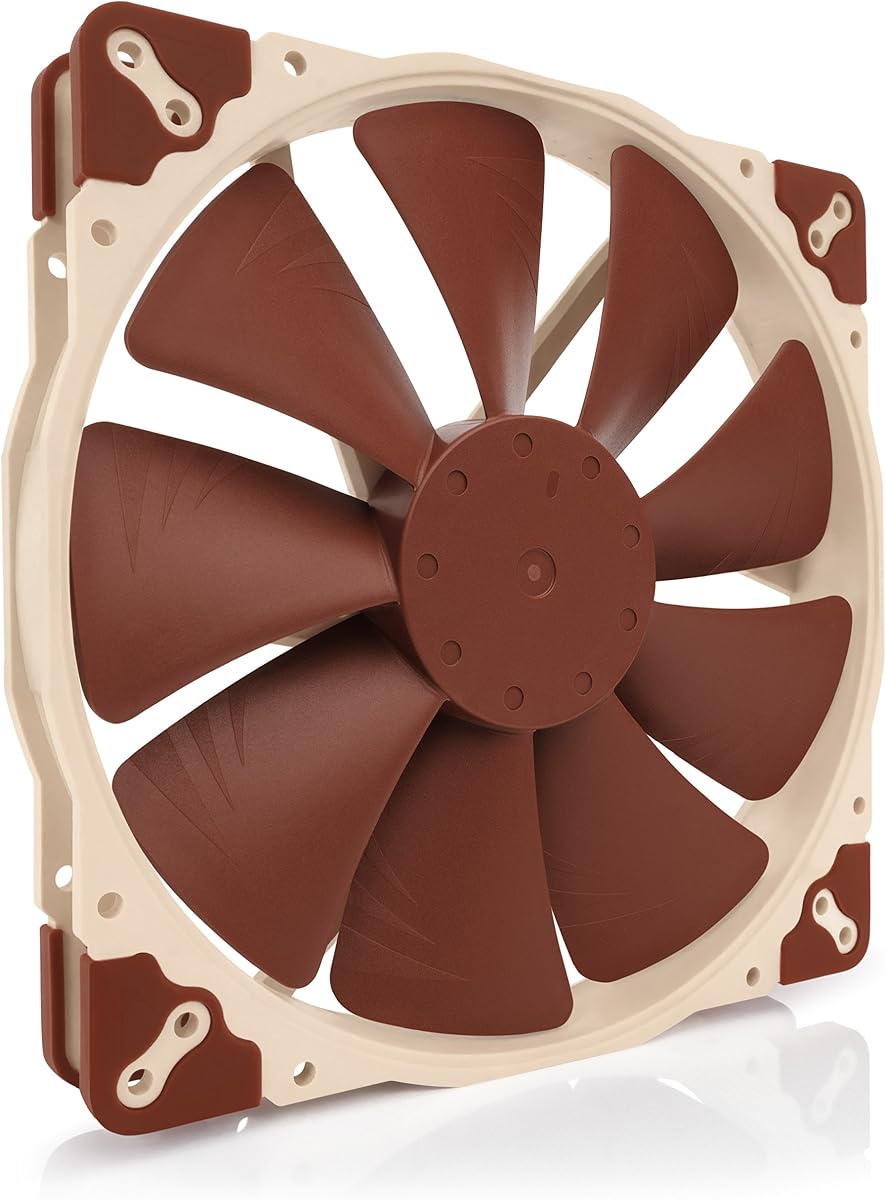
The Noctua NF-A20 PWM stands out as the premier choice for users seeking a balance of silence and cooling power. With an impressive 4.8 rating from verified buyers, it consistently delivers on its promise of high performance without excessive noise. The fan's design focuses on maximizing airflow while minimizing acoustic disturbances through advanced engineering techniques.
We may earn a commission when you buy through this link, at no additional cost to you.
Its Flow Acceleration Channels and Advanced Acoustic Optimisation frame work together to create a smooth airflow path that reduces turbulence and noise. The 4-pin PWM control allows for precise speed regulation ranging from 350 to 800 RPM depending on system demands. Included accessories like the Low-Noise Adaptor give users even more flexibility to tune performance for near-silent operation.
While the price is higher than many alternatives, the build quality justifies the investment for long-term reliability. The included y-cable makes it easy to control two fans on a single header which simplifies cable management. The only trade-offs are the need for sufficient case clearance and the budget consideration for cost-sensitive builds.
This fan is ideal for enthusiasts and professionals who prioritize acoustic comfort alongside thermal performance. It fits well in quiet computing environments where noise reduction is critical. If you want a fan that works right out of the box with minimal setup, this is the model to choose.
The frame design reduces resonances and vibrations that typically cause unwanted noise during operation.
Automatic speed adjustment via motherboard headers ensures optimal cooling without manual intervention.
We may earn a commission when you buy through this link, at no additional cost to you.
The Thermaltake Pure 20 Series offers exceptional value for builders who want solid performance without breaking the bank. With a 4.5 rating users appreciate its ability to move significant air while staying relatively quiet. The design focuses on practical efficiency with features that make installation and operation straightforward.
We may earn a commission when you buy through this link, at no additional cost to you.
The 200x30mm thick profile provides high air pressure and airflow capacity. Its fan blade design focuses airflow efficiently to reduce noise without sacrificing cooling power. The anti-vibration mounting system helps dampen vibrations that can otherwise cause annoying noise or case resonance during high-load scenarios.
A long life sleeve bearing ensures reliability though it may not match the lifespan of premium ball bearing options. The shaved frame allows for more versatile installation especially with Thermaltake chassis units. An LED version is also available for those who want aesthetic customization without extra cost.
This fan is best suited for budget-conscious builders who still demand quality cooling. It works well in mid-tower cases where airflow is a priority. If you need a reliable fan that balances cost and performance this is a smart choice.
Blade geometry is optimized to direct air where it is needed most for efficient cooling.
Rubber pads and mounts reduce vibration transfer to the case for quieter operation.
We may earn a commission when you buy through this link, at no additional cost to you.
The Noctua NF-A20 PWM chromax.Black.swap combines high performance with custom aesthetics for a truly premium experience. Users rate it 4.6 out of 5 praising its silent operation and versatility. The all-black design appeals to those wanting a cohesive look without compromising cooling performance.
We may earn a commission when you buy through this link, at no additional cost to you.
This model features Flow Acceleration Channels and Advanced Acoustic Optimisation similar to standard A-series fans. The chromax.black.swap edition includes swappable anti-vibration pads in red black white blue yellow and green allowing for color customization. The large diameter ensures high airflow at low RPMs for minimal noise.
Three sets of mounting holes including 154×154 170×170 and 110x180mm provide broad compatibility across different cases. The 4-pin PWM version enables automatic speed control via motherboard headers. While expensive the customization options and reliability make it worth the investment for enthusiasts.
Ideal for users who want both performance and visual customization this fan delivers. The pad swaps allow personalization without permanent modifications. If you value both aesthetics and silent cooling this is the best premium option.
Swappable pads let you match the fan to your system color scheme easily.
Multiple hole patterns ensure this fan fits almost any case needing 200mm cooling.
We may earn a commission when you buy through this link, at no additional cost to you.
The Thermaltake CT200 PWM Fan delivers impressive airflow figures that suit demanding cooling requirements. With a 4.3 rating it offers solid performance for builders prioritizing air volume. The hydraulic bearing ensures quiet operation while maintaining reliability over extended use.
We may earn a commission when you buy through this link, at no additional cost to you.
Optimized with 9 blades this fan pushes up to 131.6 CFM of airflow. The hydraulic bearing system supports silent operation across the speed range. Daisy chain connectors allow quick installation without managing multiple cables to the motherboard.
The CT lineup matching design complements existing fans for a unified aesthetic. Speed control ranges from 500 to 900 RPM via PWM. While it lacks advanced features found in premium models it provides excellent airflow value for specific cooling needs.
This fan works well for high-performance builds needing significant air movement. It is compatible with modern cases supporting 200mm fans. For builders focused on raw airflow this is a strong option.
Simplifies cable management by linking multiple fans to a single header.
Bearing design reduces noise compared to standard sleeve bearings during operation.
We may earn a commission when you buy through this link, at no additional cost to you.
The Cooler Master SickleFlow 200 aRGB combines efficient cooling with vibrant lighting. Rated 4.6 by users it delivers high airflow and quiet operation. The frosted blade design disperses lighting effectively for a uniform glow.
We may earn a commission when you buy through this link, at no additional cost to you.
Dynamic PWM allows adjustable speeds from 0 to 800 RPM to balance noise and airflow. The hybrid PBT frame provides stability and reduces noise through anti-resonance mounting. Bearing sealant prevents dust and oil leakage extending fan lifespan.
Optimized blades ensure maximum efficiency and quietness without sacrificing airflow. Installation is simplified by the frame design. This fan suits users wanting both performance and aesthetic lighting in one package.
Best for builders integrating RGB systems with cooling needs. The lighting sync enhances visual appeal while maintaining thermal efficiency. If you prioritize aesthetics alongside performance this model delivers.
Enhances light dispersion for a uniform vibrant lighting effect across blades.
Adjustable speed range allows users to tune fan performance to preference.
We may earn a commission when you buy through this link, at no additional cost to you.
The Noctua NF-A20 FLX is designed for users prioritizing near-silent operation. Rated 4.7 it excels in acoustic performance while maintaining airflow efficiency. The FLX version offers two fixed speeds via the Low-Noise Adaptor.
We may earn a commission when you buy through this link, at no additional cost to you.
Its A-series design includes Flow Acceleration Channels for smooth airflow. The 3-pin Molex connection supports direct power or motherboard headers with adapters. Anti-vibration mounts and multiple hole patterns ensure compatibility and quiet operation.
Speeds of 800 and 550 RPM provide flexibility. The adaptor allows fine-tuning for maximum airflow or silent use. While lacking PWM automatic control it offers reliable performance for static setups.
Ideal for silent computing builds where manual control is acceptable. The build quality ensures longevity and quiet operation. Choose this if absolute silence is your priority.
Allows selection between two speed settings for performance or silence.
Mounts minimize noise transfer to the chassis during operation.
We may earn a commission when you buy through this link, at no additional cost to you.
The Noctua NF-A20 5V PWM offers unique USB power options for devices without standard fan headers. Rated 4.7 it delivers excellent performance in portable or special setups. The USB adaptor cable enables operation from power banks or host ports.
We may earn a commission when you buy through this link, at no additional cost to you.
PWM control allows automatic speed adjustment. Polarity protection safeguards against incorrect connections. The OmniJoin adaptor set connects to proprietary headers for flexibility. Noise levels remain low at 18.1 dB(A).
This fan suits small form factor builds or auxiliary cooling needs. The 5V design ensures safe operation with USB supplies. While niche it provides solutions where standard 12V fans cannot be used.
Best for specialized applications like enclosures or external cooling. The versatility of power options makes it stand out. Consider this for unique integration requirements.
Runs on USB ports or power banks for portable or non-standard setups.
Enables connection to proprietary headers for broad compatibility.
We may earn a commission when you buy through this link, at no additional cost to you.
The Cooler Master MF200R RGB supports major RGB ecosystems for synchronized lighting. Rated 4.4 it balances aesthetics with functionality. Certification covers Asus Aura Gigabyte fusion and MSI RGB systems.
We may earn a commission when you buy through this link, at no additional cost to you.
Hybrid design combines static pressure and airflow for versatile cooling. Silent cooling technology includes sound absorbing rubber pads. The smart fan sensor protects against motor jams automatically. Noise levels remain around 28 dB.
While requiring a controller this fan simplifies lighting integration. The hybrid blade design ensures stable operation. It fits well in builds needing coordinated aesthetics without compromising thermal performance.
Best for RGB enthusiasts needing broad compatibility. The jam protection adds reliability. Choose this for integrated lighting solutions.
Ensures compatibility with major motherboard RGB control software.
Automatically stops motor if obstruction detected to prevent damage.
We may earn a commission when you buy through this link, at no additional cost to you.
The CHICIRIS 200mm Case Fan offers strong ARGB sync at a competitive price. With 34 RGB lamp beads it delivers vibrant lighting effects. Hydraulic bearings ensure quiet operation as low as 9 dBA.
We may earn a commission when you buy through this link, at no additional cost to you.
Motherboard sync allows control via 5V 3pin headers. The fan delivers 95CFM air volume at speeds up to 1000RPM. Optimized 9 blades ensure efficient heat dissipation. Standard mounting fits most cases.
Installation is tool-free with included cables. Wide compatibility ensures it works with most motherboards. While lacking extensive reviews the specs suggest strong performance for the price.
Best for users wanting RGB and performance affordably. The sync capability enhances system aesthetics. Consider this for budget-friendly lighting upgrades.
Supports 5V 3pin headers for seamless lighting integration.
Ensures low noise and long life through sealed lubrication.
We may earn a commission when you buy through this link, at no additional cost to you.
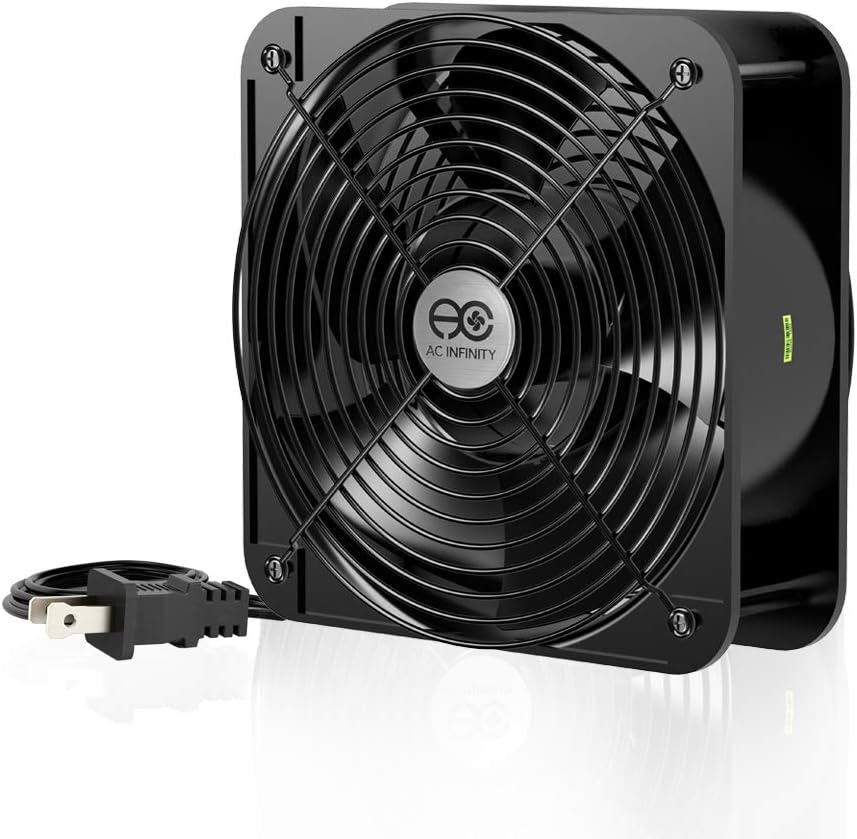
The AC Infinity AXIAL 2060 offers industrial-strength airflow for projects requiring maximum ventilation. Rated 4.5 it delivers 425 CFM. The 60mm thickness provides significant pressure for specialized cases or projects.
We may earn a commission when you buy through this link, at no additional cost to you.
Dual-ball bearings support 67000 hours of lifespan. The aluminum construction ensures durability. It runs on 120V AC with included guards and screw sets. Speed reaches 3200 RPM for maximum performance.
While loud it is ideal for ventilation or replacement needs. The heavy-duty build suits continuous use. It fits cases needing extra depth or high volume cooling.
Best for industrial or project builds needing extreme airflow. The reliability is strong. Consider this for high-volume ventilation requirements.
Maximizes ventilation for projects needing strong air movement.
Supports extended use with reliable bearing technology.
We may earn a commission when you buy through this link, at no additional cost to you.
Selecting the right 200mm case fan involves evaluating multiple technical and practical factors that impact cooling efficiency and system acoustics.
Bearing type is a critical factor for fan longevity and noise. Sleeve bearings are cost-effective but may have shorter lifespans compared to ball or hydraulic bearings. Hydraulic and dual-ball bearings offer better reliability and reduced friction making them ideal for continuous operation.
When choosing a fan consider the expected lifespan and maintenance needs. Premium bearings justify higher costs for long-term use while sleeve bearings suffice for budget builds.
Airflow measured in CFM determines how much air a fan moves while static pressure indicates its ability to push air through obstacles like radiators. High CFM is essential for general case ventilation whereas high static pressure suits restricted areas.
Evaluate your case layout and cooling requirements. Fans with balanced ratings ensure efficient thermal management without excessive noise or power draw.
PWM fans offer automatic speed control via motherboard headers providing dynamic adjustment based on temperature. FLX fans provide fixed speeds using adaptors for users preferring manual control or simpler setups without PWM compatibility.
Select PWM for automated efficiency and FLX for static noise profiles. Ensure your motherboard supports the chosen interface type.
200mm fans often feature multiple hole patterns like 154×154 170×170 and 110x180mm for broad compatibility. Verify your case supports the fan size and thickness especially 30mm or 60mm profiles.
Check internal clearance to avoid obstruction from drive bays or cables. Proper fit ensures vibration free installation and optimal performance.
Noise measured in dB(A) varies significantly among models. Premium fans like Noctua achieve exceptionally low noise through acoustic optimization while budget options may generate more sound at similar airflow.
Prioritize lower dB ratings if silence is critical. Anti-vibration mounts and optimized blades further reduce noise during operation.
RGB fans add aesthetic value but require compatible headers and controllers. Sync capabilities with motherboard software allow unified lighting effects across components.
Choose between standard RGB and ARGB based on software preference. Ensure your system supports 5V or 12V RGB to avoid compatibility issues.
Frame materials like PBT or aluminum influence durability and resonance. Anti-resonance designs and rubber pads minimize vibrations transferring to the case.
A sturdy frame ensures stability during high-speed operation. Consider hybrid designs combining strength and flexibility for optimal performance.
Budget fans offer solid performance at lower costs while premium models justify expenses with advanced features and reliability. Balance initial investment against expected lifespan.
Assess long-term value over upfront price. Reliable fans reduce replacement costs and maintain consistent cooling performance.
Install the fan with correct orientation to ensure optimal airflow direction intake or exhaust. Use included screws and anti-vibration pads to secure the fan firmly to the case frame.
Connect the fan to a compatible 4-pin or 3-pin motherboard header or power supply. Verify that the cable matches the connector type to avoid electrical issues during operation.
Regularly clean the blades and frame with compressed air to prevent dust buildup. Periodic maintenance extends bearing life and maintains optimal airflow performance over time.
The primary advantage is increased airflow at lower RPMs resulting in quieter operation. Larger fans move more air efficiently reducing noise while maintaining thermal performance.
Check your case specifications for available fan mounts and clearance dimensions. Look for markings indicating 200mm slots and ensure there is enough space for the fan thickness.
Yes using FLX adaptors or BIOS settings. PWM fans allow motherboard speed control while FLX fans provide fixed speeds via adaptors for manual tuning.
For users prioritizing silence and longevity they are worth the investment. Better bearings and design features reduce noise and extend lifespan compared to budget alternatives.
RGB uses 12V 4-pin connectors while ARGB uses 5V 3-pin for individual LED control. ARGB offers more customization but requires compatible headers on your motherboard.
Most use standard SATA or motherboard fan headers. Some models include adapters or daisy chain connectors for easier cable management without special power requirements.
The top picks including the Noctua NF-A20 PWM and Thermaltake Pure 20 Series demonstrate that there are excellent options for every budget and build type. Prioritize noise performance and airflow capacity based on your specific needs.
When selecting a fan consider bearing longevity mounting compatibility and control features. Premium fans offer advanced acoustics while budget models provide solid performance without high costs.
Remember that prices and availability may change so always check current listings before purchasing. Investing in the right fan ensures long-term system reliability and acoustic comfort.