
TP-Link Tapo C500
4.5Editor score
360° Visual Coverage
1080p Full HD Live View
Physical Privacy Mode
This guide compares the top 360 Degree Security Camera models for complete coverage, analyzing resolution, connectivity, smart features, and storage options to
Securing your property requires comprehensive coverage without blind spots. A 360 Degree Security Camera offers panoramic views, ensuring every corner is monitored efficiently. These devices are essential for homes and businesses needing wide-angle surveillance.
We evaluated ten leading models based on resolution, connectivity, and smart detection capabilities. Our analysis focuses on real-world performance, ease of installation, and value. This list helps you find the right camera for your specific security needs.
Each pick highlights key strengths and ideal use cases for different environments. We cover indoor, outdoor, and hybrid options to suit various setups. Please note that pricing and availability may change frequently on retail platforms.
4.5Editor score

4.1Editor score

4.2Editor score
This side-by-side comparison highlights the core specifications of all ten selected models. Review resolution, power source, and connectivity options to find the best fit for your surveillance setup.



The REOLINK WiFi Security Fisheye Camera ranks first for its impressive panoramic view and resolution. It delivers a 360° view without blind spots, making it ideal for monitoring large indoor spaces like offices or warehouses. Its 6MP resolution ensures vivid details are captured clearly.
We may earn a commission when you buy through this link, at no additional cost to you.
This model stands out with dual-band WiFi support, offering stability on 2.4GHz or speed on 5GHz. Smart person detection filters out false alerts, and the local storage option avoids monthly fees. Installation is straightforward for users needing a reliable indoor solution.
While it excels in coverage, it lacks outdoor weatherproofing. Additionally, users must purchase a microSD card separately for recording. These trade-offs are acceptable given its strong performance in indoor environments.
Buy this camera if you need a high-quality indoor monitor with full room coverage. It suits businesses or homes prioritizing detail and flexibility without ongoing subscription costs.
The fisheye lens provides a 180° field of view in all directions, covering every corner of a room without movement.
Choose 5GHz for faster data or 2.4GHz for better range, ensuring stable connections in various home network setups.
We may earn a commission when you buy through this link, at no additional cost to you.
This REOLINK PoE Fisheye Camera offers a robust solution for users preferring wired connectivity. Its 6MP resolution and panoramic view deliver sharp images, while PoE simplifies installation with a single cable for power and data. It works well indoors or in covered outdoor areas.
We may earn a commission when you buy through this link, at no additional cost to you.
The camera supports NVR connections and includes two-way talk for interaction. Dewarping technology corrects fisheye distortion for clearer views. Night vision extends up to 26 feet, ensuring visibility in low light conditions.
Users should note that the DC adapter is not included and specific NVR models are needed for advanced features. These limitations are minor for those already invested in the REOLINK ecosystem.
Choose this if you need a reliable wired camera with strong resolution and NVR compatibility. It is perfect for setups where cable management is preferred over wireless signals.
PoE handles power and data over one Ethernet cable, reducing clutter and simplifying installation for professional setups.
Built-in dewarping ensures undistorted images, making it easier to identify people and objects clearly in the view.
We may earn a commission when you buy through this link, at no additional cost to you.
The Amcrest Fisheye IP POE Camera is a top choice for businesses needing detailed analytics. It offers 5MP video and features like people counting and tripwire intrusion. These tools help track traffic and monitor security events effectively.
We may earn a commission when you buy through this link, at no additional cost to you.
Its image sensor provides ultra-clear footage, and storage options include MicroSD, NAS, and cloud services. The built-in microphone supports audio recording. However, some features require specific Amcrest NVR models.
Users must buy a PoE injector separately, which adds to the initial cost. This is a consideration for small setups but manageable for professional installations with existing infrastructure.
Buy this for business applications requiring data insights beyond basic surveillance. It suits stores or offices needing to count visitors or analyze foot traffic patterns.
Deep IVS features like tripwire and intrusion detection allow for smart alerts that focus on relevant security events.
Store footage locally or in the cloud via Amcrest Cloud, offering flexibility based on privacy and bandwidth preferences.
We may earn a commission when you buy through this link, at no additional cost to you.
The TP-Link Tapo C500 is an affordable option offering wide coverage with pan and tilt functions. It covers 360° horizontally and 130° vertically, ensuring no corner is missed. With 1080p resolution and night vision up to 98 feet, it performs well at night.
We may earn a commission when you buy through this link, at no additional cost to you.
Its physical privacy mode blocks the lens when not in use, adding a layer of trust. Two-way audio and voice control with Alexa make it user-friendly. The Tapo app allows easy management of settings and recordings.
Some users may need to ensure their router supports 2.4 GHz specifically, as 5 GHz is not supported for this model. This limitation is minor given the overall value and feature set.
Choose this if you need a reliable budget camera with strong coverage and privacy features. It is ideal for homeowners seeking quality without a high investment.
The lens physically blocks itself for privacy, ensuring you control exactly when the camera captures your space.
Person detection and motion tracking allow the camera to follow movement, keeping an eye on activity automatically.
We may earn a commission when you buy through this link, at no additional cost to you.
The Hiseeu 3K PTZ System is a comprehensive solution for full property monitoring. It includes four cameras with 5MP resolution and a pre-installed 1TB HDD. This setup allows 24/7 recording without immediate need for external storage.
We may earn a commission when you buy through this link, at no additional cost to you.
Its dual night vision modes include color illumination, providing clear details in low light. Human detection filters reduce false alarms. The system supports wired connections, ensuring stability for critical areas.
Wired installation requires running cables, which may be challenging for some users. However, the reliability and included hardware offset this effort for long-term security needs.
Buy this if you need a ready-to-use system for a large property. It suits those wanting a complete setup without extra hardware purchases.
Choose between color night vision, IR B&W, or triggered color mode to adapt to different lighting conditions.
The 1TB HDD provides over 30 days of storage, allowing for extensive playback and event history tracking.
We may earn a commission when you buy through this link, at no additional cost to you.
The eufy Security SoloCam S340 offers a premium experience with solar power and dual-lens clarity. Its 3K resolution provides sharp visuals, and the solar panel ensures continuous operation. This eliminates the need for battery changes or complex wiring.
We may earn a commission when you buy through this link, at no additional cost to you.
Installation takes minutes, and local storage means no monthly fees. The 360° pan and tilt cover all angles without blind spots. It is perfect for driveways or porches where sunlight is available.
Performance depends on direct sunlight access, which may vary in shaded areas. This constraint is acceptable for most sunny locations but worth considering for dense tree coverage.
Choose this for a wireless, eco-friendly solution with strong image quality. It suits homeowners wanting high-end features without recurring subscription costs.
Daily direct sunlight keeps the camera running indefinitely, offering a truly wireless and maintenance-free security solution.
Pan and tilt functions eliminate blind spots, allowing you to monitor every corner of your property remotely.
We may earn a commission when you buy through this link, at no additional cost to you.
The aosu Solar Camera Wireless delivers reliable outdoor monitoring with full solar power. It features 2K resolution and automatic human tracking, focusing on people when detected. This helps capture critical events accurately.
We may earn a commission when you buy through this link, at no additional cost to you.
Its smart alerts include preview images, helping you judge threats quickly. The built-in light and sound alarm can deter suspicious individuals. Voice-changing talk adds privacy during interactions.
The camera relies on direct sunlight for consistent power. This may limit placement options in heavily shaded areas but works well for most open spaces.
Buy this if you want a wireless outdoor camera with strong tracking and alert features. It is great for driveways or backyards needing active security.
When motion is detected, the camera automatically focuses and tracks the person, ensuring detailed recording of events.
Daily sunlight recharges the battery, allowing for 365 days of surveillance without regular maintenance or charging.
We may earn a commission when you buy through this link, at no additional cost to you.
The aosu Solar Camera Fixed is designed for straightforward setup with app voice guidance. It includes a fixed solar panel for continuous power, making installation simple. The 2K resolution ensures clear images day and night.
We may earn a commission when you buy through this link, at no additional cost to you.
Its IP65 weatherproof rating handles outdoor conditions. Compatibility with Google Assistant adds convenience. The camera offers a permanent solution with minimal effort for mounting.
The fixed panel may require careful placement to ensure adequate sunlight. However, the ease of setup makes it a strong choice for beginners.
Choose this for a quick and easy outdoor camera. It is ideal for those who value simplicity and reliable solar power.
Step-by-step voice guidance simplifies the connection process, ensuring you install the camera correctly without confusion.
Once installed, the camera runs continuously on solar power, offering a true wireless experience without battery changes.
We may earn a commission when you buy through this link, at no additional cost to you.
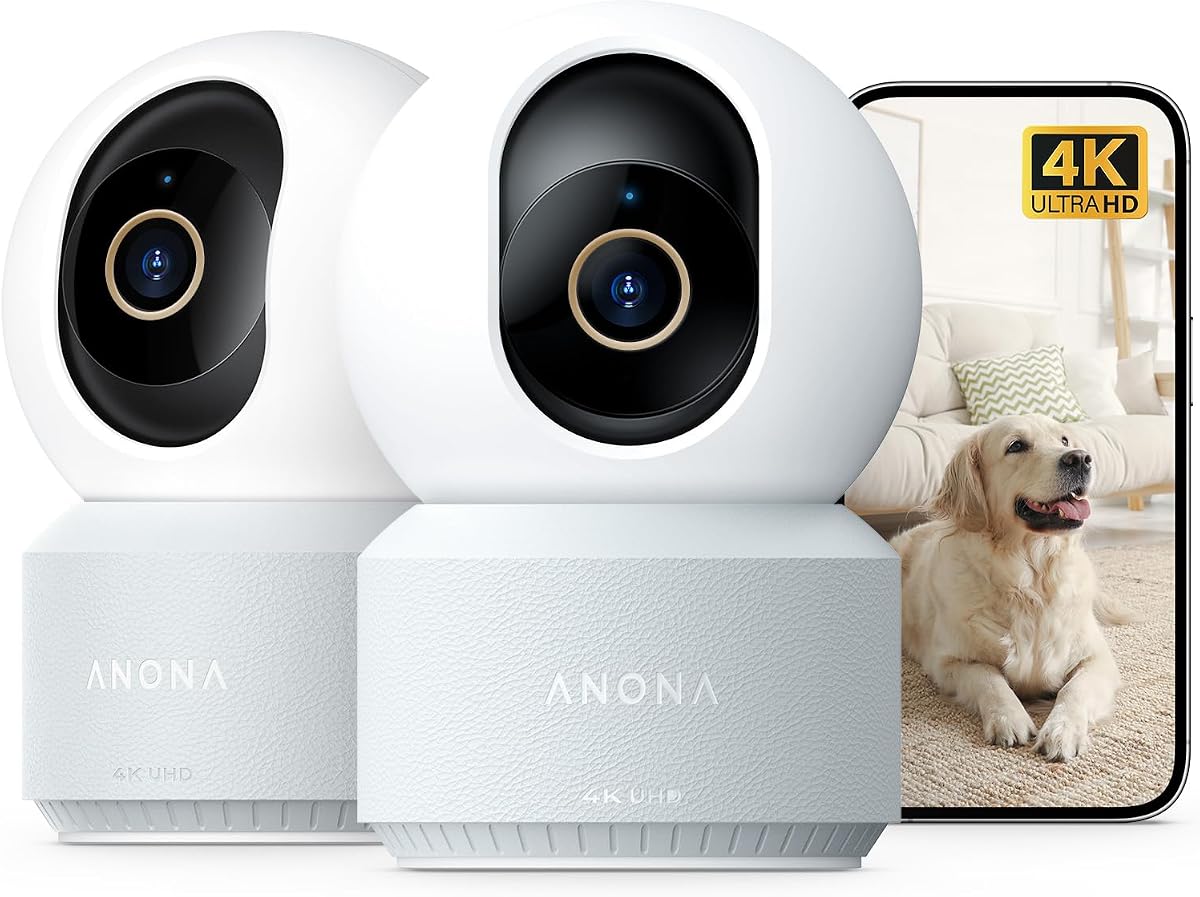
The Anona 4K UHD Indoor Camera delivers exceptional detail with 4K resolution and 8x zoom. It is specifically designed to detect pets, people, and baby crying. These features make it a top choice for family monitoring.
We may earn a commission when you buy through this link, at no additional cost to you.
Wi-Fi 6 ensures fast and stable connections. Auto-tracking follows moving objects, and privacy mode protects your space when needed. The two-pack bundle offers great value for multi-room coverage.
Users must purchase a microSD card for storage separately. This is a minor inconvenience for the high quality and advanced features provided.
Buy this if you need detailed indoor monitoring for children or pets. It suits families prioritizing clarity and specialized detection capabilities.
AI algorithms identify pets or crying babies and send instant notifications, ensuring you are never away from a child or pet.
The latest Wi-Fi 6 technology offers faster data transmission and better stability than older standards.
We may earn a commission when you buy through this link, at no additional cost to you.
This HD 1080P Dome Camera provides a practical solution for legacy analog systems. It supports multiple video output modes and offers a wide fisheye view. It is suitable for basic surveillance in small offices or homes.
We may earn a commission when you buy through this link, at no additional cost to you.
The camera works indoors and outdoors with simple coaxial wiring. It provides essential monitoring without requiring network setup. This makes it a low-cost entry point for basic security needs.
While functional, it lacks advanced smart features found in modern digital cameras. This is acceptable for those upgrading existing analog setups or needing basic coverage.
Choose this if you have an existing analog system or need a budget-friendly basic camera. It suits setups where advanced analytics are not a priority.
The camera supports TVI, AHD, CVI, and CVBS modes, ensuring compatibility with various DVR systems.
Using coaxial cables, you can install this camera easily without needing complex network configurations or IP address setups.
We may earn a commission when you buy through this link, at no additional cost to you.
Selecting the right 360 Degree Security Camera requires evaluating several key factors to ensure it meets your surveillance needs.
Resolution determines how clear your footage will be. Look for 2K or higher for detailed images. Higher resolution helps identify faces and license plates.
Prioritize at least 2K resolution for effective identification in any scenario.
Decide between Wi-Fi and wired connections. Wi-Fi offers flexibility but needs strong signals. Wired PoE provides stability but requires cabling.
Choose based on your home's infrastructure and available power sources.
Solar cameras reduce maintenance, while wired ones ensure constant power. Consider your location's sunlight availability. Battery-powered options may need frequent charging.
Select a power source that fits your environment to avoid interruptions.
AI features like person detection reduce false alarms. Some models track movement or cry detection. These features add value by focusing on relevant events.
Look for models with customizable detection zones for better accuracy.
Local storage like MicroSD saves money on subscriptions. Cloud storage offers remote access but costs monthly fees. Some systems support both options.
Decide based on your budget and privacy preferences for footage retention.
Night vision ensures visibility in low light. IR LEDs work best in total darkness. Color night vision needs some light but offers more detail.
Ensure the range matches your property size for continuous monitoring.
Outdoor cameras need high IP ratings. Look for IP65 or higher for rain and dust. Temperature ranges matter for extreme climates.
Check IP ratings to guarantee durability against weather elements.
Some cameras require professional setup. Others offer app guidance for DIY. Consider mounting brackets and cable management.
Pick models with tools and clear manuals for smoother installation.
Install the camera in a high position for optimal coverage. Ensure it has a clear view of entry points. Test connectivity before final mounting.
Regularly check lens cleanliness for clear images. Update firmware via the app for security patches. Reset settings if you notice connectivity issues.
Review footage periodically to adjust motion zones. Manage storage by deleting old files or increasing card capacity. Protect privacy settings when at home.
A 360 Degree Security Camera provides panoramic coverage of an area without blind spots. It uses fisheye lenses or pan/tilt mechanisms to capture full surroundings.
Many models offer local storage options to avoid monthly fees. However, cloud features often require a subscription. Always check storage options before purchasing.
Local recording works without internet if the camera stores data locally. Live streaming usually requires a network connection. Check specific models for offline capabilities.
They offer wider coverage reducing the need for multiple cameras. However, fisheye distortion may require dewarping. Consider your space size for the best choice.
Mount it high for full coverage. Connect it to power and network sources. Follow app instructions for setup and calibration. Ensure it is secure.
Most models include IR night vision for darkness. Some offer color night vision with ambient light. Check range limits for your needs.
Yes, most models allow remote viewing via apps. You can check live feeds from anywhere. Ensure internet connectivity is stable for access.
The REOLINK WiFi Security Fisheye Camera leads with balanced resolution and smart features. For budget options, the TP-Link Tapo C500 offers excellent coverage at a low cost.
Prioritize resolution and power source based on your environment. Indoor setups benefit from Wi-Fi, while outdoors may need solar or wired connections.
Always verify current pricing and availability as models change. Invest in a camera that fits your specific security and budget needs effectively.