
FLASHFORGE Creator 5 Pro
4.4Editor score
65 C active chamber
HEPA13 filtration
4 independent extruders
This guide compares the top 3D printers for high temperature filaments including ABS PC and Nylon based on heated chambers speed and reliability.
Finding the right 3D printer for high temperature filaments requires careful consideration of chamber heating and nozzle capabilities. Engineering materials like ABS and PC need consistent heat to prevent warping and ensure strong layers.
We evaluated ten leading models based on their ability to handle advanced polymers safely. Our analysis focuses on enclosed designs active heating systems and extruder durability to help you choose wisely.
Each pick below highlights key strengths and limitations for thermal printing. Prices and availability change frequently so verify current details before purchasing your next machine for professional projects.
4.4Editor score

4.7Editor score
4.3Editor score
This side-by-side comparison highlights key specs for each model including max nozzle temperature chamber heating capabilities and build volume to help you match the right printer to your engineering needs.



The Bambu Lab P2S Combo stands out as a top contender for printing with high temperature filaments. It combines speed with thermal management features that reduce warping in materials like ABS and Nylon.
We may earn a commission when you buy through this link, at no additional cost to you.
Its Adaptive Airflow System balances cooling and heat retention automatically. This ensures crisp overhangs while maintaining a stable 50 C chamber environment necessary for engineering-grade prints.
Users should note that multi-color functionality requires the AMS 2 Pro unit which adds to the cost. However the included drying feature keeps spools ready for flawless prints.
This machine is ideal for professionals needing reliable results without constant tuning. It delivers consistent quality from design to finished print with minimal intervention.
The system balances cooling and heat retention to keep overhangs crisp while maintaining a 50 C chamber for engineering-grade materials.
The AMS 2 Pro enables seamless multi-color and multi-material printing with built-in filament drying at up to 65 C.
We may earn a commission when you buy through this link, at no additional cost to you.
The FLASHFORGE Creator 5 Pro is engineered for industrial grade performance with high temperature filaments. It offers an active heated chamber that maintains 65 C to prevent warping in advanced materials.
We may earn a commission when you buy through this link, at no additional cost to you.
With four independent extruders it switches colors instantly without purging. This design eliminates waste and ensures pristine color separation during multi-material projects.
The HEPA13 filtration system captures particles and odors making it safe for office environments. Users benefit from a clean workspace even when printing toxic fumes.
This model suits businesses needing volume production of engineering parts. Its speed and thermal control make it a powerful tool for professional workflows.
The active chamber heating system maintains a stable temperature up to 65C to ensure consistent interlayer adhesion and minimize warping.
Four independent extruders allow instant color switching without purging improving efficiency while ensuring material purity.
We may earn a commission when you buy through this link, at no additional cost to you.
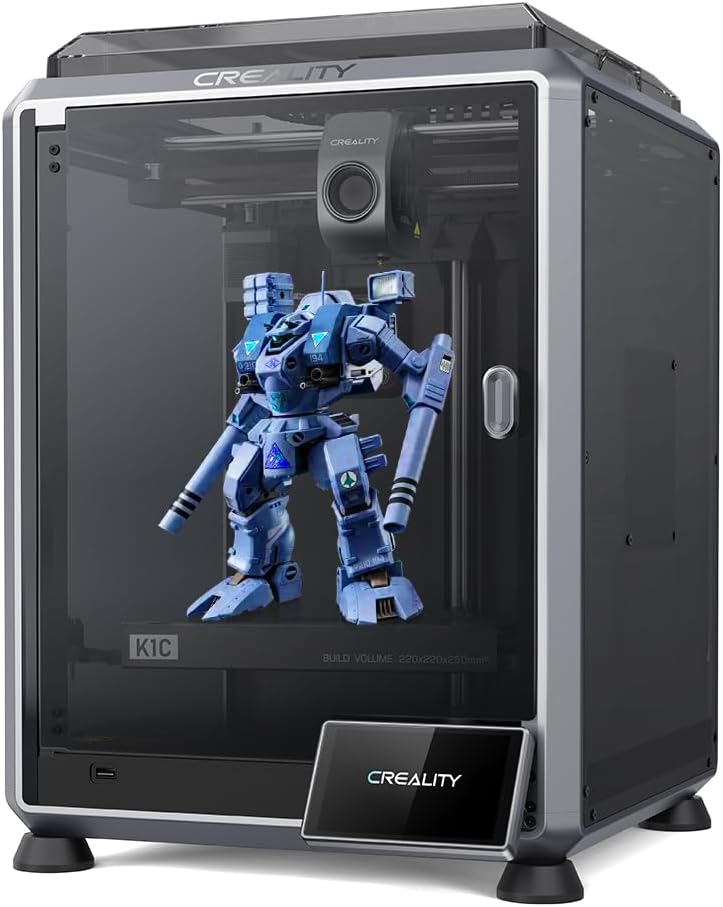
The Creality K1C delivers impressive performance at a budget friendly price. Its upgraded structure and 300 C nozzle make it suitable for many high temperature materials including carbon fiber.
We may earn a commission when you buy through this link, at no additional cost to you.
Auto calibration tools save setup time and reduce user errors. The K1C boots up quickly and supports rapid printing without complex tuning.
While it lacks a fully heated chamber users can still print ABS with proper enclosure modifications. The AI camera helps catch failures before waste accumulates.
This printer is perfect for hobbyists entering engineering printing. It balances cost with capability allowing access to advanced filaments without high expense.
The durable steel-stripped copper nozzle and titanium alloy heatbreak enable 300C printing of carbon fiber and other abrasive materials.
An observant AI camera recognizes failures and supports real-time monitoring to minimize waste during long prints.
We may earn a commission when you buy through this link, at no additional cost to you.
The Bambu Lab P1S provides a fully enclosed design ideal for advanced filaments like ABS ASA and PC. It supports high speeds up to 500 mm/s while maintaining precision.
We may earn a commission when you buy through this link, at no additional cost to you.
Automatic bed leveling ensures high quality successful prints from the start. Users spend less time setting up and more time creating.
While it does not include an active heater the enclosure retains heat well enough for many projects. Adding an AMS system enables multi-color capabilities.
This model is great for creators needing reliability without complexity. It offers strong thermal stability for engineering prints at a reasonable price point.
The fully enclosed body improves print performance for advanced filaments like ABS ASA and PC.
With 500mm/s speed and 20000mm/s acceleration users avoid waiting and focus on creating faster.
We may earn a commission when you buy through this link, at no additional cost to you.
The Bambu Lab A1 offers speed and precision for those new to 3D printing. It features full-auto calibration to eliminate manual hassles and active flow rate compensation for smooth prints.
We may earn a commission when you buy through this link, at no additional cost to you.
While primarily open frame it handles standard engineering filaments with care. The motor noise canceling keeps the environment quiet during operation.
Adding an AMS lite allows vibrant multi-color prints. However users should note this unit lacks a heated chamber for high temperature materials.
This machine suits hobbyists seeking fast reliable results. It simplifies the workflow from design to finished print for beginners.
Full-auto calibration handles Z-offset and bed leveling automatically for optimal performance every time.
Active motor noise canceling creates a quiet environment so users can focus on work.
We may earn a commission when you buy through this link, at no additional cost to you.
The FLASHFORGE AD5X features IFS technology allowing up to four colors simultaneously. Its 300 C nozzle supports a wide range of filaments including ABS and PETG.
We may earn a commission when you buy through this link, at no additional cost to you.
Fully automatic leveling ensures consistent quality every time. The large build volume supports bigger projects without assembly steps.
While it lacks a built-in chamber for high temp printing the hardware is capable with modifications. Users can add enclosure kits for advanced materials.
This printer fits artists and hobbyists needing color variety. It balances speed and precision for intricate designs and prototypes.
Advanced IFS technology allows up to four different colors simultaneously for vibrant multi-colored models.
The high-temperature nozzle reaches up to 300C for a wide range of filaments including ABS and PETG.
We may earn a commission when you buy through this link, at no additional cost to you.
The Anycubic Kobra S1 Max features a large build volume and 65 C heated chamber for engineering filaments. It supports PC and PA6-CF with a 350 C hotend.
We may earn a commission when you buy through this link, at no additional cost to you.
Vibration compensation reduces ringing during high-speed printing. The CoreXY structure maintains stability at speeds up to 600 mm/s.
Real-time AI monitoring detects failures to reduce waste. Users benefit from a robust system designed for large scale prototypes.
This machine suits professionals needing size and heat. It delivers strong performance for functional parts and ambitious creations.
The 65C heated chamber handles engineering filaments including ABS ASA PC PA and PC-CF safely.
CoreXY motion system maintains precision even at 600mm/s with vibration compensation reducing ringing.
We may earn a commission when you buy through this link, at no additional cost to you.
The Flashforge AD5X delivers 300C hotend performance with direct 4-color printing. It features auto leveling and a flexible PEI plate for strong adhesion.
We may earn a commission when you buy through this link, at no additional cost to you.
Dual-band Wi-Fi allows monitoring from anywhere. The nozzle can be swapped in thirty seconds for quick maintenance.
Users should note the build volume is compact. It supports engineering filaments with an enclosure upgrade.
This printer is ideal for small workshops needing color and speed. It balances functionality with convenience for prototypes.
4-color direct printing via IFS system allows auto-swap without manual intervention.
Vibration compensation and linear rails deliver studio-grade precision even at max speed.
We may earn a commission when you buy through this link, at no additional cost to you.
The Snapmaker U1 features four independent toolheads with a 5-second tool changer. This system reduces waste and speeds up multi-material printing significantly.
We may earn a commission when you buy through this link, at no additional cost to you.
Users can mix rigid and flexible materials in one print. Automatic calibration ensures smooth dimensionally accurate results.
While expensive it simplifies complex workflows. The built-in library helps beginners get started quickly.
This machine suits makers needing design freedom. It supports engineering materials and flexible supports for prototypes.
The SnapSwap system enables true multi-color printing without manual filament swaps or purging.
True multi-material printing combines rigid and flexible materials in a single print.
We may earn a commission when you buy through this link, at no additional cost to you.
The FLASHFORGE Creator 5 Pro offers industrial engineering design with a 65C active chamber. Its near-zero waste system eliminates massive purge waste while saving costs.
We may earn a commission when you buy through this link, at no additional cost to you.
Safety features include dual HEPA13 and activated carbon filtration. Users get a safe odorless environment for high temp printing.
Remote control via Flash Studio allows progress monitoring. This model fits professional studios needing reliability.
This printer suits businesses producing industrial parts. It balances safety and speed for robust production workflows.
Switching nozzles without flushing filament slashes operational overhead and material costs.
Dual HEPA13 and activated carbon system traps ultrafine particles and fumes safely.
We may earn a commission when you buy through this link, at no additional cost to you.
Selecting a printer for high temperature filaments involves evaluating thermal stability enclosure design and extruder strength.
An active heated chamber maintains consistent temperatures during prints. This prevents warping in materials like ABS and PC.
Look for models supporting at least 60C to ensure stable interlayer adhesion.
High temperature filaments require higher nozzle heat. A 300C nozzle is standard for most engineering materials.
Ensure the extruder supports 300C printing to handle PC and PA safely.
Fully enclosed designs protect prints from drafts. This improves layer bonding for high temp materials.
Choose a sealed body to maintain internal heat and reduce warping risks.
Direct extruders grip abrasive filaments better. Look for hardened nozzles to prevent wear.
A clog-free extruder ensures consistent flow for carbon fiber materials.
Large build volumes allow bigger projects. Ensure size matches your prototype needs.
Check dimensions before buying to avoid size limitations.
High speeds should not compromise precision. Look for vibration compensation features.
Balance speed with stability for quality engineering results.
Independent extruders reduce waste in multi-color prints. This improves efficiency.
Choose models with separate nozzles for color purity.
High temperature filaments release fumes. HEPA filters capture volatile particles.
Ensure the printer includes filtration for safe workspace use.
Always preheat the chamber before printing high temperature materials. This ensures consistent adhesion and reduces warping.
Use appropriate cooling settings for engineering filaments. Keep fans off for materials like PC to maintain strength.
Clean the nozzle and extruder regularly to prevent clogging. Use brass tools for hardened nozzles.
ABS requires a nozzle temperature of 230-260C and a heated chamber around 50C. This prevents warping and ensures strong layer bonding.
Yes, an enclosed design is essential for materials like PC. It maintains consistent heat and reduces drafts that cause warping.
Most high temp materials require hardened nozzles. Standard brass nozzles wear out quickly with abrasive filaments.
Yes, 300C is sufficient for PC when paired with a heated chamber. Ensure extruder support reaches this temperature.
Use an active heated chamber at 50C. Ensure the build surface is clean and the chamber is sealed.
Yes, Nylon needs a heated chamber to prevent warping. Look for models supporting 60C internal temperatures.
HEPA filtration and auto-shutdown sensors protect against fumes. Ensure the printer includes air filtration.
Clean the nozzle regularly and use hardened tips. Check the extruder motor for wear every few months.
The Bambu Lab P2S and FLASHFORGE Creator 5 Pro offer top-tier thermal performance. They combine speed and stability for professional results.
Prioritize heated chambers and extruder durability when selecting. These features determine success with engineering filaments.
Prices and availability vary so check current details before buying. Verify specs match your specific material needs.