
ELUTENG Curved Monitor Light Bar
4.6Editor score
Wireless remote control included
Asymmetric surround lighting
Base-free space saving design
Finding the right lighting for your workspace is crucial for comfort and productivity. A curved monitor light bar offers a specialized solution designed to fit the arc of modern displays without casting unwanted glare on the screen.
We have analyzed ten leading models based on their optical design, adjustability, and eye-care features. This list covers options ranging from budget-friendly picks to premium solutions with advanced sensors and remote controls.
Each selection highlights key strengths and potential trade-offs to help you decide. Note that availability and pricing can change frequently, so verify details before making your final purchase decision for your desk.
4.6Editor score

4.9Editor score

4.7Editor score
As an Amazon Associate we earn from qualifying purchases.
This side-by-side comparison highlights the core specifications and unique selling points of each model to help you quickly identify which light bar aligns best with your specific monitor curvature and workflow needs.




This LYMAX light bar stands out for its intelligent sensor technology that turns the light on when you sit down and off when you leave. It has an excellent rating and delivers high-quality illumination suitable for professional environments.
We may earn a commission when you buy through this link, at no additional cost to you.
The optical design follows the curve of your monitor to ensure light lands on your desk and not your screen. Its high CRI ensures colors are rendered accurately, which is vital for creative tasks like photo editing or design work.
While it is more expensive than some competitors, the convenience of auto on-off and the robust build quality justify the investment. You do not need to worry about forgetting to turn off the lamp, which saves energy.
This model is ideal for users who want a set-it-and-forget-it lighting solution that adapts to their presence. If you value convenience and high-quality light output, this is a top recommendation for any workspace.
The PIR sensor detects movement to automate lighting, reducing standby waste and ensuring the desk is never dark when you need it.
With a CRI of 97, this light bar renders true colors, making it suitable for color-critical work while protecting eyes with flicker-free output.
We may earn a commission when you buy through this link, at no additional cost to you.
The ELUTENG light bar offers a great entry point for those seeking eye protection without a high cost. It delivers solid performance with essential features like dimming and color adjustment suitable for daily tasks.
We may earn a commission when you buy through this link, at no additional cost to you.
Its asymmetric design ensures that light is directed downward to prevent screen glare. The included wireless remote makes it easy to adjust settings from your chair, adding convenience without complicating the setup.
Although it lacks some advanced features like auto-dimming or memory, it covers the basics well. The build quality is reliable for the price, and it fits most curved monitors securely without taking up desk space.
This is the perfect choice for students or casual users who need simple, effective lighting. If you want a clean look and good value for money, this model fits the bill nicely.
The base-free design means the light attaches directly to the monitor, freeing up your desk surface for other essential peripherals and accessories.
Using a wireless remote allows you to change light settings effortlessly, which is useful when you are deep in work or gaming sessions.
We may earn a commission when you buy through this link, at no additional cost to you.
BenQ is known for display technology, and this light bar reflects that expertise with premium build quality and smart features. It offers a comprehensive lighting experience that caters to professionals who demand precision and comfort.
We may earn a commission when you buy through this link, at no additional cost to you.
The wireless controller allows you to adjust brightness and color temperature with a simple dial, while the display shows exact values. The wide backlight reduces the contrast between your screen and the dark room, easing eye strain significantly.
Despite the high cost, the durability and performance are unmatched. The clamp is designed to fit various monitor thicknesses without damaging them, and the LEDs are tested to last for years of consistent use.
If you work long hours at a computer and need the best possible lighting to maintain focus and comfort, this model is worth the investment. It is a professional tool designed for serious users.
The wireless dial provides intuitive adjustments, letting you fine-tune your lighting environment instantly without reaching for buttons on the bar itself.
Advanced eye-care features reduce fatigue by balancing light output to minimize strain, making it ideal for extended periods of screen time.
We may earn a commission when you buy through this link, at no additional cost to you.
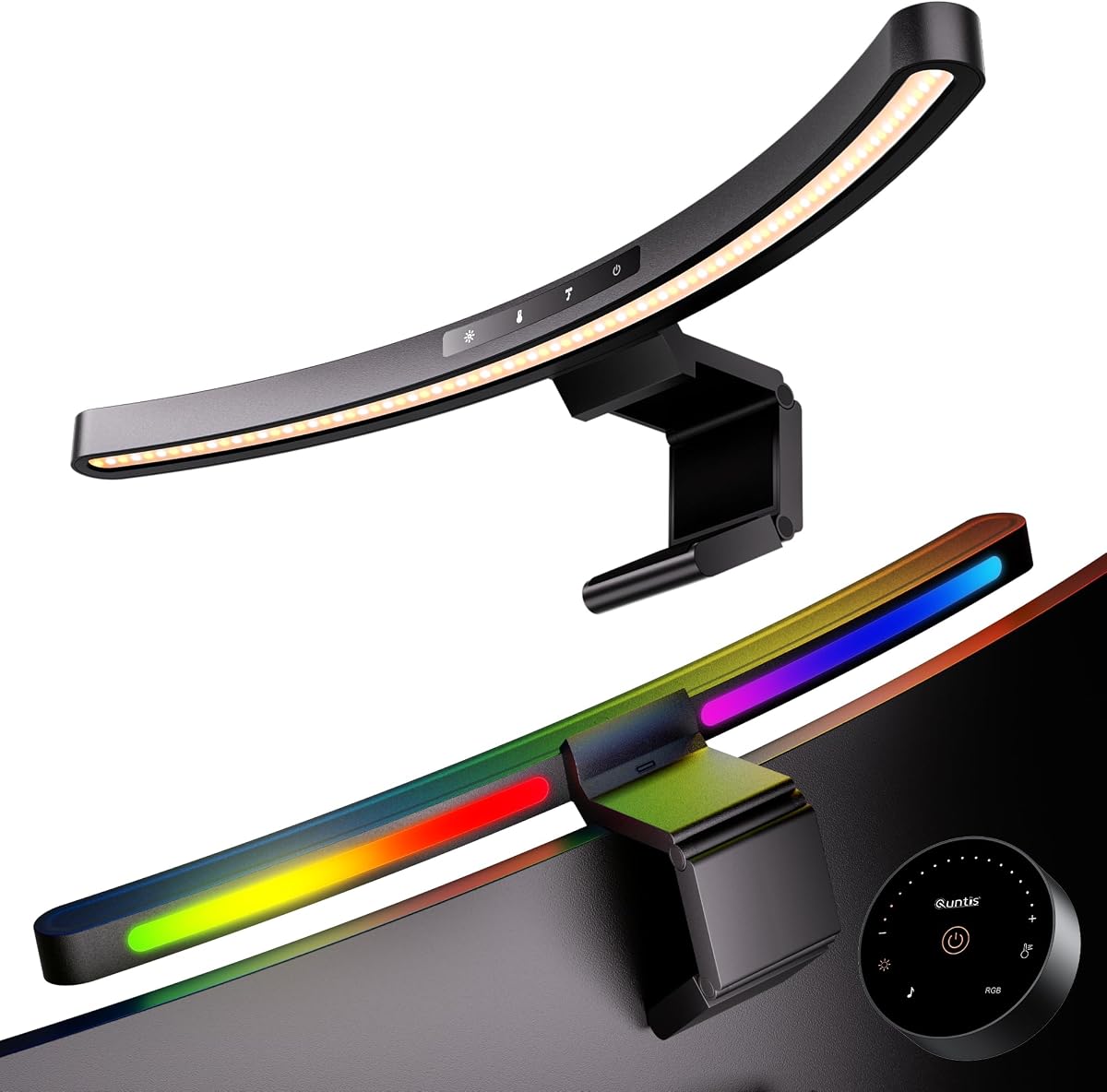
This Quntis model is specifically engineered for larger ultrawide curved monitors that are often difficult to light evenly. It uses a foldable dual light design to cover wider areas without compromising on quality or glare reduction.
We may earn a commission when you buy through this link, at no additional cost to you.
The patented clamps adapt to various screen thicknesses, ensuring a secure fit even on irregular monitor backs. With an IEC anti-blue light certification, it is designed to protect your eyes during long sessions of work or gaming.
The foldable nature allows you to adjust the angle and reach depending on your task. It includes a smart sensor that adjusts brightness based on ambient light, adding a layer of automation to your workspace lighting.
If you have a large curved monitor, this bar provides the necessary coverage and flexibility. It is an excellent choice for those who need a custom fit for their specific display setup.
The extended reach and curved design ensure light is distributed evenly across wide screens, preventing dark corners and uneven lighting.
Certified anti-blue light technology helps reduce eye fatigue, ensuring your eyes stay comfortable during extended periods of screen usage.
We may earn a commission when you buy through this link, at no additional cost to you.
The ONWAY light bar focuses on ease of use with a dedicated wireless remote for all adjustments. It is designed to work with a wide range of monitors and provides solid auto-dimming capabilities to maintain consistent brightness.
We may earn a commission when you buy through this link, at no additional cost to you.
Its design includes a camera base to support your webcam without cluttering your desk. The RGB backlight adds a touch of style for gamers or those who enjoy a more vibrant workspace atmosphere.
While it has many features, it remains affordable and functional. The stepless adjustment allows for fine-tuned control over your environment, ensuring you always have the right level of light for your current task.
This is a strong option for users who want a balance of functionality and aesthetics. The remote control makes it accessible and convenient for everyday adjustments.
Integrated camera mounting options keep your webcam secure and centered without needing extra stands or clips on your desk surface.
With adjustable RGB modes and color temperatures, you can tailor the lighting to match your mood or activity for a personalized experience.
We may earn a commission when you buy through this link, at no additional cost to you.
This model takes flexibility to the next level with two independently adjustable pivoting bars. It is built for ultrawide setups where standard bars might not align properly with the screen's arc.
We may earn a commission when you buy through this link, at no additional cost to you.
The high CRI ensures that colors are true to life, which is beneficial for creative professionals. The memory function saves your settings, so you do not have to reset them every time you turn the light on.
The pivoting feature allows you to concentrate light on specific areas of the desk when you need precision or expand it for general tasks. This adaptability makes it a versatile tool for various work styles.
If you have a large ultrawide monitor and need precise lighting control, this is a great choice. It combines high optical quality with mechanical flexibility for a superior experience.
Independent pivoting bars allow you to direct light exactly where you need it, whether for focused work or broad desk coverage.
With a CRI of 98, colors are rendered accurately, ensuring that your visual output matches your intentions during creative tasks.
We may earn a commission when you buy through this link, at no additional cost to you.
This compact light bar offers unique music sync features that react to sound for a dynamic lighting experience. It maintains a strong focus on eye care while adding a fun element for entertainment sessions.
We may earn a commission when you buy through this link, at no additional cost to you.
The front light is bright enough to illuminate keyboards and workspaces without glare, while the backlight helps reduce screen contrast. The Ra95 CRI ensures that colors remain accurate for any work-related tasks.
The auto-off timer helps you take regular breaks, promoting healthy screen habits. It is designed to be user-friendly with both remote and touch controls, ensuring convenience for all scenarios.
This is an excellent pick for gamers or entertainment lovers who want their lighting to match their content. It combines practical desk lighting with an engaging ambient feature.
Music sync modes bring your setup to life by reacting to audio beats, creating a lively atmosphere for games and music listening.
The built-in timer reminds you to step away from the screen, helping to prevent eye strain and encourage regular breaks during long sessions.
We may earn a commission when you buy through this link, at no additional cost to you.
This Quntis model is designed to fit a wide range of monitor types including flat and curved screens. The weighted clamp provides a secure hold, ensuring the light stays in place even during adjustments.
We may earn a commission when you buy through this link, at no additional cost to you.
The remote control allows you to manage brightness and color temperature without getting up. Auto-dimming technology adjusts the light output based on ambient conditions, maintaining comfort throughout the day.
It is a solid all-rounder for general office use. The asymmetrical optical design prevents glare, ensuring that your screen remains visible and clear while you work or study.
If you need a reliable light that adapts to different monitor shapes, this is a strong choice. It offers good value with essential features for a productive workspace.
The triple-fold weighted clamp ensures stability without slipping, even on irregular or curved monitor backs, keeping your light securely in place.
Auto-dimming sensors adjust brightness in real time, ensuring your desk is always well-lit regardless of changes in room lighting.
We may earn a commission when you buy through this link, at no additional cost to you.
This model focuses heavily on providing a vivid RGB experience for gaming and entertainment. It features multiple color options and dynamic effects that enhance your setup's atmosphere without taking up desk space.
We may earn a commission when you buy through this link, at no additional cost to you.
The touch-sensitive buttons make it easy to switch between modes and colors. A timer function is included to remind you to take breaks, supporting healthy usage habits during long sessions.
While it lacks the premium optics of more expensive models, it delivers on style and basic illumination. The anti-weight clips ensure it stays secure on curved screens without damaging the back.
This is a fun choice for those who prioritize visual style in their setup. It brings color and life to your workspace while keeping things simple and affordable.
Multiple RGB color modes allow you to customize the look of your setup to match your personal style or gaming vibe.
Responsive touch buttons provide quick access to all features, making it easy to change settings without reaching for a remote.
We may earn a commission when you buy through this link, at no additional cost to you.
This lamp offers a straightforward approach to desk lighting with essential features like dimming and color adjustment. It is designed to be easy to install and use for anyone needing basic glare-free light.
We may earn a commission when you buy through this link, at no additional cost to you.
The asymmetrical design ensures light is directed to the desk without reflecting on the screen. It includes a timer function to help you manage screen time and prevent eye fatigue during long periods of use.
While it does not have advanced sensors or remotes, it covers the fundamental needs of a workspace light. The non-slip padding provides a secure hold, ensuring stability during daily adjustments.
If you want a no-fuss solution for your desk that protects your eyes and saves space, this is a practical choice. It offers solid performance at a basic level.
A convenient snap-on design allows for quick setup, making it easy to adjust and place atop various monitor thicknesses.
The lightweight and adjustable design ensures minimal desk space is used, keeping your workspace tidy and organized.
We may earn a commission when you buy through this link, at no additional cost to you.
Selecting the right monitor light bar involves considering your specific monitor type, desired features, and budget. This guide breaks down the key factors to help you make an informed decision.
Ensure the light bar matches your monitor's curvature and thickness. Look for clamps that fit your screen width and thickness without slipping or causing damage. Some bars are designed specifically for ultrawide screens.
Check that the clamp is adjustable and fits your monitor thickness to prevent slipping or damage. Verify the curvature range if you have a deeply curved screen.
A quality light bar should direct light downward using an asymmetric optical design. This prevents light from reflecting on the screen or shining into your eyes, which is crucial for comfort.
Look for features labeled as glare-free or with specific angles to ensure light is directed only where needed without creating reflections.
Consider how you want to adjust brightness and color temperature. Options include touch buttons, remotes, or smart sensors that adjust light based on ambient conditions.
Remote controls and sensors add convenience but may increase cost. Decide if you need hands-free operation or manual adjustment features for your workflow.
A higher CRI ensures colors are rendered accurately, which is important for design or photo work. Aim for a CRI of 90 or higher for true-to-life visuals.
Check the CRI rating in specifications to ensure the light bar provides accurate color reproduction for professional tasks.
Some light bars include RGB backlighting to add ambiance to your workspace. This can reduce eye strain by balancing screen brightness with the room's ambient light.
Decide if you want decorative lighting features or just focused task lighting. RGB modes are great for gaming setups but may not be necessary for professional work.
A robust clamp with non-slip pads ensures stability on your monitor. Look for reinforced designs that can handle different screen shapes without flexing or slipping.
Verify the clamp material and padding to avoid scratches. A solid build quality ensures the light bar stays secure and durable over time.
Most light bars use USB power which is convenient for connection to a PC or adapter. Ensure the cable length is sufficient to reach your setup without cluttering your desk.
Check for USB-C compatibility or standard USB A depending on your available ports. A right-angle cable helps keep your workspace tidy.
Models with ambient light sensors adjust brightness automatically to match room conditions. This saves energy and keeps lighting consistent without manual changes.
Consider if you value smart features like presence detection or auto-dimming for added convenience and energy efficiency.
To install, clean the back of your monitor to ensure the clamp grips securely. Attach the bar to the top center of the screen and adjust the angle so light points downward toward your desk.
Connect the power cable to a USB port or adapter. Use the controls to adjust brightness and color temperature to suit your current environment and task needs.
Periodically check the clamp for stability and clean the light cover to maintain performance. Avoid bending the bar excessively to prevent damage to the LEDs or internal wiring.
Many bars can work on flat screens if they are adjustable. However, curved bars may not fit as securely on flat surfaces. Check the product specs for compatibility with both types of monitors.
It provides even illumination that matches the curve of the screen. This reduces glare and eye strain compared to standard straight bars on curved displays.
Yes, most use a clamp system that attaches to the top of the monitor without tools. Simply adjust the clamp width and hang it securely for quick setup.
Many models have a dedicated camera mount or clip to avoid blocking your webcam. This allows you to keep your video feed clear while using the light.
Use a soft, dry cloth to wipe the surface. Avoid using harsh chemicals or water directly on the bar to protect the electronics and finish.
Yes, by providing glare-free illumination and reducing contrast with the room. They also often include anti-blue light features to protect eyes during long use.
Most connect via USB to a computer or power adapter. Some may require a USB-C cable while others use standard USB-A depending on the model.
Most manufacturers offer a limited warranty covering defects. Check the product listing for details on warranty duration and what it covers specifically.
Choosing the right light bar depends on your monitor size and desired features. Models like the LYMAX and BenQ offer advanced automation and high optical quality for professionals.
Consider your budget and specific needs such as RGB or auto-dimming when selecting. The ELUTENG and Quntis models provide great value for those seeking basic functionality without breaking the bank.
Always verify the latest prices and availability before buying. Investing in a good light bar can significantly improve your comfort and productivity at the desk.