
abxylute C6 Wireless PC Controller
4.3Editor score
Hall Effect Joysticks
18 Hours Battery Life
Multi-Platform Support
This guide compares the top game controllers for Mac, analyzing compatibility, battery life, and features to help you find the perfect gaming accessory for
Finding the right game controller for Mac can be tricky due to varying compatibility standards. You need a device that connects seamlessly without lag or drivers.
We analyzed ten top-rated controllers based on user feedback and technical specs. Each option offers unique strengths for different gaming preferences and budgets.
Our detailed reviews highlight key features like battery life and joystick quality. Prices may change, so check current listings before making your final decision.
4.3Editor score

4.7Editor score

4.5Editor score
This table provides a quick side-by-side comparison of all ten controllers. Review the key specifications to determine which model aligns best with your gaming needs.


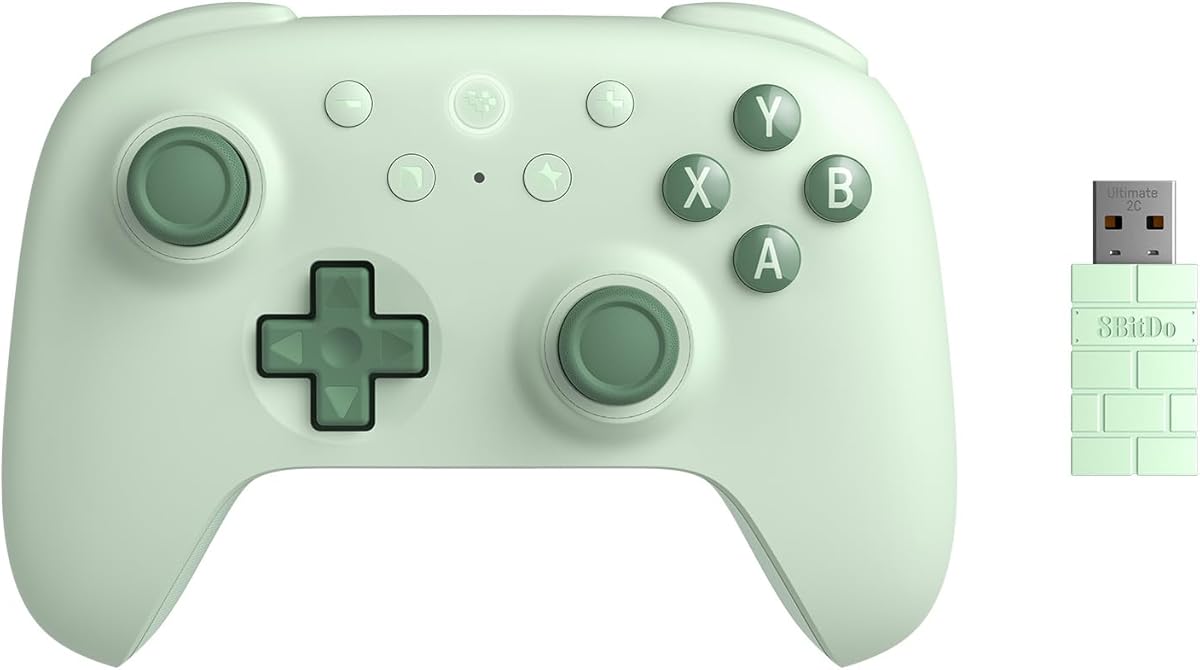

The abxylute C6 offers exceptional value for budget-conscious Mac users seeking reliable wireless performance. It features Hall Effect joysticks that prevent drift, ensuring longevity. With a 1000Hz polling rate, it delivers responsive gameplay suitable for various genres.
We may earn a commission when you buy through this link, at no additional cost to you.
Key strengths include an impressive 18-hour battery life and seamless connectivity across multiple platforms. The controller supports both Bluetooth and wired modes, giving users flexibility. Turbo modes add versatility for rapid actions in competitive titles.
While it lacks a gyroscope on Mac, the precision of the Hall Effect sensors compensates well. Build quality is functional but not premium. For the price, the performance-to-cost ratio is hard to beat in this category.
Buy this if you want a reliable controller without spending much. It is ideal for casual gamers or those needing a secondary controller for travel or backup use during extended sessions.
Hall Effect sensors ensure long-lasting accurate input without physical wear affecting performance over time.
The 600mAh battery supports up to 18 hours of continuous play, reducing frequent recharging needs.
We may earn a commission when you buy through this link, at no additional cost to you.
The AceGamer Aurora II brings upgraded connectivity with a focus on stability. It uses a 2.4G wireless mode that minimizes input lag. Hall Effect joysticks are included to reduce stick drift significantly.
We may earn a commission when you buy through this link, at no additional cost to you.
Its customizable back keys allow players to map shortcuts or combos efficiently. The 1000mAh battery ensures long play sessions without interruption. RGB lighting adds a visual flair that many gamers enjoy during evening play.
However, it is not compatible with Xbox systems, limiting some cross-platform utility. The added weight might fatigue some hands during marathon sessions. Still, the feature set is robust for PC and Switch users.
This controller fits users who prioritize stable wireless connections and extra programmable inputs. It serves well for genres requiring quick reflexes and multiple simultaneous commands.
The upgraded receiver ensures a stable signal with strong anti-interference properties for uninterrupted gaming.
Two additional back buttons let you create custom combos to enhance your competitive gaming experience.
We may earn a commission when you buy through this link, at no additional cost to you.
The 8Bitdo Ultimate 2 stands out with TMR joysticks offering superior sensitivity and durability. It supports a 1000Hz polling rate for ultra-fast response times. The charging dock is a convenient addition for keeping the controller ready.
We may earn a commission when you buy through this link, at no additional cost to you.
Key strengths include the trigger mode switch, allowing customization between linear and tactile inputs. Pro back paddles enhance control for complex moves. Its seamless connection to Apple devices makes it ideal for Mac setups.
The price is higher than average, but the included dock justifies the cost for many. The dock adds bulk for travel, though. This is a premium choice for serious gamers who need reliability.
Invest in this controller if you value precision and convenience. It is best for competitive players or those who want a high-quality dock solution for their home setup.
TMR joysticks provide higher sensitivity and precision compared to traditional Hall Effect sensors.
Switch between linear and non-linear triggers to match the specific needs of different game genres.
We may earn a commission when you buy through this link, at no additional cost to you.
The EasySMX X15 is designed for versatility with three connection modes including Bluetooth and 2.4G wireless. It features Hall Effect joysticks that eliminate drift concerns. The battery life is rated up to 20 hours for extended sessions.
We may earn a commission when you buy through this link, at no additional cost to you.
Switching between PC and Switch modes is quick with a simple button combination. The textured grips provide comfort during long play. However, it lacks a mic jack which limits voice chat options on some devices.
The absence of a gyroscope restricts motion control features on certain platforms. Despite this, it offers a solid build and good battery performance. The RGB lighting adds a nice visual touch to the black casing.
Choose this controller for its battery life and easy mode switching. It fits well for users who play across multiple devices regularly without needing advanced motion features.
The 1000mAh battery supports up to 20 hours of playtime before requiring a recharge.
Press B + Minus + Plus to quickly swap between PC and Switch modes without reconnecting.
We may earn a commission when you buy through this link, at no additional cost to you.
The 8Bitdo SN30 Pro combines a classic retro design with modern Hall Effect joysticks. It is officially supported on Mac, ensuring smooth connectivity. The controller is compact enough to fit easily in a pocket.
We may earn a commission when you buy through this link, at no additional cost to you.
It features 6-Axis gyro motion controls and rumble vibration for immersive feedback. The clickable joysticks and proper D-pad offer tactile precision. Turbo functions help quickly defeat enemies in competitive scenarios.
The lack of back buttons limits complex mapping options. Its smaller form factor might not suit larger hands perfectly. Still, the design nostalgia paired with modern tech makes it a top contender.
Buy this if you appreciate retro style and portability. It is perfect for retro gaming enthusiasts or casual gamers who want a reliable controller on the go.
A classic cross button and shoulder-button layout pays homage to vintage gaming consoles.
Officially compatible with iPhone iPad macOS and Apple TV for seamless integration.
We may earn a commission when you buy through this link, at no additional cost to you.
The SN30 Pro G Classic is an upgraded transparent version of the popular SN30 Pro. It retains all the core features like Hall Effect joysticks and motion controls. The transparent shell adds a unique aesthetic appeal to your desk.
We may earn a commission when you buy through this link, at no additional cost to you.
It connects via Bluetooth or USB-C cable, providing flexibility in usage. The battery life is rated at 16 hours which is decent for daily play. Turbo functions and customizable keys enhance the experience.
Like the standard version, it lacks back buttons and has a smaller form factor. The transparent design might show fingerprints easily over time. It serves well for fans who want a distinctive look.
Select this if you like the retro style but want a unique visual twist. It works perfectly for casual gaming sessions on Mac and other supported platforms.
The transparent design offers a unique look while maintaining the familiar retro control layout.
Supports both Bluetooth wireless and USB-C cable connection for versatile usage.
We may earn a commission when you buy through this link, at no additional cost to you.
The Xbox Wireless Gaming Controller is a standard choice offering broad compatibility. It supports up to 40 hours of wireless play using AA batteries. The textured grip on triggers and bumpers improves control.
We may earn a commission when you buy through this link, at no additional cost to you.
You can connect via Bluetooth or use the included USB-C cable for zero-setup wired play. Custom controls are available via the Xbox Accessories app to remap buttons. This flexibility suits many gaming setups.
Using AA batteries adds ongoing costs compared to built-in rechargeables. The build is heavier which might tire hands over time. Yet, it is a reliable standard for any PC or Mac gamer.
Buy this if you want a proven controller with excellent battery life. It is ideal for users who prefer standard Xbox layout and extensive customization options.
Get up to 40 hours of wireless battery life on standard AA batteries.
Plug in compatible headsets using the 3.5mm audio jack for voice chat.
We may earn a commission when you buy through this link, at no additional cost to you.
The Moonag Wireless PC Controller offers a great mix of budget pricing and advanced features like RGB lighting. It includes Hall Effect joysticks to prevent drift. The 1000Hz polling rate ensures ultra-low latency for competitive games.
We may earn a commission when you buy through this link, at no additional cost to you.
Programmable macro buttons and dual vibration feedback add depth to gameplay. The ergonomic shape fits comfortably in hands for long sessions. Battery life is supported by an 800mAh charge that is solid for casual use.
Build quality feels basic compared to premium models. The RGB effects are fun but may drain battery faster. Still, it offers a strong feature set for the price point available.
Choose this for affordable RGB flair with Hall Effect tech. It fits gamers who want visual effects without spending much on a main controller.
Supports 1000Hz polling rate for ultra-fast response times in wired and wireless modes.
Dynamic RGB lighting around buttons and joysticks creates an immersive gaming look.
We may earn a commission when you buy through this link, at no additional cost to you.
The 8Bitdo Ultimate 2C brings high-end features to a smaller profile. It features Hall Effect joysticks and triggers for durability. The remappable L4/R4 bumpers allow custom mapping without extra software.
We may earn a commission when you buy through this link, at no additional cost to you.
It supports a 1000Hz polling rate ensuring fast response. The design is refined for tactile feel and lightweight comfort. Turbo functions help with rapid actions in action titles.
Compatibility is limited mainly to Windows and Android platforms unlike other Ultimate models. The lack of a dock reduces convenience for charging. Still, it is a strong option for Android users.
Buy this if you need a reliable controller with remappable bumpers at a lower cost. It serves well for mobile gaming on supported devices.
Custom button mapping is available without using software for quick adjustments.
Refined bumpers and D-pad offer a light but tactile feel for precise inputs.
We may earn a commission when you buy through this link, at no additional cost to you.
The Logitech G F310 is a classic wired gamepad that works with many titles. It features a familiar Xbox 360 layout for easy transition. The floating D-pad offers responsive directional changes during gameplay.
We may earn a commission when you buy through this link, at no additional cost to you.
Profiler software allows the gamepad to be programmed for keyboard commands. The six-foot cord provides freedom to sit back from your monitor. It supports old standbys and new titles well.
As a wired controller, it lacks wireless flexibility. It is older tech lacking modern features like gyro. Still, it is a budget-friendly workhorse for basic gaming needs.
Select this if you want a cheap reliable wired controller. It is best for casual users or retro setups where wireless is not required.
Allows the gamepad to be programmed to perform keyboard and mouse commands.
A unique floating D-pad rests on four switches making it responsive to quick changes.
We may earn a commission when you buy through this link, at no additional cost to you.
Selecting the right controller involves several factors beyond just looks. This guide explains what to look for when buying for Mac.
Ensure the controller supports Bluetooth or a compatible dongle for Mac. Some models need a Windows driver which may not work seamlessly.
Check if it offers both wireless and wired modes for flexibility depending on your setup.
Hall Effect joysticks are preferred as they prevent drift caused by physical wear over time. This ensures longevity and consistent precision.
Look for TMR options if you want even higher sensitivity for competitive play.
For wireless models, battery capacity matters. Aim for at least 15 hours to avoid frequent charging interruptions.
Consider rechargeable lithium-ion models for cost savings over AA batteries.
Comfort is vital for long sessions. Check if the controller has textured grips and a balanced weight distribution.
Try to read reviews about hand fatigue to ensure it fits your grip style.
Verify that the controller officially supports macOS or iOS. Some devices only work partially on Mac without full driver support.
Ensure it handles your specific games correctly before purchasing.
Additional features like back buttons or turbo modes can enhance gameplay. Evaluate if you need these for your favorite games.
A charging dock adds convenience but increases overall cost significantly.
Prices vary widely across models. Determine your maximum budget before shopping to narrow down options effectively.
Sometimes paying slightly more gets you a better warranty and build quality.
To start using your controller, connect it via Bluetooth by pressing the pair button. Wait for your Mac to recognize the device automatically.
Clean the controller regularly with a dry cloth to remove dust and oils that build up during gameplay. This helps prevent sticky buttons over time.
Store the device in a cool dry place away from direct sunlight. Avoid dropping it to protect the sensitive internal electronics.
Not all wireless controllers work seamlessly with Mac. Always check for explicit macOS support before buying to ensure you can pair via Bluetooth without needing extra drivers.
Hall Effect joysticks use magnetic sensors instead of physical contacts. This prevents stick drift and extends the lifespan of the controller significantly.
Most modern controllers use USB-C cables for charging. Some premium models come with dedicated charging docks for convenience during long play sessions.
Yes you can use Xbox controllers on Mac via Bluetooth or wired connection. Ensure your Mac version supports the specific controller model for optimal performance.
A good battery life should be at least 15 hours of continuous use. This allows for extended gaming sessions without needing to recharge frequently.
Some models include 6-Axis gyro motion controls for enhanced gameplay. Check product specs carefully if motion sensing is important for your specific games.
We reviewed ten top controllers offering various strengths from budget to premium. Our top picks balance reliability performance and feature sets effectively.
Prioritize joysticks and connectivity for a smooth experience on your Mac. Features like back buttons can add significant value depending on your needs.
Always check current prices and availability before purchasing to ensure you get the best deal for your chosen controller today.