
ASRock B550M-ITX/AC
4.3Editor score
Affordable entry level pricing
Solid AM4 compatibility
Integrated WiFi connectivity
This comprehensive guide compares the top ten ITX motherboards for AMD processors to help you find the perfect compact board for your small form factor PC
Building a compact PC requires careful component selection to ensure performance without sacrificing space. ITX motherboards for AMD offer the perfect balance of power and portability for modern gaming and workstation setups.
We evaluated ten leading models based on power delivery, connectivity options, thermal design, and overall value. Our analysis covers both AM4 and AM5 platforms to suit various processor generations and budget constraints effectively.
Each selection highlights specific strengths like overclocking potential, storage capacity, and wireless connectivity. Please note that availability and pricing fluctuate frequently so always verify current details before making your final purchase decision.
4.3Editor score
4.3Editor score

4.2Editor score
The following table provides a side by side overview of key specifications across all ten selected motherboards to help you quickly identify the model that best fits your specific build requirements and budget.


The ASRock B650I Lightning WiFi stands out as a top contender for builders seeking a reliable AM5 platform in a compact form factor. With a rating of 4.1 stars it offers a balanced mix of performance features and build quality suitable for modern Ryzen processors.
We may earn a commission when you buy through this link, at no additional cost to you.
Its 8+2+1 phase power design ensures stable power delivery even under load which is crucial for high performance Ryzen 9000 series chips. The inclusion of PCIe 5.0 for M.2 storage future proofs your system for faster drive speeds while DDR5 support up to 7200+ OC provides ample memory bandwidth.
While the board lacks extensive RGB headers and a pre installed I/O shield these are minor trade-offs given the price point and feature set. The BIOS Flashback feature is particularly useful for updating firmware without a CPU installed which simplifies initial setup for new builders.
This board is ideal for users who want to leverage the latest AM5 technology without overspending on premium features they may not need. It delivers excellent stability and connectivity making it a solid foundation for both gaming and productivity small form factor builds.
The PCIe 5.0 M.2 slot allows you to utilize next generation NVMe SSDs that offer significantly higher data transfer rates than previous generations.
With premium Dr.MOS components the power delivery system maintains efficiency and reduces heat generation ensuring consistent performance during intensive tasks.
We may earn a commission when you buy through this link, at no additional cost to you.
For users sticking with AM4 processors the GIGABYTE B550I AORUS PRO AX offers exceptional value and performance. Its 4.3 rating reflects user satisfaction with its robust build quality and reliable operation under various workloads.
We may earn a commission when you buy through this link, at no additional cost to you.
The board features an extended VRM heatsink and aluminum backplate that effectively dissipate heat ensuring stable operation even during overclocking sessions. The integrated I/O shield speeds up the build process and adds a professional look to your chassis. Dual M.2 slots provide flexible storage options for those needing speed and capacity.
The lack of DDR5 support is expected given the AM4 socket limitation but the DDR4 memory support remains highly capable for most applications. Limited USB ports might require a hub for users with many peripherals but the included WiFi 6 ensures modern connectivity standards are met.
This board is perfect for builders looking to maximize the potential of existing AM4 CPUs or upgrade within the AM4 ecosystem. Its combination of cooling power delivery and features makes it one of the best ITX options for the platform.
The extended VRM heatsink and backplate design ensures that power components stay cool during extended use preventing thermal throttling.
The included integrated I/O shield eliminates the need to install a separate piece which saves time and reduces installation frustration.
We may earn a commission when you buy through this link, at no additional cost to you.
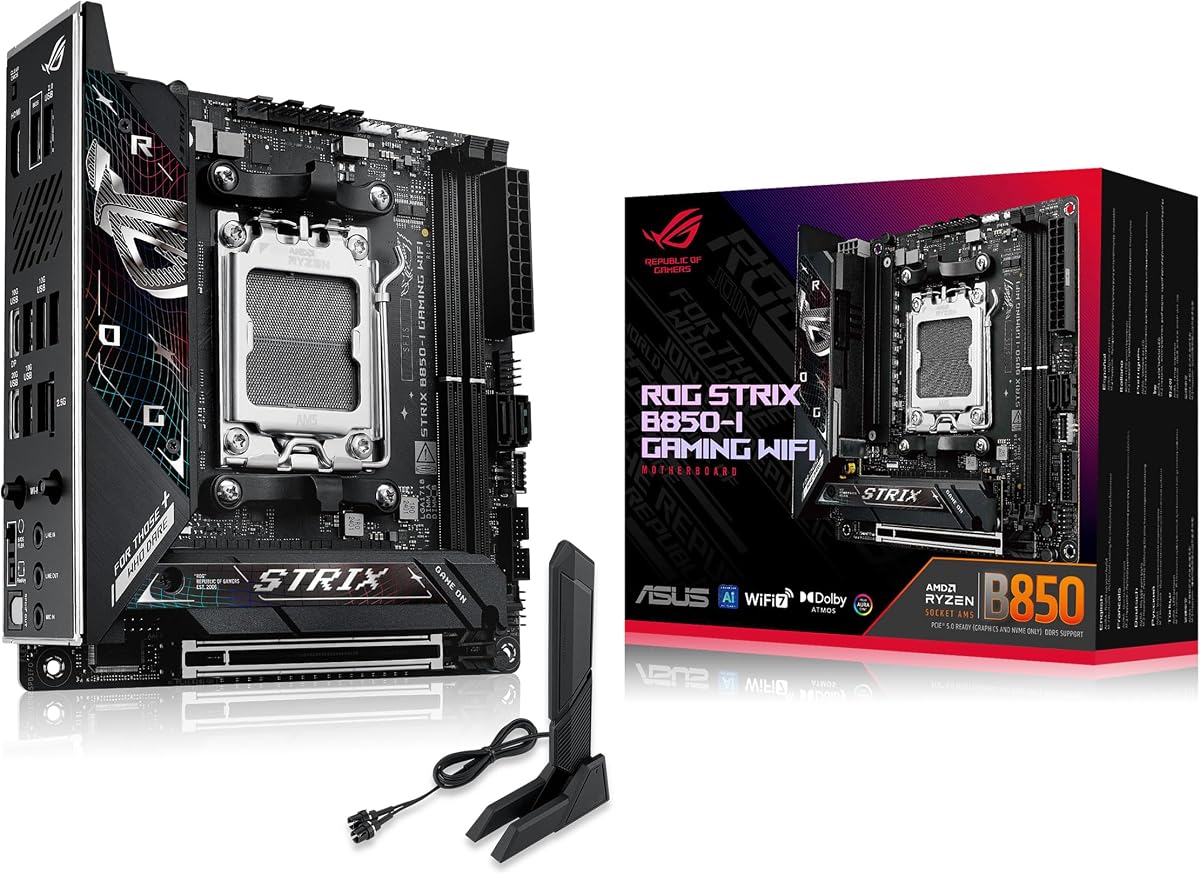
The ASUS ROG Strix B850-I Gaming WiFi pushes the boundaries of what is possible in an ITX form factor with its advanced features and performance capabilities. With a 4.3 rating it appeals to enthusiasts who want the latest technology in a compact package.
We may earn a commission when you buy through this link, at no additional cost to you.
Its 10+2+1 power stage design rated for up to 70A per stage provides ample headroom for high end Ryzen processors. The inclusion of WiFi 7 and two PCIe 5.0 M.2 slots ensures you are prepared for the fastest peripherals available. AI Overclocking simplifies performance tuning for users who might not want to manually adjust settings.
While the price is higher than entry level boards the features justify the cost for those seeking top tier performance. The BIOS interface can be complex for beginners but offers extensive control for experienced users who want to fine tune their system.
This motherboard is best suited for users building a high performance SFF rig who do not want to compromise on connectivity or power. It represents a solid investment for those planning to use next generation Ryzen processors for years to come.
ASUS AI Overclocking and AI Networking tools analyze your system to automatically optimize performance and connection quality for better results.
Dual PCIe 5.0 M.2 slots allow for massive storage capacity with the fastest data transfer speeds currently available on the consumer market.
We may earn a commission when you buy through this link, at no additional cost to you.
The Gigabyte A520I AC is an ideal choice for budget conscious builders who need a reliable AM4 platform without breaking the bank. Its 4.4 rating highlights user satisfaction with its stability and ease of use for basic gaming and productivity tasks.
We may earn a commission when you buy through this link, at no additional cost to you.
Despite its low price it supports Ryzen 5000 series processors providing a good upgrade path for existing AM4 users. The board includes Intel WiFi and Bluetooth which saves cost on dongles and ensures wireless connectivity is available out of the box. Three display interfaces offer flexibility for multi monitor setups.
The limitation to PCIe 3.0 means you will not get the full speed of newer GPUs but for most users the difference is negligible. The power design is sufficient for non overclocking CPUs but might struggle with heavy multi core loads.
This board is perfect for entry level builds or office PCs where cost efficiency is a priority. It offers essential features without unnecessary bloat making it a practical solution for those needing a compact AMD system.
By focusing on essential features the board keeps costs low while still providing necessary connectivity and support for modern Ryzen CPUs.
Three display output options allow you to connect multiple screens for productivity or entertainment without needing additional hardware.
We may earn a commission when you buy through this link, at no additional cost to you.
The MSI MPG B850I Edge TI WiFi is designed for users who demand top tier performance and connectivity in their small form factor systems. A 4.4 rating indicates strong approval from users who value its advanced features and build quality.
We may earn a commission when you buy through this link, at no additional cost to you.
Its support for DDR5 speeds up to 8200+ MT/s allows for extreme memory performance which is beneficial for content creation and gaming. The 5G LAN provides faster network speeds than standard 2.5G options ensuring your system can handle high bandwidth tasks. The premium thermal design keeps components cool under stress.
The price is substantial but reflects the high end components and features included. Limited rear USB ports might require front panel headers for additional devices which can complicate case selection for some users.
This board is recommended for enthusiasts who want the best possible memory and network speeds in an ITX package. It is a premium choice that delivers on performance promises for those willing to invest in top tier hardware.
The Memory Boost technology optimizes signal integrity to allow higher stable overclocking speeds for DDR5 memory modules.
With 5G LAN you get faster download and upload speeds which is ideal for competitive gaming and large file transfers.
We may earn a commission when you buy through this link, at no additional cost to you.
The ASRock B550M-ITX/AC is a great choice for budget builders looking for a reliable AM4 board with essential features. Its 4.3 rating reflects satisfaction with its performance and value proposition for entry level SFF builds.
We may earn a commission when you buy through this link, at no additional cost to you.
It supports Ryzen 5000 series processors allowing for good performance without the cost of higher tier boards. The included AC WiFi ensures you have wireless connectivity without needing extra adapters. The compact layout fits easily into most ITX cases.
The VRM cooling is basic which limits overclocking potential but is adequate for stock operation. The low number of USB ports may require hubs for users with multiple peripherals.
This board is perfect for those building a first SFF PC or upgrading an older system on a budget. It provides a balance of price and performance that meets the needs of most casual users.
The included WiFi module saves you the cost of a separate card and provides reliable wireless access for your system.
Support for Ryzen 5000 series ensures compatibility with modern CPUs that offer strong performance for gaming and work.
We may earn a commission when you buy through this link, at no additional cost to you.
The ASRock A520M-ITX/AC offers the most basic features for users who need a simple and affordable ITX board. A 4.3 rating shows users appreciate its straightforward functionality and ease of use for standard tasks.
We may earn a commission when you buy through this link, at no additional cost to you.
It works well with Ryzen 3000 and 4000 series processors which are still capable for many modern applications. The WiFi module provides essential wireless capabilities and the BIOS is user friendly for beginners. Its small size makes it easy to fit into tight cases.
Limitations include no overclocking support and basic connectivity options which might not suit power users. It is designed for stability and low cost rather than high performance.
This board is best for office PCs or media centers where high performance is not critical. It provides a reliable foundation for users who want to spend the minimum amount necessary for a functional system.
This board is one of the most affordable options available making it accessible for first time builders with limited budgets.
Designed for daily use the board prioritizes stability over advanced features ensuring consistent performance for basic tasks.
We may earn a commission when you buy through this link, at no additional cost to you.
The ASUS ROG STRIX X870-I GAMING WIFI is a flagship ITX board designed for users who demand the highest performance and features. With a 4.2 rating it is highly regarded for its ability to handle demanding workloads and future proof builds.
We may earn a commission when you buy through this link, at no additional cost to you.
It includes USB4 connectivity which allows for ultra fast data transfer and support for high speed displays. The Dynamic OC Switcher and Core Flex technologies allow for precise control over performance and power usage. WiFi 7 ensures you have the latest wireless standards available.
The price is very high which may not be justified for typical users but is excellent for those needing USB4 or advanced tuning. The software suite can be complex and may require learning to maximize the board's potential.
This board is recommended for professional workstations and enthusiasts who need maximum performance in a small case. It offers a complete solution for those who want to build a top tier system without compromising on features.
USB4 ports support data rates up to 40Gbps allowing for rapid transfers with external storage and high resolution displays.
Tools like Dynamic OC Switcher let you adjust performance based on workloads to balance power efficiency and speed effectively.
We may earn a commission when you buy through this link, at no additional cost to you.
The GIGABYTE B850I AORUS PRO offers a strong feature set and a notable five year warranty that provides peace of mind for buyers. Despite a 3.6 rating users appreciate the build quality and modern connectivity options for AM5 platforms.
We may earn a commission when you buy through this link, at no additional cost to you.
It includes PCIe 5.0 and WiFi 7 which keeps it competitive with newer boards on the market. The EZ-Latch features simplify installation and removal of components making maintenance easier. The power phase design supports high performance Ryzen processors effectively.
Some users report software inconsistencies which may impact initial setup experiences. The rating suggests that while hardware is solid support and software need improvement.
This board is good for those who prioritize warranty support and modern connectivity. It offers a balanced option for AM5 users who want reliable hardware with added protection.
A five year warranty offers significant protection against defects which is rare for ITX boards and adds value to the purchase.
The EZ-Latch mechanism allows for quick removal of components without tools which speeds up upgrades and cleaning tasks.
We may earn a commission when you buy through this link, at no additional cost to you.
The GIGABYTE X870I AORUS PRO ICE stands out with its distinctive white aesthetic that appeals to builders prioritizing visual style. With a 3.9 rating it offers solid technical specs but has received mixed feedback on overall experience.
We may earn a commission when you buy through this link, at no additional cost to you.
It features the latest connectivity standards including WiFi 7 and PCIe 5.0 ensuring future readiness. The white color scheme is perfect for custom builds where visual consistency is important. The five year warranty adds reliability to the purchase.
While the look is appealing some users have found the software experience lacking compared to competitors. The price is high which may deter budget focused builders.
This board is best for users who want a stylish board for a white themed build. It provides the necessary performance for high end AMD systems with an attractive design.
The white PCB and components create a cohesive look that is highly desired for custom builds where appearance is a priority.
Despite the aesthetic focus the board includes top tier performance features that ensure it is not just about looks.
We may earn a commission when you buy through this link, at no additional cost to you.
Selecting the right ITX motherboard involves evaluating several critical factors to ensure your small form factor build meets your performance and budget requirements.
Ensure the motherboard supports your chosen AMD processor generation. AM4 boards work with Ryzen 5000 series while AM5 boards support Ryzen 7000 and newer. Check manufacturer compatibility lists before purchasing to avoid mismatched components.
Matching the socket type is essential for your CPU to function correctly and for you to utilize modern features effectively.
Look for a robust VRM design especially if you plan to use high core count processors or overclock. More power phases generally mean better stability and heat distribution under load.
A strong power delivery system ensures your CPU receives clean stable power which is vital for performance and longevity.
DDR5 is standard for AM5 boards offering higher bandwidth while DDR4 is used on AM4. Check supported speeds to ensure your memory will run at optimal performance.
Choosing the right memory type affects overall system responsiveness and multitasking capabilities significantly.
ITX boards usually have limited slots so check M.2 availability. PCIe 5.0 offers future proofing for fast NVMe drives but PCIe 4.0 is often sufficient for current needs.
Sufficient storage slots are crucial for balancing OS and game files without needing external solutions.
Evaluate USB ports WiFi version and LAN speed. Modern boards often include WiFi 7 and 2.5G LAN which are beneficial for high speed wireless and wired connections.
Good connectivity ensures you can easily connect peripherals and maintain fast network speeds.
Compact cases trap heat so effective VRM and M.2 cooling are essential. Heatsinks and thermal pads help dissipate heat to maintain stable performance.
Proper cooling prevents thermal throttling and keeps your system running reliably during intensive use.
Look for durable components like high quality capacitors and reinforced slots. Build quality impacts longevity and resistance to physical stress.
Investing in solid build quality reduces the risk of failure over time.
Check the manufacturer warranty period and support policies. Longer warranties indicate confidence in product durability and provide peace of mind for consumers.
Strong warranty support ensures you are protected if hardware issues arise after purchase.
When installing your motherboard always use an anti static wrist strap and work on a clean non conductive surface. Follow the manufacturer manual to align the board correctly with the case standoffs to prevent short circuits.
Keep the system clean by regularly dusting out vents and fans. Dust accumulation can lead to overheating which may cause instability or hardware failure over time.
Update BIOS regularly to ensure compatibility with new CPUs and fix bugs. Use the BIOS flashback feature if available to update safely without installing a CPU first.
Yes ITX motherboards are excellent for gaming as they support high performance CPUs and GPUs. They save space without compromising on speed for most gaming scenarios. Just ensure your case has good airflow to handle heat.
ITX builds often require more attention to airflow. Use case fans to push cool air in and hot air out. Consider larger tower coolers if your case supports them or high quality AIO solutions to manage CPU heat.
Upgrades depend on the socket and BIOS support. AM4 boards can support Ryzen 5000 with a BIOS update. AM5 boards support newer Ryzen series but check compatibility lists before upgrading.
AM4 uses DDR4 memory and supports older Ryzen CPUs while AM5 uses DDR5 and supports newer Ryzen models. AM5 offers better performance and future proofing but costs more.
ITX boards typically have fewer USB ports than larger boards. Expect around 5 to 10 total depending on the model. Use front panel headers or hubs if you need more connections.
Most modern ITX boards include built in WiFi but some budget models do not. Check the product details to confirm if you need wireless connectivity before buying.
We have explored ten top rated ITX motherboards for AMD ranging from budget options to high end models. Each offers unique strengths tailored to different build needs and performance goals.
Consider your CPU choice required features and budget when making your decision. Prioritize power delivery and thermal design for reliable performance in small cases.
Prices and availability change frequently so verify current details on Amazon before purchasing. Select the model that best balances your specific requirements and long term needs.