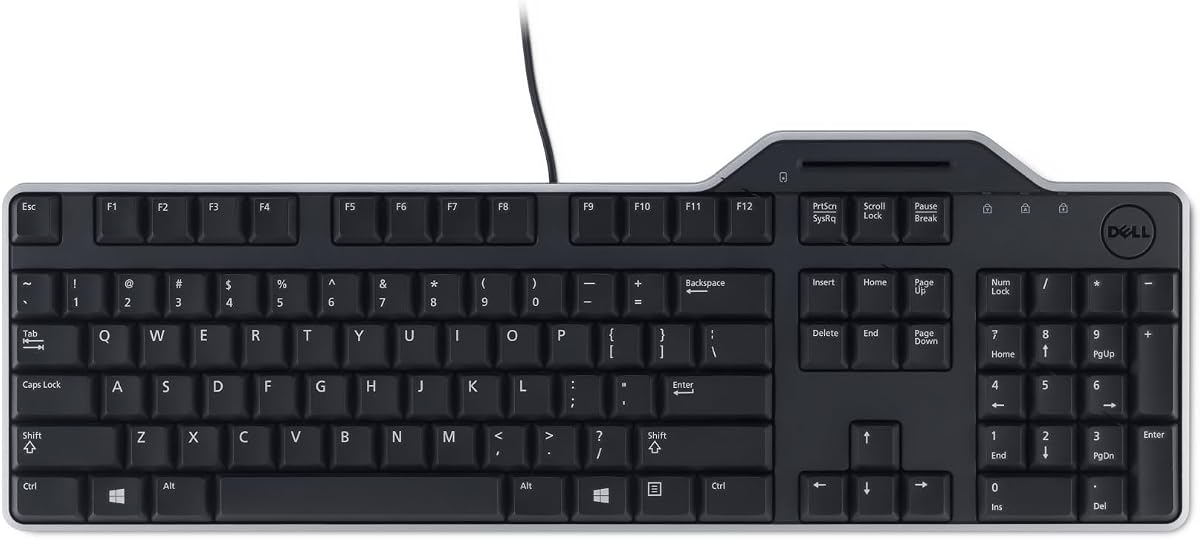
Dell KB813 Black USB
4.6Editor score
Spill-Resistant Design
Detachable Palm Rest
Wired USB Connectivity
This guide compares the top ten keyboards with smart card readers for secure login, banking, and enterprise access, helping you choose the best fit.
Securing your digital workspace requires more than just strong passwords. A keyboard with smart card reader integrates authentication directly into your typing experience. This combination simplifies secure logins while protecting sensitive data from unauthorized access attempts.
We evaluated ten leading models based on compatibility, build quality, and security standards. Our analysis covers government compliant options and budget friendly choices. Each product was selected for its reliability in professional environments like healthcare finance and federal agencies.
Every pick highlights specific strengths such as ergonomic design or mechanical switches. Note that availability and pricing can fluctuate based on market demand. Always verify current specifications before purchasing to ensure compatibility with your existing security infrastructure.
4.6Editor score

4.6Editor score

4.1Editor score
The following table provides a side-by-side overview of the most popular smart card keyboards available today. Compare key specifications and certifications to find the device that matches your security needs and budget constraints.


The Cherry KC 1000 stands out as a top choice for secure environments. It carries FIPS 201 approval which is essential for federal and government use. Users appreciate the secure PIN entry feature that prevents shoulder surfing during authentication.
We may earn a commission when you buy through this link, at no additional cost to you.
Its integrated chip card terminal ensures that sensitive data never leaves the secure module. The keyboard supports multiple protocols including T=0 and T=1 for maximum compatibility. The thin design allows it to fit easily on cluttered desks without taking up much space.
While it lacks extra multimedia keys this trade-off ensures focus on security tasks. The driver support covers Windows MacOS and Linux making it versatile for mixed OS offices. Some users may find the lack of a wrist rest uncomfortable during long shifts.
This keyboard is ideal for organizations prioritizing strict security standards. It balances functionality with compliance in a way few competitors match. If you need a reliable tool for secure logons this model is highly recommended.
Support for T=0 T=1 and S=8 ensures broad compatibility with legacy and modern smart card systems.
The one-handed operation of the smart card module reduces strain and speeds up daily login routines.
We may earn a commission when you buy through this link, at no additional cost to you.
The Dell KB813 offers excellent value for users needing basic smart card functionality. It includes an integrated reader that enhances security without breaking the budget. The spill resistant design protects against accidental liquid spills which is common in busy offices.
We may earn a commission when you buy through this link, at no additional cost to you.
Comfort is a key focus with low profile keys and a detachable palm rest. This setup allows for extended typing sessions without wrist fatigue. The wired USB connection ensures fast and secure data transfers to your Dell system.
While it lacks advanced multimedia keys the simplicity is a benefit for focused work. The quiet operation makes it suitable for open office environments. Some users might prefer more ergonomic customization for very long hours.
This model is perfect for small businesses or home offices seeking reliable security. It combines durability with essential features at a competitive cost. If you need a straightforward solution this keyboard delivers consistent performance.
Water resistant materials protect internal components from common desk accidents and spills.
Low profile keys reduce finger travel distance for faster and quieter typing sessions.
We may earn a commission when you buy through this link, at no additional cost to you.
The Adesso TruForm is designed for agencies requiring TAA compliance. Its split ergonomic design promotes natural hand positioning to reduce strain. The built-in smart card reader supports secure logon and web applications seamlessly.
We may earn a commission when you buy through this link, at no additional cost to you.
Users benefit from dedicated internet and multimedia hotkeys for quick access. The integrated palm rest helps maintain proper posture during long shifts. Membrane key switches provide a quiet and comfortable typing experience.
The premium price reflects its specialized compliance and ergonomic features. While setup might take time the long-term health benefits are significant. Some users may find the split layout adjustment period challenging initially.
This keyboard is ideal for federal contractors and health organizations. It balances security requirements with user comfort effectively. For environments demanding strict compliance this model offers a robust solution.
Designed specifically for GSA sales and government agencies requiring US Trade Agreement Act specifications.
Split zones and gentle slopes minimize wrist strain and improve posture during extended use.
We may earn a commission when you buy through this link, at no additional cost to you.
The Adesso EasyTouch 130SB brings mechanical durability to secure environments. Red switches offer silent tactile feedback rated for fifty million keystrokes. It includes a dedicated Copilot AI hotkey for instant assistant access.
We may earn a commission when you buy through this link, at no additional cost to you.
Security is certified to EMV 4.0 and FIPS 201 standards ensuring broad interoperability. The large print keycaps improve visibility for users with vision needs. This design helps reduce errors during critical data entry tasks.
While mechanical keyboards often cost more this model justifies the price with longevity. Some users may find the extra hotkey setup complex initially. It is a solid choice for those who prefer tactile feedback.
This keyboard suits users needing both precision and security features. The AI integration adds a modern touch to traditional secure work. For office workers seeking speed and safety this device is a strong option.
Red mechanical switches withstand fifty million keystrokes ensuring years of reliable performance in busy offices.
A single Copilot hotkey provides quick access to creative suggestions without leaving your workflow.
We may earn a commission when you buy through this link, at no additional cost to you.
The Dell Keyboard Smartcard USB focuses on reliable performance and simplicity. Wired USB connectivity ensures secure fast data transfers without battery issues. A spill resistant keyboard protects against inevitable beverage mishaps in the office.
We may earn a commission when you buy through this link, at no additional cost to you.
Comfort is ensured through low profile keys and a detachable palm rest. The quiet typing experience reduces distractions for those in shared workspaces. It supports a full size layout with easy access to all standard keys.
While it lacks modern smart features its stability is a major plus for users. Some may miss extra media keys found on other models. The design prioritizes function over flair for professional use.
Ideal for general office staff needing basic smart card support. It offers a balance of comfort and security at a reasonable price. If you value dependability this keyboard delivers consistent results every day.
Reliable wired connection eliminates battery dependency and ensures fast secure data communication.
Spill resistant design safeguards internal electronics from accidental liquid damage effectively.
We may earn a commission when you buy through this link, at no additional cost to you.
The Kensington KB201C is built for organizations requiring CAC authentication. It meets TAA standards making it ready for US Federal Government institutions. The reader ensures secure efficient access compliant with FIPS 201 standards.
We may earn a commission when you buy through this link, at no additional cost to you.
A full size layout with numeric keypad facilitates faster data entry for professionals. Quiet click keys maintain focus without disturbing colleagues in shared spaces. The three year limited warranty offers peace of mind for enterprise buyers.
While user ratings are lower the compliance features are critical for specific sectors. Some users might find the click sound less smooth than silent keys. It is a specialized tool for strict regulatory environments.
This keyboard is perfect for government contractors and secure facilities. It balances security compliance with standard productivity tools. For agencies needing certified access this model is a necessary investment.
Compliance with PC/SC and USB CCID ensures reliable authentication across various secure systems.
Full numeric keypad and quiet keys support efficient data entry without office disruptions.
We may earn a commission when you buy through this link, at no additional cost to you.
The Lenovo Smartcard Wired Keyboard II provides a straightforward secure solution. It features a US English layout suitable for standard office work. The compact design saves desk space while maintaining essential functionality for smart cards.
We may earn a commission when you buy through this link, at no additional cost to you.
Wired connectivity ensures stable performance without battery dependency. Users appreciate the durable build quality for daily heavy use. The simple setup process gets you up and running quickly.
While it lacks advanced ergonomic features the value is competitive. Some users may need an external wrist rest for long sessions. It is a no fuss option for basic authentication needs.
This keyboard is ideal for budget conscious businesses seeking reliability. It delivers core smart card functionality without unnecessary extras. For standard desktop setups this model offers consistent performance.
Compact form factor leaves more room for documents and peripherals on crowded desks.
Wired USB connection ensures stable data transfer without wireless interference or batteries.
We may earn a commission when you buy through this link, at no additional cost to you.
The HP USB Business Slim Smartcard keyboard prioritizes a clean professional look. Its slim profile fits easily into modern office setups. The built-in spill drain system helps manage accidental liquid spills effectively.
We may earn a commission when you buy through this link, at no additional cost to you.
Key light indicators provide clear status visibility during use. Membrane keys offer a quiet typing experience suitable for shared environments. The USB interface ensures compatibility with standard business systems.
While it lacks a wrist rest the slim design appeals to minimalists. Some users may want more ergonomic support for long work hours. The spill drain is a thoughtful addition for busy workspaces.
This keyboard is well suited for corporate offices needing reliable security. It balances style and function without sacrificing essential features. For those valuing a tidy desk this model is an excellent choice.
Built-in drain channels divert fluids away from internal electronics to prevent damage.
Key light indicators clearly show system status for easier user monitoring.
We may earn a commission when you buy through this link, at no additional cost to you.
The Cherry Secure Board 1.0 is designed for high security environments. It supports both smart cards and NFC tags for flexible authentication. Secure mode with authentication and encryption protects data particularly with thin clients.
We may earn a commission when you buy through this link, at no additional cost to you.
PC/SC smart card reader ensures compliance with industry standards. GS approval adds a layer of trust for critical infrastructure use. The QWERTY layout supports standard productivity tasks alongside security functions.
While setup can be complex the security benefits are substantial. Some users may find the feature set overwhelming for basic needs. It is a professional tool for highly sensitive data protection.
This keyboard is best for organizations handling critical or classified data. The NFC and encryption features provide robust protection against unauthorized access. For security first environments this model is a top contender.
Support for NFC tags allows multiple ways to verify identity beyond physical cards.
Secure mode ensures data is encrypted before transmission for enhanced privacy.
We may earn a commission when you buy through this link, at no additional cost to you.
The NEW OEM Dell KB813t offers a reliable standard for secure typing. It arrives in unopened condition ensuring quality and protection. The USB English keyboard supports basic smart card reader functions effectively.
We may earn a commission when you buy through this link, at no additional cost to you.
Compatible with Dell systems this keyboard provides seamless integration. The black design fits professional environments with a modern look. Wired connection ensures stable performance during critical security tasks.
While it is a basic model the OEM quality is consistent. Users may find it lacks modern multimedia features found in other devices. It serves well for standard authentication requirements.
This keyboard is perfect for IT departments needing direct replacements. It offers proven reliability for Dell environments without extra complexity. For straightforward security needs this model is a safe choice.
Designed specifically for Dell systems ensuring plug-and-play setup without driver issues.
New unopened condition ensures you receive a pristine unit ready for deployment.
We may earn a commission when you buy through this link, at no additional cost to you.
Choosing the right smart card keyboard requires balancing security compliance with ergonomic comfort. These factors ensure your device meets organizational standards while supporting daily productivity without discomfort.
Look for FIPS 201 and PC/SC compliance which are essential for government and enterprise use. These certifications guarantee the smart card reader meets rigorous security standards for authentication and data protection. Without these certifications you may face issues integrating with secure systems.
Prioritize models with verified security standards to ensure long-term compliance with organizational policies.
Smart card keyboards are often used for long periods so ergonomic features matter. Look for split layouts or attached wrist rests to reduce strain on your wrists and forearms. A comfortable keyboard reduces fatigue and improves productivity over time.
Choose a keyboard with ergonomic features that match your workspace layout and typing habits.
Ensure the keyboard supports your operating system whether Windows MacOS or Linux. Check driver availability to avoid installation headaches in busy IT environments. Cross platform support ensures flexibility across different user groups.
Always verify OS compatibility before purchasing to guarantee smooth integration with your current setup.
Business environments demand durable construction that withstands daily heavy use. Look for spill resistant designs or sealed keyboards to protect against accidents. A robust build ensures the device lasts longer reducing replacement costs.
Invest in keyboards with durable materials to protect your investment against wear and accidental spills.
Standard 104 key layouts provide access to all necessary functions including numpads. Consider if you need extra multimedia keys or specific hotkeys for productivity. A well organized layout speeds up workflow and reduces confusion.
Select a layout that supports your daily tasks without requiring unnecessary key combinations.
Wired USB connections offer stable and secure performance without battery concerns. Wireless options exist but require management and may face interference issues. For secure logons wired options are often preferred for reliability.
Prioritize wired connections for secure tasks to ensure consistent performance without battery interruptions.
A solid warranty protects your purchase against defects and early failures. Look for manufacturers offering at least one year coverage for peace of mind. Good support ensures you can resolve issues quickly if they arise.
Check warranty terms carefully to ensure you are covered for the expected lifespan of the device.
Smart card keyboards range from budget models to premium enterprise solutions. Decide if your needs require advanced compliance features or basic functionality. Balancing cost with required features ensures value for your organization.
Set a clear budget based on necessary security features to avoid overspending on unneeded extras.
Connect the keyboard securely to your system via USB before inserting any cards. Ensure drivers are installed if required by your operating system to recognize the smart card reader properly. Test the connection by inserting a valid card and checking for authentication success.
Keep the card slot clean by avoiding dust and debris buildup over time. Use compressed air gently to clear any obstructions that might interfere with card insertion. Regular cleaning helps maintain consistent reading performance without damage to internal components.
Store the keyboard in a dry environment away from direct sunlight and moisture. If not in use for long periods unplug the device to prevent potential electrical issues. Following these steps will extend the life of your smart card keyboard significantly.
A smart card reader keyboard integrates a secure card slot directly into the keyboard device. It allows users to authenticate securely by inserting a smart card during login. This setup simplifies secure access without requiring separate external hardware.
Many models support MacOS but check specific driver availability before purchasing. Some require additional software to recognize the card reader on Apple systems. Always verify OS compatibility lists provided by the manufacturer.
Most operating systems include basic drivers but some cards require additional software. Your organization may provide specific tools for authentication protocols. Always consult your IT department for required software setup.
Use compressed air to gently remove dust without inserting sharp objects. Avoid using liquids directly on the keyboard to prevent internal damage. Clean regularly to ensure reliable card insertion and reading.
Yes many models are FIPS 201 approved for use with government smart cards. Always verify specific certifications to ensure they meet federal or agency requirements. Compliance ensures the device works with official authentication systems.
Check connections and drivers first to rule out simple setup issues. Restarting the system may resolve temporary recognition problems. If issues persist contact the manufacturer support or use a backup device.
We have reviewed ten top options ranging from budget to premium secure models. The Cherry KC 1000 stands out for compliance while the Dell KB813 offers great value. Each pick balances security features with usability for diverse work environments.
Prioritize compatibility and certifications to ensure the keyboard meets your specific security needs. Consider ergonomic features if you plan to use the device for long hours daily. Your choice should support both efficiency and safety effectively.
Remember that pricing and availability can change over time. Always check current product pages before finalizing your purchase. Staying informed ensures you get the best deal for your specific requirements.