
Razer BlackWidow V4 Low Profile HyperSpeed Wireless Gaming Keyboard
4.2Editor score
Low profile green switches
980 hour battery life
Aluminum top case build
This guide compares the top low profile mechanical keyboards for fast paced games, evaluating speed, build, and features to help gamers find their perfect
Finding the right low profile mechanical keyboard for fast paced games requires balancing speed with comfort. These keyboards offer shorter key travel and rapid actuation points to help you react instantly during intense matches. They also reduce wrist strain over long gaming sessions compared to standard full-height mechanical keyboards.
We compared ten real products based on switch type, connectivity options, build quality, and customization features. Our analysis focuses on how each model performs under pressure during competitive gaming and daily use. We looked at user feedback and technical specifications to ensure every recommendation delivers genuine value for gamers seeking precision and speed.
Each pick below shows detailed strengths, trade-offs, and specific use cases to match your setup. Prices and availability change frequently so always check current listings before making your final decision. This guide helps you narrow down options quickly so you can focus on improving your gameplay instead of hunting for hardware.
4.2Editor score

4.7Editor score

4.6Editor score
This table offers a side-by-side comparison of all ten low profile mechanical keyboards evaluated in this guide. Each row highlights critical specifications such as switch type, connectivity, layout size, and unique features to help you compare models at a glance.




The Keychron K1 Ultra 8K stands out as a top-tier option for gamers who demand raw speed and flexibility. With a rare 8K polling rate in wired mode, this keyboard delivers input feedback faster than almost any consumer peripheral on the market today. Its low-profile POM switches provide a satisfying tactile experience without the bulk of traditional mechanical keyboards.
We may earn a commission when you buy through this link, at no additional cost to you.
Key features like hot-swappable sockets allow you to experiment with different switch types without soldering. The tri-mode connectivity lets you switch between 2.4GHz wireless, Bluetooth 5.2, and wired USB-C seamlessly. Built-in sound-dampening layers ensure that even during intense gaming sessions, keystrokes remain crisp and quiet.
One trade-off is the complexity of ZMK firmware which requires some technical know-how to fully customize. However the Launcher Web App simplifies much of this process for average users. The inclusion of a programmable knob adds utility beyond standard gaming keys which is rare in this category.
If you prioritize speed and customization above all else this keyboard is worth the investment. It serves both competitive gamers and power users who need a versatile input device for work and play alike.
The 8K polling rate ensures your inputs are registered by your PC eight thousand times per second in wired mode. This reduces latency to near zero during wired sessions which is critical for competitive fast-paced titles where milliseconds matter.
Switch between devices effortlessly using the tri-mode system. Whether you need low-latency gaming via 2.4GHz wireless or seamless multitasking across multiple devices via Bluetooth this keyboard adapts to your workflow without missing a beat.
We may earn a commission when you buy through this link, at no additional cost to you.
The Razer BlackWidow V4 Low Profile brings premium build quality and exceptional battery life to the gaming world. Its Low Profile Green Mechanical Switches offer a satisfying tactile bump with a 1.2mm actuation point which balances precision with speed. The wireless performance is excellent thanks to HyperSpeed technology that rivals wired connections for lag-free play.
We may earn a commission when you buy through this link, at no additional cost to you.
Battery life is a standout feature lasting up to 980 hours on a single charge in power-saving mode. This means you can game for weeks without hunting for a cable. The aluminum top case adds durability and a premium feel while stabilizing the keyboard during intense use.
While the keyboard is heavier than some competitors that added weight contributes to its stable and premium feel. The price point is high but justified by the materials and features. This is a top choice for users who value wireless freedom and long-term durability.
Ideal for gamers who want a wireless keyboard that performs like a wired one without compromises on build or battery life. It is perfect for desk setups where aesthetics and longevity are prioritized over ultra-lightweight portability.
With up to 980 hours of battery life this keyboard reduces the hassle of frequent charging. You can focus on gameplay for extended periods without worrying about running out of power mid-session.
The Low Profile Green Mechanical Switches deliver a satisfying tactile feedback that mimics traditional mechanical feel but with faster actuation. This helps gamers register inputs quickly while maintaining the satisfying click they love.
We may earn a commission when you buy through this link, at no additional cost to you.
The Ranked G65 Guardian offers exceptional value for gamers seeking a hot-swappable low-profile keyboard. At its price point it delivers an aluminum frame which is rare in budget keyboards. The 65 percent layout saves desk space while keeping essential keys accessible for daily gaming and work.
We may earn a commission when you buy through this link, at no additional cost to you.
Its hot-swap capability lets you change switches easily using included tools. This means you can customize the keyboard's feel over time as your preferences evolve. Pre-lubed stabilizers ensure a clean typing experience with minimal rattle right out of the box.
The main compromise is that software is basic compared to high-end competitors. Some users may need to remap keys manually for specific setups. However the hardware quality and customization potential far outweigh these minor limitations for most users.
This keyboard is perfect for enthusiasts on a budget who want to experiment with low-profile switches without spending a fortune. It is an ideal entry point into the world of hot-swappable mechanical keyboards.
Hot-swap sockets let you upgrade or change switches instantly without soldering. This flexibility is usually found only in premium keyboards making this budget option highly versatile for experimenting with different typing feels.
The 65 percent layout retains arrow keys and essential function keys while removing the numpad. This frees up mouse space for low-sensitivity gaming which is critical for fast-paced titles requiring precise cursor movements.
We may earn a commission when you buy through this link, at no additional cost to you.
The Redragon K618 PRO offers a compelling combination of low-profile design and tri-mode connectivity at a budget-friendly price. It connects via USB-C, Bluetooth, and 2.4GHz wireless allowing you to jump between devices without re-pairing. This flexibility suits users who work across PC laptop and tablet.
We may earn a commission when you buy through this link, at no additional cost to you.
Its slim design reduces travel distance for faster actuation which helps during rapid gaming inputs. The dedicated macro zone adds utility without needing complex software setup. It is a practical choice for casual gamers who want speed without paying a premium.
Build materials are mostly plastic which feels less sturdy than aluminum rivals. Software is also basic limiting deep customization options. However for the price these trade-offs are acceptable for users prioritizing convenience and speed over premium aesthetics.
This keyboard is a strong contender for budget-conscious gamers who need multi-device support. It delivers essential low-profile performance without forcing you to stretch your wallet too far.
Tri-mode connectivity allows instant switching between PC laptop and tablet without re-pairing. This seamless workflow makes it easy to use one keyboard across multiple systems without interruptions.
The dedicated 4×5 macro zone lets you record combos without software. This simplifies setup for games requiring complex key bindings making it accessible even for non-technical users.
We may earn a commission when you buy through this link, at no additional cost to you.
The Keychron K5 Version 2 brings professional-grade QMK firmware to a low-profile wireless form factor. It offers a full 100 percent layout so you retain the numpad while enjoying shorter key travel. Bluetooth 5.2 ensures stable wireless connections across up to three devices.
We may earn a commission when you buy through this link, at no additional cost to you.
Acoustic foam layers dampen ping and noise making this one of the quietest options available. The 2000 mAh battery provides up to 105 hours of use which supports long sessions without interruption. This makes it ideal for office gamers who need a silent and efficient tool.
Full layout size may not fit smaller desks but the productivity benefits are clear for data-heavy tasks. QMK requires some learning but offers unmatched control over key mappings. For power users this trade-off is well worth the flexibility gained.
Choose this model if you need a quiet full-size low-profile keyboard with deep customization. It is a workhorse for gamers who also work long hours and value a silent environment.
Layered acoustic foams dampen sound to reduce noise during late-night gaming. This helps avoid disturbing others while maintaining a responsive and precise typing experience.
Open-source QMK firmware allows deep customization of layers macros and shortcuts. You can tailor the keyboard to match any workflow making it adaptable for complex gaming and productivity tasks.
We may earn a commission when you buy through this link, at no additional cost to you.
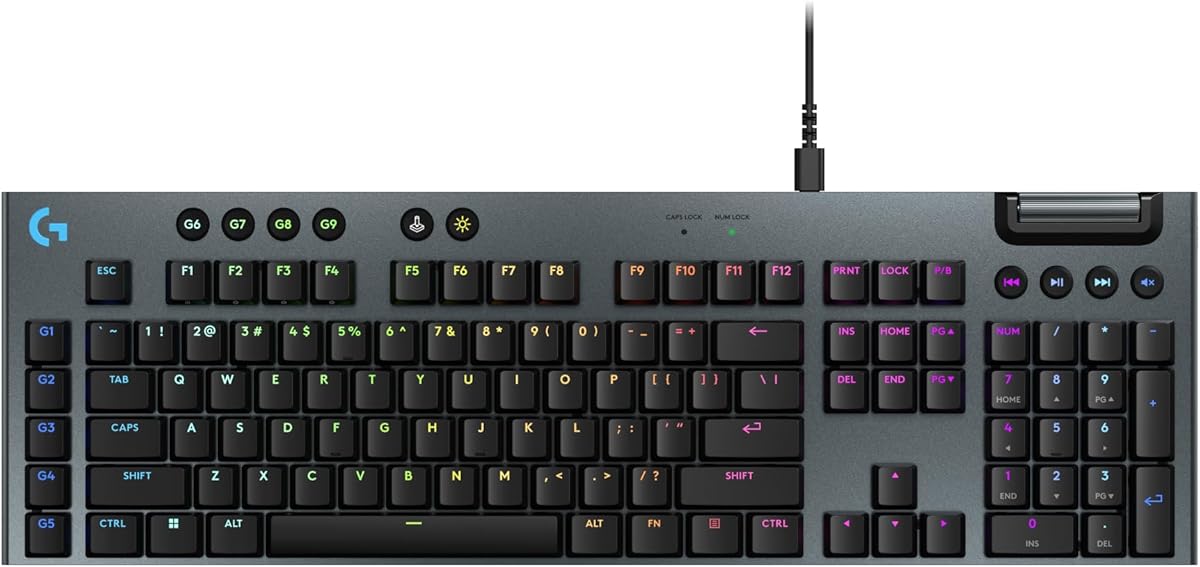
The Logitech G915 X Wired is engineered for pure gaming speed with a 1.3mm actuation point that registers keystrokes almost instantly. Its low-profile GL mechanical switches are designed specifically for reducing latency during competitive matches. The sand-blasted aluminum top plate adds durability while keeping the overall height low.
We may earn a commission when you buy through this link, at no additional cost to you.
LIGHTSYNC RGB allows extensive customization of lighting effects synced with other Logitech gear. The volume roller and media controls make it easy to adjust audio without interrupting gameplay. Double-shot PBT keycaps ensure legends remain visible even after thousands of hours of use.
As a wired-only model it lacks the flexibility of wireless options which may limit setup choices. The price is also high compared to rivals offering similar features. However for users prioritizing speed and build quality this model delivers reliable performance.
Best suited for competitive gamers who prefer wired stability over wireless freedom. Its precision and durability make it a top choice for esports environments where reliability is paramount.
With a 1.3mm actuation point this keyboard registers inputs faster than standard mechanical keyboards. This speed advantage can translate to quicker reactions during high-pressure gaming moments.
Sand-blasted aluminum and double-shot PBT keycaps ensure longevity and a high-end feel. These materials resist wear and maintain a pristine appearance over years of daily use.
We may earn a commission when you buy through this link, at no additional cost to you.
The Keychron K3 Version 2 offers a compact 75 percent layout that balances space-saving with full functionality. It retains arrow keys and essential modifiers while removing the numpad for desk space. Its aluminum body is lightweight making it easy to transport or reposition frequently.
We may earn a commission when you buy through this link, at no additional cost to you.
QMK firmware support allows deep customization similar to the K5 model. Bluetooth 5.1 connectivity ensures stable connections across multiple devices. Extra keycaps for Mac and Windows are included simplifying OS transitions for travelers or multi-device users.
The lack of a numpad may inconvenience data-entry users but most gamers will appreciate the space savings. Some may note Bluetooth 5.1 is slightly older than 5.2 but performance remains solid for most applications.
Ideal for users who need a portable low-profile keyboard without sacrificing key functionality. It is perfect for travelers or small desk setups where space is at a premium.
The 75 percent layout and lightweight aluminum frame make this keyboard easy to carry. You can take it to cafes or shared workspaces without adding bulk to your bag.
Included extra keycaps allow seamless transitions between Mac and Windows. This dual-OS compatibility ensures you do not lose access to essential shortcuts regardless of which system you are using.
We may earn a commission when you buy through this link, at no additional cost to you.
The Razer Ornata V3 uses Mecha-Membrane switches that blend mechanical click with membrane softness. This hybrid design reduces noise while maintaining tactile feedback which many users find comfortable for long sessions. The included magnetic wrist rest provides ergonomic support essential for extended gaming marathons.
We may earn a commission when you buy through this link, at no additional cost to you.
UV-coated keycaps resist wear and fading better than standard ABS plastics. The keyboard features dedicated media keys allowing instant control over audio playback without switching screens. It is a practical full-size option for users seeking comfort and durability.
Non-mechanical switches may disappoint purists looking for distinct mechanical feel. The lack of wireless connectivity limits flexibility for clean desk setups. However for casual users these compromises are minor compared to the comfort offered.
Choose this keyboard if you prioritize comfort and ergonomics over extreme speed. It is ideal for users who type and game for long hours and need wrist support.
The soft-touch magnetic wrist rest provides essential comfort during long sessions. This reduces strain on your wrists which is vital for maintaining peak performance over hours of use.
UV-coated keycaps ensure legends remain crisp even after years of use. This durability makes the keyboard a long-term investment for daily gaming and typing tasks.
We may earn a commission when you buy through this link, at no additional cost to you.
The Razer Ornata V3 TKL offers the same comfortable Mecha-Membrane switches as its full-size sibling but in a space-saving tenkeyless format. This layout improves mouse space for low-sensitivity gaming. Chroma RGB lighting allows customization to match your desk setup visually.
We may earn a commission when you buy through this link, at no additional cost to you.
Snap Tap technology prioritizes the latest input between assigned keys enhancing in-game movement responsiveness. The included wrist rest ensures ergonomic support during extended sessions. It is a practical choice for gamers who want comfort without taking up too much desk real estate.
The lack of a numpad is a limitation for productivity users needing number entry. Wired-only connectivity may be restrictive for wireless setups. But for gamers prioritizing space and comfort this model delivers solid performance.
Best for users who need a compact and comfortable keyboard for gaming. It balances ergonomic design with essential gaming features for a well-rounded experience.
Snap Tap technology allows smoother and faster in-game movement by prioritizing recent key inputs. This feature can improve responsiveness during high-speed gameplay moments.
The TKL design removes the numpad to free up space for mouse movement. This makes it easier to use low-sensitivity aiming styles common in fast-paced competitive games.
We may earn a commission when you buy through this link, at no additional cost to you.
The Cherry MX 10.0N is designed for pure speed using genuine MX Low Profile Speed switches. These linear switches are quiet and responsive making them ideal for rapid input sequences. The aluminum housing adds durability while keeping the profile slim at just 0.87 inches.
We may earn a commission when you buy through this link, at no additional cost to you.
Its integrated stand bar allows you to adjust the typing angle for better ergonomics. RGB backlighting is customizable though options are simpler compared to software-driven rivals. This keyboard prioritizes raw performance and build quality over advanced features.
The price point is high relative to feature count which may deter budget users. RGB control lacks advanced software customization. However for users seeking authentic MX speed in a low-profile form this model is unmatched.
Ideal for competitive players who want the fastest linear switches available. It delivers premium reliability and speed without unnecessary distractions.
Genuine MX Low Profile Speed switches offer the fastest linear response in the market. This ensures your inputs register as quickly as possible for peak gaming performance.
A sturdy aluminum housing ensures durability and a premium feel. This solid build resists flexing even during intense keystrokes providing consistent feedback over time.
We may earn a commission when you buy through this link, at no additional cost to you.
Choosing the right low profile mechanical keyboard involves evaluating switch speed, connectivity, layout, and build quality. This guide helps you identify which factors matter most for your specific gaming needs.
Switch type determines speed and feel. Low profile switches have shorter travel distances which reduce the time between pressing a key and registering it. Linear switches are quiet and smooth while tactile options provide feedback. For fast-paced games linear switches often win for raw speed.
Prioritize actuation points under 2mm for fastest response. Tactile feedback is acceptable if it helps avoid accidental presses but speed remains priority.
Polling rate measures how often the keyboard sends data to your PC. Higher rates like 1000Hz or 8K polling reduce latency significantly. Competitive gamers benefit from higher polling rates for smoother input registration during critical moments.
Look for keyboards offering at least 1000Hz polling. Higher rates are a plus for wired setups where bandwidth supports them.
Wireless vs wired depends on your setup priorities. Wired offers zero latency but limits cable management. Wireless provides flexibility but ensure it uses 2.4GHz not Bluetooth for gaming. Dual-mode options give you the best of both worlds.
Choose wired for tournament play and wireless for clean desks. Verify low-latency claims before buying wireless models.
Full-size keyboards offer numpads but take up space. TKL and compact layouts free up mouse space for better aiming. Consider your desk size and whether you need the numpad for productivity.
Smaller layouts benefit competitive gamers. Ensure arrow keys and modifiers remain accessible regardless of size.
Aluminum frames add durability and reduce flex compared to plastic. Keycaps should be PBT or double-shot to resist wear. A sturdy build ensures consistent key feel over thousands of hours of use.
Invest in keyboards with solid tops and premium caps. Durability saves money long-term and maintains performance.
QMK or ZMK firmware offers deep customization for remapping keys and macros. Proprietary software varies in quality and flexibility. Choose models with open-source options if you want total control.
Ensure software supports your OS and offers layering. Remapping flexibility is vital for complex game bindings.
Wireless models need strong battery life to avoid interruptions during long sessions. Aim for keyboards lasting 50+ hours at standard brightness. Power-saving modes can extend runtime further for casual users.
Check charging time and method too. USB-C charging is standard now and ensures you stay powered quickly.
Ergonomics include wrist rest quality and keycap height. Low profiles reduce finger strain over time. Wrist rests prevent wrist fatigue during marathon sessions.
Look for soft-touch rests and low-profile keycaps. Comfort is as important as speed for long gaming hours.
Always start by cleaning your hands before use to prevent oil buildup on keycaps. Dust and debris can get trapped under low-profile switches reducing performance. Use a compressed air canister regularly to blow out particles from around keycaps.
For wireless models keep the USB receiver close to your device to reduce signal loss. Pair devices in a consistent order to avoid confusion when switching modes. Charge the battery before it drops too low to prevent sudden shutdowns during play.
If your keyboard supports hot-swapping, change switches slowly to avoid bending pins. Use the provided tools and keep them in the case for future upgrades. Lubricate stabilizers periodically to maintain smoothness.
Yes they are faster due to shorter travel distances and lower actuation points. This means your fingers move less before registering a keystroke. This reduced physical time adds up during rapid key combinations common in gaming.
Many modern low-profile keyboards support multi-device switching via Bluetooth or 2.4GHz dongles. You can pair with up to three devices and toggle between them using dedicated keys. This makes multitasking across PC tablet and phone seamless.
Most low-profile mechanical keyboards support Mac and Windows. They include dual OS keycaps or software to remap keys for macOS. Check specific model descriptions to ensure full compatibility with your operating system.
Wireless gaming keyboards using 2.4GHz wireless are nearly lag-free comparable to wired connections. Bluetooth may have slightly higher latency and is better suited for typing. Always use the 2.4GHz mode for competitive gaming to minimize delay.
Quality low-profile switches typically last 50 million keystrokes or more. This equals years of heavy use without failure. Brands like Razer Cherry and Keychron use durable materials to ensure longevity over time.
Some low-profile keyboards like the Keychron K1 and Ranked G65 support hot-swapping. This lets you replace switches without soldering. Check product specifications before buying if you want customization flexibility.
These ten models offer excellent choices for gamers seeking speed and comfort. The Keychron K1 Ultra 8K leads with its unmatched polling rate and versatility. Razer's BlackWidow V4 delivers premium wireless performance while Ranked G65 offers budget-friendly customization.
Prioritize switch type and connectivity based on your play style. If you value raw speed go for wired models with low actuation points. If you need flexibility choose wireless with strong battery life and reliable 2.4GHz connections.
Check current availability and pricing since these values fluctuate. Read detailed reviews to ensure the model matches your specific desk setup. With the right low-profile keyboard you can enhance both performance and comfort during intense gaming sessions.