
SteelSeries Prime
4.3Editor score
Lightweight 69 gram design
Magnetic optical switches
TrueMove Pro sensor
RGB lighting support
Discover the top Mice for Aim in Esports and FPS Gaming by comparing sensors, weights, and features to find the perfect tool for competitive play.
Finding the right gear can transform your gameplay experience significantly. A quality mouse offers precision and comfort for intense sessions. We review top models tailored for esports athletes and casual players seeking peak performance today.
We evaluated each option based on sensor accuracy, weight distribution, and build quality. Our comparison includes wired and wireless designs suitable for various grip styles. This list helps you navigate the vast market of competitive gaming peripherals easily.
Each selection highlights key strengths and potential trade-offs for different needs. You will see detailed specs and real-world performance insights below. Please note that availability and details may shift as manufacturers update their product lines.
4.3Editor score

4.3Editor score

4.5Editor score
This side by side comparison highlights the core specifications of all ten selected gaming mice. Reviewing weight, sensor type, and connectivity helps identify the best match for your specific play style and budget requirements efficiently.




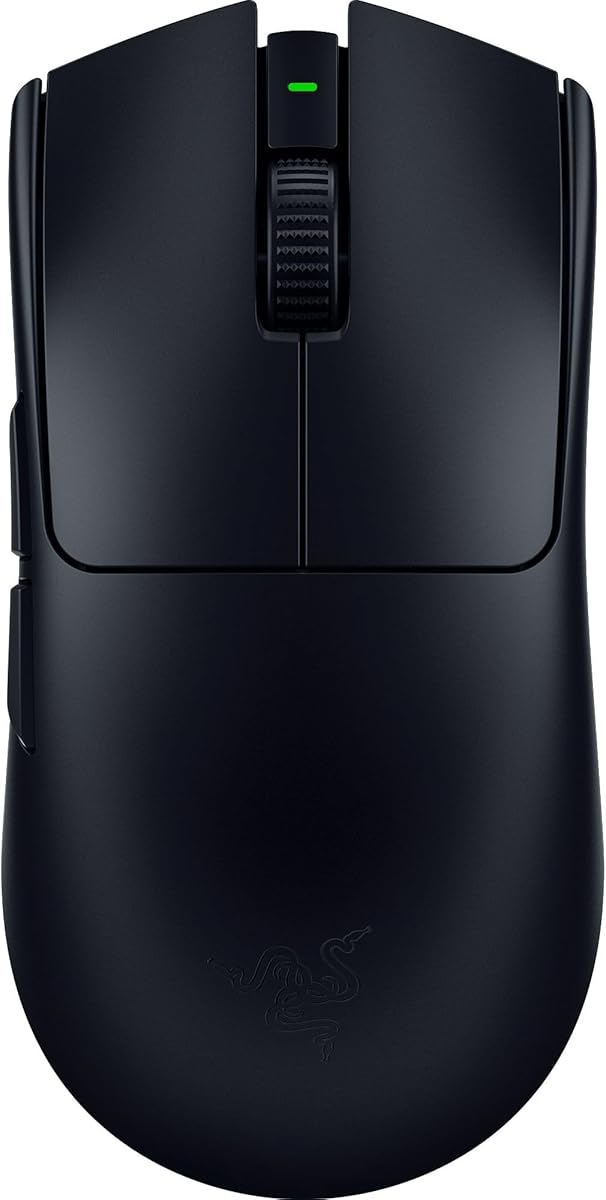
The SteelSeries Prime stands out as an affordable choice for competitive gaming. It carries a high rating and promises professional grade features like optical switches. The lightweight design enhances agility during fast paced gameplay sessions.
We may earn a commission when you buy through this link, at no additional cost to you.
Its TrueMove Pro sensor delivers precise tracking with 18K CPI. This ensures movements translate accurately to the screen without drift. The magnetic optical switches offer rapid response times and increased durability over standard mechanical parts.
While excellent for the price, it lacks wireless connectivity which some prefer. The shape is optimized for right handed users specifically which limits its appeal. However these trade offs are acceptable for those focused on budget friendly performance.
Buyers seeking a reliable entry level esports mouse should consider this model. It balances cost with high quality components effectively. The durable construction ensures longevity even under heavy daily usage conditions.
These switches use magnets for actuation offering faster response and higher durability than standard options.
The shape was engineered with pro input to support claw and finger grips comfortably.
We may earn a commission when you buy through this link, at no additional cost to you.
The Razer Viper V3 HyperSpeed offers a solid wireless experience at a reasonable point. It holds a strong rating for reliability and performance. The sensor quality ensures accurate tracking across various surfaces including glass.
We may earn a commission when you buy through this link, at no additional cost to you.
Its Focus Pro 30K optical sensor provides precise tracking capabilities for competitive play. The HyperSpeed wireless technology minimizes latency effectively. The mouse runs on a single AA battery which can last up to 280 hours of gaming.
However the 82 gram weight is slightly heavier than ultra lightweight models. Using an AA battery might inconvenience users preferring rechargeable options. These factors should be weighed against the impressive battery life and cost savings.
This mouse fits well for players needing a robust wireless option without premium pricing. The ergonomic design supports long sessions comfortably. It remains a top contender for those balancing performance and practicality.
This tech provides a low latency connection that remains stable even in noisy wireless environments.
A dedicated button on top allows quick toggling between DPI stages for immediate sensitivity changes.
We may earn a commission when you buy through this link, at no additional cost to you.
The ASUS ROG Harpe Ace Aim Lab excels in aim optimization for serious gamers. It features a lightweight design and strong integration with Aim Lab software. This combination helps players refine their settings and improve consistency.
We may earn a commission when you buy through this link, at no additional cost to you.
The ROG AimPoint optical sensor delivers industry leading precision with minimal deviation. Its NVIDIA Reflex verification ensures low latency responsiveness during matches. The Tri Mode connectivity offers flexibility across wired and wireless setups.
While performance is top notch the price reflects its premium status. Some users may find the semi symmetrical shape less versatile. Yet the benefits for competitive improvement make it a worthy investment.
Competitive players focused on aiming mechanics will find great value here. The tailored settings enhance gameplay efficiency significantly. It stands out as a specialized tool for dedicated esports enthusiasts.
This software analyzes user habits to suggest optimal DPI and lift off distance for better performance.
Official verification allows monitoring of mouse responsiveness to ensure minimal system latency.
We may earn a commission when you buy through this link, at no additional cost to you.
The Razer Basilisk V3 offers exceptional ergonomic support for long gaming sessions. It is widely praised for its comfort and customizable features. The scroll wheel allows switching between free spinning and tactile modes easily.
We may earn a commission when you buy through this link, at no additional cost to you.
Its Focus Plus 26K DPI optical sensor ensures smooth tracking without smoothing. The 11 programmable buttons provide flexibility for complex macros and commands. Optical switches offer crisp execution with a high lifespan.
The wired connection limits portability compared to wireless options. The heavier build might feel cumbersome for fast flicks. Despite this it remains a top choice for users prioritizing comfort and customization.
Buyers seeking a comfortable mouse for extended play should consider this model. The customizable RGB lighting adds a personal touch. It excels for gamers needing extensive button access and ergonomic support.
Users can switch between free spin for speed and tactile mode for precise control effortlessly.
These switches eliminate unintended misclicks with a fast actuation speed for responsive gaming.
We may earn a commission when you buy through this link, at no additional cost to you.
The white variant of the ASUS ROG Harpe Ace brings a fresh look to the lineup. It matches the features of the black version with the same performance. This color choice suits setups needing a clean aesthetic.
We may earn a commission when you buy through this link, at no additional cost to you.
Its 36K DPI sensor and Aim Lab optimization ensure high precision and better accuracy. The 54 gram design aids swift movements during competitive matches. Tri Mode connectivity offers seamless switching across multiple devices.
A downside is the potential for visible dust or dirt on the casing. Performance is identical to the black variant so no hardware upgrade exists. The style remains the primary differentiator here for buyers.
Those seeking a lighter mouse with a distinct look will appreciate this option. The white finish pairs well with modern setups. It delivers the same competitive edge as its counterpart.
The white finish provides a sleek look that contrasts well with dark desk setups.
This tool helps optimize settings based on user data for improved gameplay efficiency.
We may earn a commission when you buy through this link, at no additional cost to you.
The SteelSeries Prime Mini is designed for small hand users seeking wireless freedom. It combines a compact shape with professional grade switches and sensors. The TrueMove Air sensor ensures accurate tracking in lightweight package.
We may earn a commission when you buy through this link, at no additional cost to you.
Its optical switches offer faster response and greater durability than standard mechanical ones. The wireless connection is lag free with a robust 100 hour battery life. This longevity reduces charging frequency significantly for users.
The small size might limit usability for those with larger hands. RGB features are minimal compared to full size models. However for portability and comfort it serves its target audience well.
Buyers with smaller hands or limited desk space should consider this compact option. It delivers high quality performance in a smaller frame. The wireless freedom enhances mobility during intense gaming sessions.
Next gen wireless technology ensures lag free data transmission for smooth gameplay.
This design caters specifically to users preferring smaller grips and portable setups.
We may earn a commission when you buy through this link, at no additional cost to you.
The Logitech G PRO X2 introduces breakthrough haptic feedback for immersive gameplay. It is engineered for speed with industry leading click response times. The HERO 2 sensor ensures pinpoint accuracy across the playing field.
We may earn a commission when you buy through this link, at no additional cost to you.
Users can customize click actuation points with ten distinct levels. The LIGHTSPEED wireless technology supports uninterrupted 8 kHz polling for consistent performance. Battery life ranges from 60 to 90 hours depending on settings.
The advanced features come with a higher price tag than standard models. Complexity in setup might deter casual players. Yet the performance and customization justify the cost for serious competitors.
Elite players seeking cutting edge technology will find this model compelling. The haptic system adds a new dimension to gameplay. It represents a significant step forward in gaming mouse innovation.
Real time feedback enhances immersion by providing physical cues during key gameplay moments.
Adjustable actuation points allow users to tailor click speed for different game scenarios.
We may earn a commission when you buy through this link, at no additional cost to you.
The Razer Viper V4 Pro sets a new benchmark for lightweight wireless performance. It boasts an ultra light design paired with advanced optical features. The 50K DPI sensor tracks fast movements with unmatched precision.
We may earn a commission when you buy through this link, at no additional cost to you.
Optical scroll technology ensures consistent tracking and increased durability over mechanical wheels. The 8000 Hz polling rate offers a faster response than many competitors. Battery life is impressive with up to 180 hours at standard settings.
The high cost may be excessive for casual gamers. Some features might be underutilized by less advanced players. Despite this it remains a top tier choice for high performance needs.
Serious competitors needing the absolute best will appreciate this investment. The combination of light weight and speed is unmatched. It delivers professional grade reliability for demanding esports environments.
Optical actuation eliminates mechanical wear for better durability and consistent tracking.
Ultra high polling rates reduce input latency for near instant response to clicks.
We may earn a commission when you buy through this link, at no additional cost to you.
The SteelSeries Prime Plus features a unique OLED screen for on board customization. This allows users to change settings directly without relying on software. It retains the magnetic switches and lightweight feel of the base model.
We may earn a commission when you buy through this link, at no additional cost to you.
The TrueMove Pro+ sensor offers precise tracking with lift off capabilities. The OLED display shows current settings like CPI at a glance. This design streamlines the user experience for quick adjustments.
The added components increase weight slightly compared to standard models. Wired connectivity limits freedom of movement for some users. The OLED feature adds value for those who prefer immediate visual feedback.
Tech enthusiasts who like visible status data will enjoy this feature. The convenience of software free adjustments is significant. It offers a practical twist on a reliable gaming design.
Displays key settings directly on the mouse for instant adjustments without extra software.
Enhanced sensor performance with bonus lift off capability for competitive play.
We may earn a commission when you buy through this link, at no additional cost to you.
The Razer Viper V3 Pro delivers balanced performance with its ultra lightweight design. It combines advanced sensor tech with reliable wireless connectivity for all games. The 35K DPI sensor ensures precise tracking on multiple surfaces.
We may earn a commission when you buy through this link, at no additional cost to you.
Its Hyperpolling technology supports up to 8000 Hz polling rates for reduced latency. Optical switches offer durability with a 90 million click lifecycle. Battery life supports intense sessions with up to 95 hours of usage.
While expensive, the feature set justifies the cost for many players. Using high polling rates can drain battery faster than standard modes. This trade off allows for customization based on user needs.
Gamers seeking a top wireless mouse with strong battery life should choose this. It balances weight and performance effectively. The reliable construction ensures it handles intense competitive gaming sessions.
Combines wireless tech with high polling for flawless performance in tournament settings.
Improved switch design reduces double click issues and increases overall lifespan.
We may earn a commission when you buy through this link, at no additional cost to you.
Selecting the right mouse depends on personal preference and specific gaming needs. This guide covers essential factors to consider before making a decision.
Sensor accuracy determines how well movement is tracked on screen. High CPI and minimal deviation ensure your actions are translated precisely. Look for optical sensors with features like zero smoothing for reliable performance.
Choose a sensor that supports your preferred DPI settings without acceleration.
Weight affects how quickly you can react and stop movement. Lightweight mice around 50 to 70 grams offer agility for flick shots. Some users prefer heavier models for stability during tracking shots.
Balance ensures the mouse feels comfortable regardless of grip style.
The shape of the mouse impacts comfort during long sessions. Symmetrical mice suit various grip styles while ergonomic ones support specific hands. Consider palm claw and finger grips when testing shapes.
Select a shape that fits your hand size to avoid strain over time.
Wired mice provide zero latency but limit movement range. Wireless options offer freedom with minimal lag via modern tech like HyperSpeed. Battery life and charging methods should be evaluated for convenience.
Choose connectivity based on your setup and mobility needs.
Switches determine the feel and life of your clicks. Optical switches use magnets to avoid mechanical contact issues. Mechanical switches may feel tactile but have lower lifespans.
Prioritize switches that match your usage intensity and feel preference.
Software allows deep customization of DPI buttons and lighting. Aim tools help refine settings based on play style. Some mice include screens or built in presets for quick adjustments.
Ensure the software supports your OS and offers needed customization.
Prices vary widely based on features and brand positioning. High end models offer advanced tech like haptic feedback and higher polling. Budget options provide essential specs without extra cost.
Determine your spending limit and prioritize core features within it.
Durable materials ensure the mouse withstands rigorous use. Gliding feet made of materials like PTFE provide smooth movement. Check for reinforced construction to avoid flex during intense actions.
Invest in a model known for reliability and solid materials.
Keep the mouse surface clean to ensure smooth gliding. Use a cloth to wipe the bottom and feet regularly. Avoid spills and dust buildup which can interfere with tracking.
Update firmware via manufacturer software for best performance. Customizing DPI buttons can improve your gameplay speed significantly. Adjust settings to match your play style and hand comfort.
Store the mouse properly when not in use. Wireless models should be charged regularly to maintain battery health. Follow manufacturer guidelines for long term maintenance and longevity.
Sensor accuracy ensures your physical movements translate exactly to on screen actions without error. High quality sensors eliminate acceleration or jitter which can ruin aim. This precision allows players to make consistent shots and improve their ranking effectively.
Modern wireless mice use technology that matches wired latency levels. Brands like Razer and Logitech offer reliable connections suitable for tournaments. Battery management is key but performance is often identical to wired options.
Most professionals prefer weights between 50 to 70 grams for agility. Lighter mice enable faster flicks while heavier ones provide stability. The best choice depends on your grip style and personal preference.
Try testing different shapes to see what feels natural in your palm. Consider the width and curvature relative to your hand size. Most retailers allow returns so you can verify fit at home safely.
Optical switches use light to trigger clicks reducing wear and latency. They typically offer faster response times than standard mechanical switches. This durability makes them ideal for high intensity gaming sessions.
Check for updates monthly to ensure you have the latest improvements. Firmware updates often fix bugs or add new features. Keeping your mouse updated maintains optimal performance and security.
Yes but specialized features like extra buttons or specific DPI settings may vary. Most models work for office tasks but ergonomics might differ. It is often better to choose a dedicated tool for each purpose.
RGB lighting adds aesthetic customization to match your setup style. Some users utilize it for game status notifications. While not critical for performance it enhances the visual experience of gaming.
We reviewed ten top contenders offering various features for different needs. From budget friendly options to premium wireless tech there is something for everyone. Choosing the right tool can elevate your competitive performance significantly.
Prioritize comfort sensor quality and battery life when narrowing down choices. The balance between weight and features often determines long term satisfaction. Consider your grip style and typical play scenarios carefully before buying.
Always check current availability and pricing before finalizing your purchase. Deals change frequently and models may be updated by manufacturers. Staying informed ensures you get the best value for your investment today.