
BMAX Mini PC Core i3 8109U
4.9Editor score
Intel Core i3-8109U
12GB RAM
Dual 4K Display Support
This guide compares the top mini PCs for Fusion 360 CAD workloads, evaluating CPU power, GPU capability, memory, and display output to help you find the
Finding the right mini PC for Fusion 360 requires balancing compact design with serious processing power. You need a machine that can handle 3D modeling, rendering, and simulations without taking up your desk space.
We compared ten real mini PCs based on their CPU cores, RAM capacity, graphics performance, and connectivity options. Each product was evaluated for its ability to run Autodesk software smoothly in professional environments.
Each pick shows key specs and real-world performance notes to guide your decision. Remember that prices and availability change frequently, so check the current listings before purchasing your next compact workstation today.
4.9Editor score

4.8Editor score
4.1Editor score
This side-by-side comparison highlights the critical specifications across all ten models to help you quickly identify which device meets your specific CAD workflow needs and budget constraints effectively.


This Glorlin model stands out as the top choice for CAD workloads due to its robust Ryzen 7 6800H processor. It achieves a high user rating and offers consistent performance for 3D modeling tasks within Fusion 360.
We may earn a commission when you buy through this link, at no additional cost to you.
The eight cores and sixteen threads provide ample power for complex assemblies while the Radeon 680M integrated graphics handle viewport navigation smoothly. Dual channel LPDDR5 memory ensures quick data access during simulations.
While it lacks a dedicated GPU, the integrated solution is sufficient for most standard engineering tasks. The trade-off of soldered RAM is acceptable given the speed gains from DDR5 technology.
Designers seeking a compact workstation that balances power and portability should choose this unit. It delivers reliable results without the bulk of traditional desktop towers.
The 6800H CPU handles multi-threaded calculations efficiently, reducing wait times during simulations and rendering tasks in Fusion 360 environments.
Support for three 4K displays allows you to keep reference drawings on one screen while modeling on another, enhancing workflow efficiency significantly.
We may earn a commission when you buy through this link, at no additional cost to you.
This BMAX unit offers an incredible value proposition for entry-level CAD users. With a nearly perfect rating, it proves that older Intel Core architecture can still handle basic Fusion 360 workflows effectively.
We may earn a commission when you buy through this link, at no additional cost to you.
The dual-core processor manages simple part modeling and assembly checks well enough for students or light commercial use. The included Windows 11 Pro license saves additional setup costs immediately.
Heavy rendering tasks may cause slowdowns, so it is best suited for drafters rather than heavy animators. The limited core count is a fair trade-off for the low entry cost.
Students and freelancers on a tight budget will find this machine sufficient for daily tasks. It provides a reliable path into 3D design without breaking the bank.
The low price makes professional design software accessible to hobbyists who need a capable machine for learning without a large upfront investment.
Despite the modest specs, the system remains stable during routine operations like saving files and running basic geometric constraints in the software.
We may earn a commission when you buy through this link, at no additional cost to you.
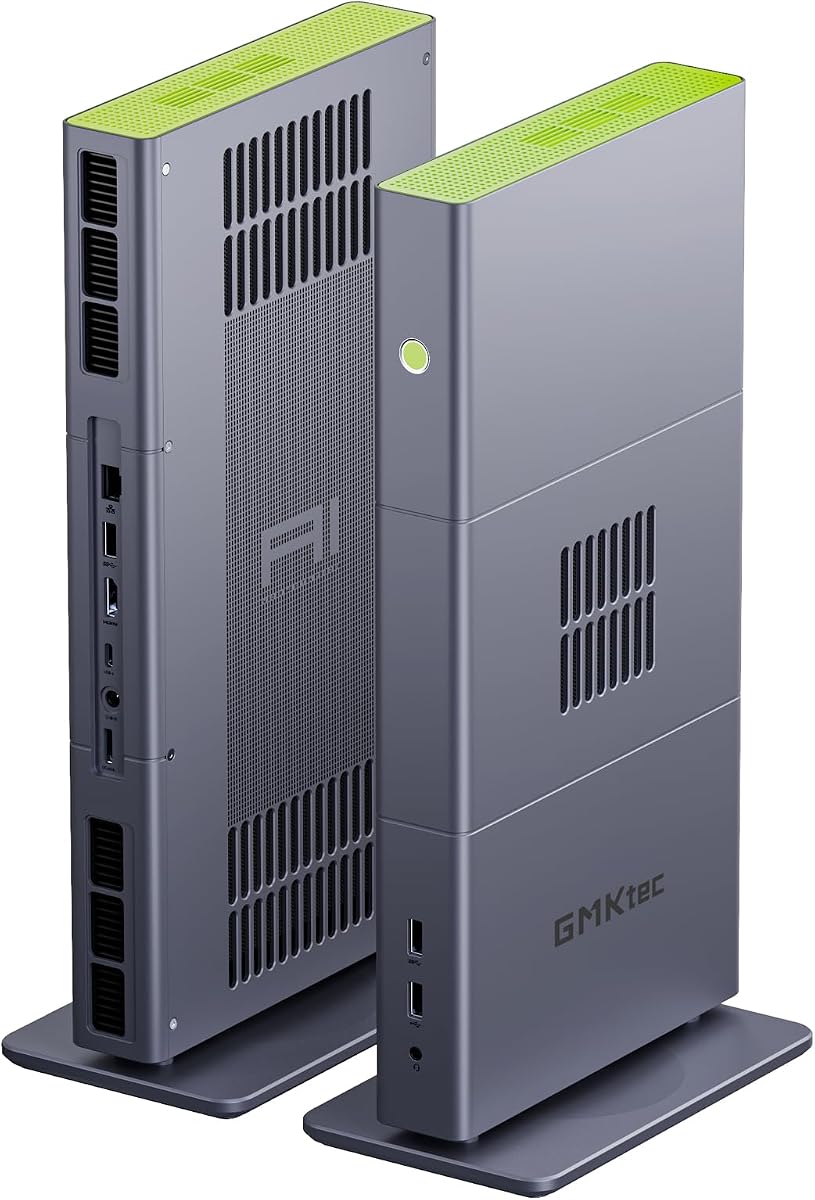
The GMKtec X3 AI represents the pinnacle of mini PC performance with its Ryzen AI Max+ 395 processor. It is designed for heavy workloads including local AI models and complex 3D rendering in Fusion 360.
We may earn a commission when you buy through this link, at no additional cost to you.
With 128GB of LPDDR5X memory, you can run multiple heavy applications simultaneously without slowdowns. The OCuLink port allows connection to powerful external GPUs for advanced rendering tasks.
This system is expensive and might be overkill for users with simpler design needs. However, for professionals needing workstation-level power in a small box, it is unmatched in the category.
Engineering firms and power users requiring maximum efficiency and expansion capabilities should consider this investment. It offers a desktop replacement experience in a mini form factor.
The 128GB memory pool ensures that massive assemblies and simulation datasets load instantly without swapping to slower storage drives.
The OCuLink interface bridges the gap between mini PCs and desktops by allowing external GPU docking for tasks requiring dedicated graphics power.
We may earn a commission when you buy through this link, at no additional cost to you.
This M6 Ultra model brings gaming-grade AMD Ryzen processors to the mini PC category. Its high clock speeds benefit single-threaded CAD tasks commonly found in Fusion 360 modeling workflows.
We may earn a commission when you buy through this link, at no additional cost to you.
The 32GB of DDR5 RAM provides a comfortable buffer for keeping many browser tabs and design tools open at once. Triple display support helps manage complex project files efficiently.
While the integrated Radeon graphics are capable, heavy rendering still relies on the CPU cores. Users should expect some fan noise under sustained load due to the high performance chip.
Gamers and designers looking for a versatile machine that handles both recreation and work will appreciate this setup. It balances speed and connectivity well in a small chassis.
The high boost clock ensures that panning and zooming in 3D views remains fluid even with detailed geometry loaded on screen.
With 32GB of RAM, you can keep large assembly files open while running virtual machines or heavy communication tools without lag.
We may earn a commission when you buy through this link, at no additional cost to you.
The Getorli Mini PC offers a well-rounded package for standard business and design needs. Its Ryzen 5 7430U processor provides reliable performance for running Fusion 360 on smaller projects.
We may earn a commission when you buy through this link, at no additional cost to you.
Sixteen GB of RAM is sufficient for daily modeling tasks and allows for future upgrades if needed. Triple 4K display output helps organize workspaces effectively for professional use.
While it uses older DDR4 memory technology, the speed difference is often negligible for typical CAD work. The dual LAN ports add value for users needing robust network connectivity options.
Professionals who need a dependable daily driver without premium pricing will find this unit suitable. It strikes a good balance between cost and functional capabilities.
Dual 2.5G LAN ports allow for direct network storage access or failover connections without relying on Wi-Fi for large data transfers.
Support for three monitors means you can view detailed schematics while working on the main assembly window simultaneously.
We may earn a commission when you buy through this link, at no additional cost to you.
The KAMRUI AK1PLUS targets general office tasks rather than heavy engineering work. It provides a solid foundation for basic viewing of Fusion 360 models if they are not complex.
We may earn a commission when you buy through this link, at no additional cost to you.
Having 16GB of RAM is generous for this price point, though the processor limits how many heavy tasks it can handle. The dual 4K HDMI outputs are useful for extended desktop setups.
Heavy rendering or complex simulations will likely struggle on this hardware. It is best used for reviewing designs rather than creating them from scratch on a tight budget.
Small businesses needing multiple units for general staff use may find this appealing. It keeps operational costs low while maintaining acceptable performance for light duties.
The ability to add 2.5-inch drives allows you to keep project archives local without replacing the main system drive.
Low power consumption reduces electricity costs and heat output, making it suitable for 24/7 office environments.
We may earn a commission when you buy through this link, at no additional cost to you.
This BOSGAME model brings older Ryzen architecture to a very competitive price point. It supports triple displays which is rare at this cost, aiding productivity for design reviews.
We may earn a commission when you buy through this link, at no additional cost to you.
The Ryzen 5 3300U offers decent multi-core performance for basic modeling and assembly management. Having 512GB NVMe storage ensures quick boot times and application launches for your daily tasks.
Sustained heavy loads may cause the system to throttle due to cooling constraints in such a small chassis. It is suitable for intermittent CAD work rather than continuous 3D rendering sessions.
Users needing a basic workstation for viewing and minor edits will find this value proposition hard to beat. It maximizes features per dollar spent effectively.
Connectivity for three displays allows you to keep reference files open while working on the main project without constant switching.
Lifetime technical support ensures that if you encounter driver issues, help is available to keep the machine running smoothly.
We may earn a commission when you buy through this link, at no additional cost to you.
The Glorlin 3501U model focuses on efficiency for learning environments. Its triple display support is excellent for students who need to reference textbooks alongside 3D software.
We may earn a commission when you buy through this link, at no additional cost to you.
Four cores and eight threads handle standard coursework assignments well. The 16GB of memory allows for smooth multitasking between design software and communication tools.
While it lacks power for professional rendering, it is sufficient for learning the interface and creating basic parts. The compact size fits well in dorm rooms or study desks.
Students starting their design journey will benefit from this affordable and capable machine. It provides the necessary tools to learn CAD without a high cost.
The setup supports viewing multiple reference pages while modeling, which is essential for following complex course instructions accurately.
WiFi 6 and Bluetooth 5.3 ensure stable connections for peripherals and cloud storage access during remote study sessions.
We may earn a commission when you buy through this link, at no additional cost to you.
This Bmax unit is the most affordable entry into the mini PC market. It serves well for very light viewing of simple 3D files and basic office work.
We may earn a commission when you buy through this link, at no additional cost to you.
The Celeron J3355 processor is limited but manages basic interface navigation in design software. Six GB of RAM is low for modern standards but sufficient for single task usage.
Complex assemblies will run slowly so this device is best for simple review tasks. It is a practical choice for secondary systems or kiosks displaying static designs.
Users needing the absolute lowest cost for a small computer will find this unit functional. It gets the job done for basic tasks without financial strain.
For displaying completed designs on a monitor, this unit performs adequately without requiring a heavy investment in hardware.
The M.2 slot allows you to add more storage for project files if the internal space becomes insufficient over time.
We may earn a commission when you buy through this link, at no additional cost to you.
The GMKtec G3 Ultra is designed for efficient office tasks and light design work. Its Pentium Gold processor offers reliable single-core performance for basic applications and web tools.
We may earn a commission when you buy through this link, at no additional cost to you.
Sixteen GB of RAM is a strong feature for this class of device ensuring smooth operation of standard business software. Dual HDMI ports allow for an expanded workspace easily.
While not meant for heavy CAD, it handles basic file management and email efficiently. The low power draw makes it ideal for always-on server or office station roles.
Small businesses looking for reliable daily drivers that do not consume much power should consider this model. It provides consistent uptime and adequate performance for general use.
The three-year warranty and energy efficiency make this a low-risk option for commercial environments needing constant uptime.
Dual 4K support helps in monitoring multiple streams of data or managing different client projects simultaneously on one desk.
We may earn a commission when you buy through this link, at no additional cost to you.
Selecting the right mini PC requires understanding how hardware components impact your specific CAD workflow and design complexity needs.
Fusion 360 utilizes multiple CPU cores for simulations and rendering tasks. A processor with more cores will reduce wait times during these intensive operations significantly.
Look for at least six cores to ensure smooth performance on complex projects.
Memory determines how many applications you can run simultaneously and how large your assemblies can be before performance drops. More RAM allows for faster data access.
Aim for 16GB minimum to handle standard engineering workloads effectively.
Integrated graphics work well for viewing basic models but dedicated GPUs are better for heavy rendering. Check the integrated graphics capabilities if budget is tight.
Ensure the GPU supports modern drivers to avoid compatibility issues with new software updates.
Solid State Drives (SSD) are essential for quick boot times and fast file loading. NVMe SSDs offer significantly faster speeds than traditional SATA options.
Choose a model with at least 512GB NVMe storage for professional use.
Multiple monitors boost productivity by allowing reference materials to be visible while you work. HDMI and DisplayPort connections provide the necessary interfaces.
Verify the mini PC supports at least two 4K displays for a clear workspace.
Ports like USB 3.2 and Ethernet are crucial for connecting peripherals and stable internet access for cloud collaboration. Ensure the device has enough ports for your needs.
Look for dual LAN ports if you need network redundancy for office work.
Small chassis can overheat under load causing the CPU to slow down. A system with good cooling ensures sustained performance without thermal throttling.
Read reviews to confirm the fan stays quiet and cool during long sessions.
Having reliable technical support is important for business users who cannot afford downtime. Check the manufacturer's warranty terms before purchasing.
Opt for brands that offer at least one year of parts and labor coverage.
Place your mini PC in a well-ventilated area to prevent overheating during long rendering sessions. Avoid covering the vents with papers or other objects.
Regularly update your graphics drivers and operating system to maintain compatibility with the latest Fusion 360 features and security patches.
Use the provided power supply to ensure stable voltage and avoid potential damage to internal components. If you plan to upgrade RAM check if the model allows expansion.
Yes, many mini PCs are powerful enough for Fusion 360. However, performance depends on the CPU cores and RAM amount. For complex rendering look for models with at least six cores and 16GB of memory.
For basic modeling and drawing, integrated graphics are usually sufficient. If you do heavy rendering or use advanced simulation tools, a dedicated external GPU might be beneficial but not strictly necessary for all users.
16GB is the recommended minimum for smooth operation with multiple applications open. If you work with large assemblies or multiple heavy programs, 32GB or more would be better.
Many models allow storage upgrades via extra M.2 slots but RAM is often soldered on mini PCs. Check the specific model specifications to see what you can upgrade before buying.
Most mini PCs listed support dual 4K displays via HDMI and DisplayPort. Some even support three screens which is great for multi-tasking design projects alongside reference materials.
Windows 11 Pro is standard on most of these units and is fully compatible with Fusion 360. Linux is supported by Fusion 360 but requires specific setup for best performance.
We reviewed ten mini PCs ranging from budget-friendly options to high-end workstations. Each model offers a different balance of power size and price to fit your needs.
When making your choice prioritize CPU core count and RAM capacity to ensure smooth performance. Do not ignore cooling capabilities as they affect long term reliability.
Prices and availability change frequently so check the current listings before purchasing. Always verify that the model meets your specific design requirements before finalizing your order today.