
amFilm Screen Protector for ASUS ROG Xbox Ally X & Ally/ROG Ally X & Ally
4.6Editor score
Ultra-clear high definition transparency
Ultra thin 0.3mm thickness
Highly durable 9H hardness
Protecting your handheld gaming console is essential for long-term performance and visual clarity. A high-quality screen guard prevents scratches from keys and coins while maintaining touch sensitivity during intense gameplay sessions. You need a solution that balances durability with optical transparency.
We evaluated ten leading tempered glass and matte options based on hardness ratings and installation ease. Our analysis covers compatibility across different Ally models including the 2023 and 2024 variants. Each product was reviewed for clarity and resistance to everyday wear and tear.
Every selection in this list offers unique benefits tailored to specific gaming needs and preferences. We highlight the key strengths and potential trade-offs for each protector to help you decide. Keep in mind that pricing and availability may change over time as market conditions evolve.
4.6Editor score
4.5Editor score
4.3Editor score
As an Amazon Associate we earn from qualifying purchases.
The following table provides a side-by-side comparison of all ten selected screen protectors to help you quickly identify the best fit for your specific needs and budget constraints.


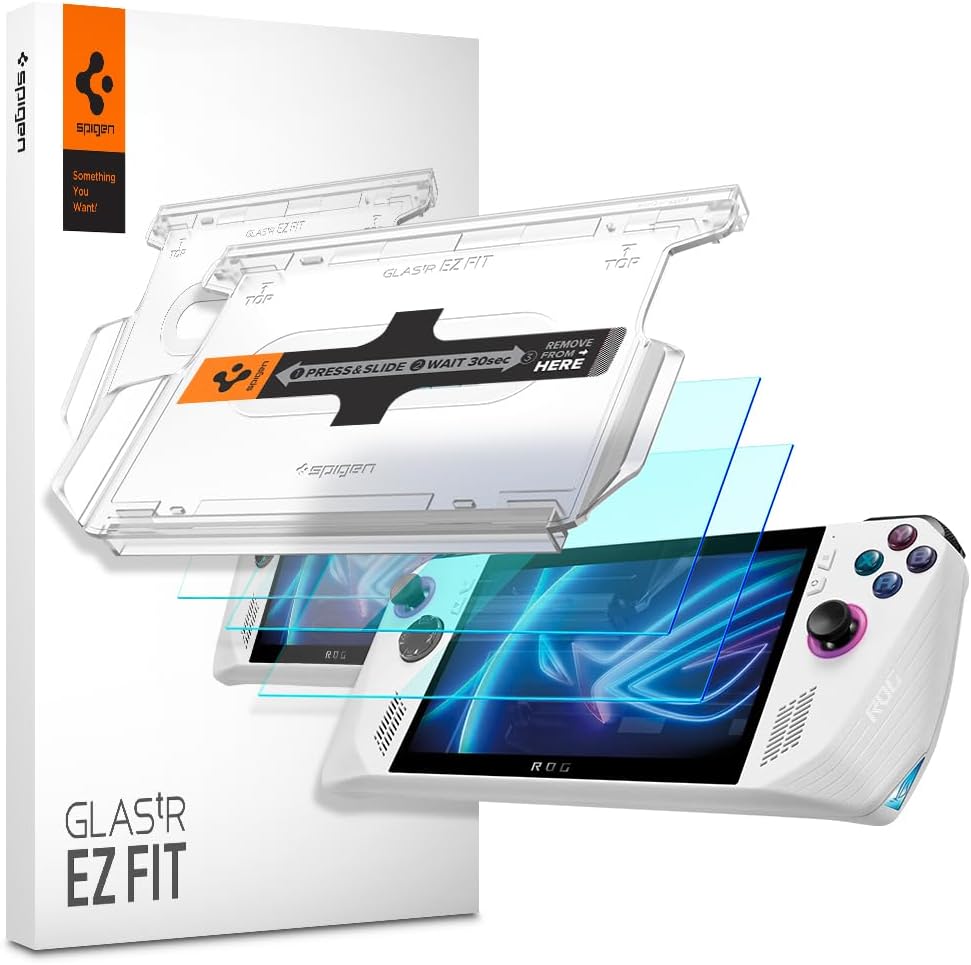
The Spigen GlasTR EZ FIT stands out as the top choice for protecting your ROG Ally with its precise fit and advanced installation tray. With a 4.5 star rating it delivers exceptional clarity and scratch resistance for your device screen.
We may earn a commission when you buy through this link, at no additional cost to you.
Its 9H hardness rating ensures it resists scratches from everyday hazards like keys and coins without leaving marks. The EZ FIT tray allows for quick alignment in under sixty seconds which reduces frustration during setup.
While it costs slightly more than generic options the included tools and guaranteed fit justify the investment for most users. The case friendly edge-inset cut prevents lifting when using protective cases which is a significant convenience feature.
Buy this if you value ease of installation and premium optical quality during gaming sessions. It remains the best balanced option for those seeking reliable protection without compromising on visual fidelity.
The EZ FIT tray uses silicone adhesive layers to ensure the protector sits perfectly without manual adjustment.
Independent lab testing confirms 100% clarity for true visibility and vivid colors matching the bare screen.
We may earn a commission when you buy through this link, at no additional cost to you.
amFilm offers a reliable budget option that covers both the original Ally and newer Xbox Ally X models effectively. With a 4.6 star rating it provides excellent transparency and scratch resistance at an affordable price point.
We may earn a commission when you buy through this link, at no additional cost to you.
Its ultra-thin 0.3mm thickness ensures full compatibility with touchscreen sensitivity so you feel no lag while playing games. The 9H hardness protects against daily wear and the oleophobic coating reduces fingerprints significantly.
Although it lacks an auto-alignment tray the included manual and cleaning kit help achieve a decent result. It is a practical choice for those who want quality protection without spending extra on branding or accessories.
Choose this if you need a versatile protector that fits various ROG models. It delivers strong value for money while maintaining high clarity and durability standards.
Designed specifically for the Xbox Ally X 2025 and ROG Ally 2023 to ensure precise edge-to-edge coverage.
Top layer reduces fingerprints and smudges making it easier to clean the screen during extended gaming sessions.
We may earn a commission when you buy through this link, at no additional cost to you.
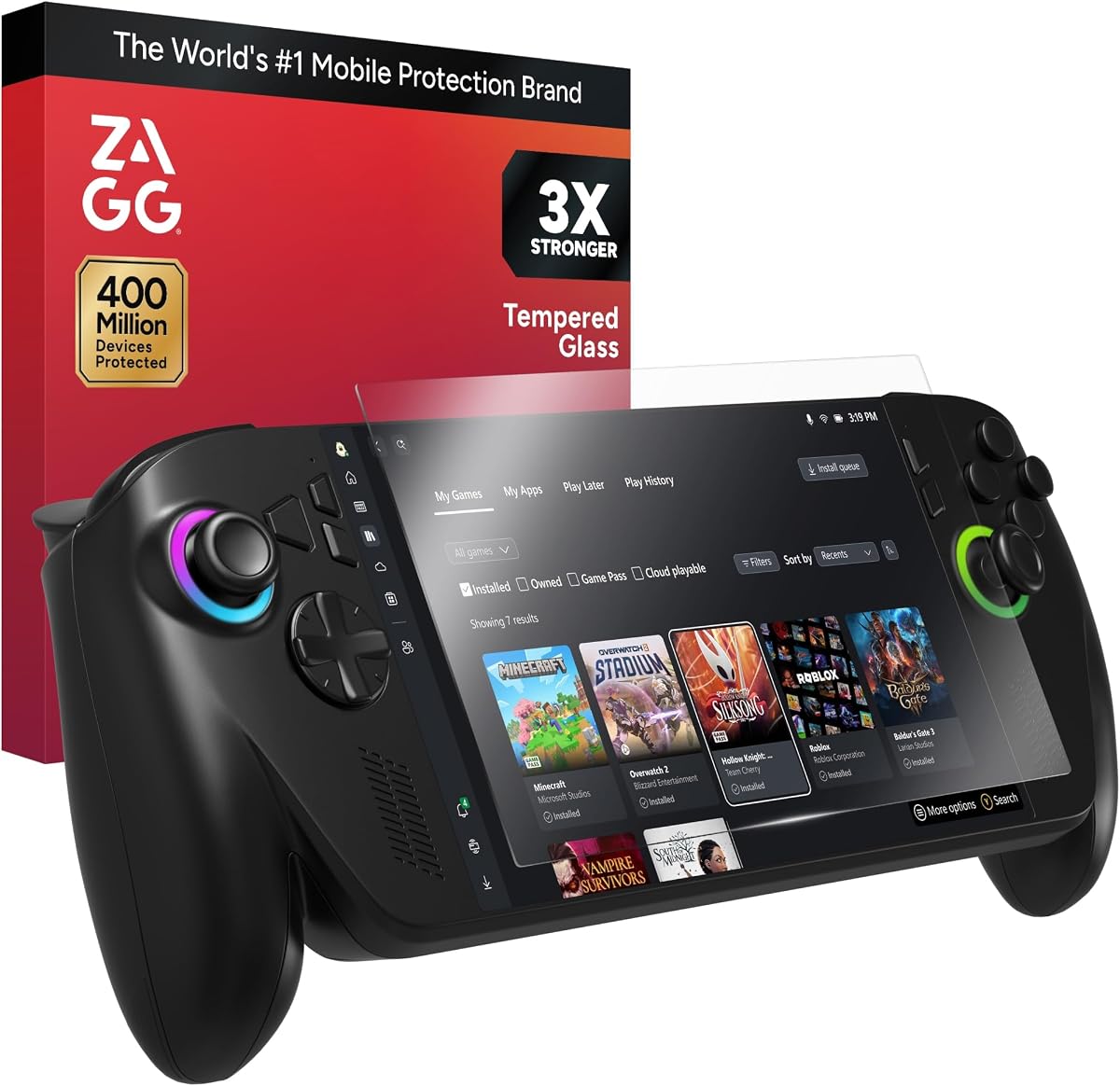
ZAGG brings its reputation for durability to the ROG Ally with a screen protector engineered to be three times stronger than standard glass. Its 4.3 star rating reflects reliable long-lasting protection and a silky smooth touch experience.
We may earn a commission when you buy through this link, at no additional cost to you.
The advanced oleophobic coating repels oils and fingerprints effectively keeping the display cleaner for longer sessions. Precision surface finishing delivers maximum scratch resistance ensuring your visuals remain pristine without any distortion or haze.
While the price is higher than other options the EZ Apply tray simplifies installation and minimizes bubbles significantly. It is ideal for users who prioritize maximum impact resistance and brand reliability over saving a few dollars.
Opt for this premium protector if you handle your device roughly or want the best possible clarity. It sets a high standard for screen protection in terms of durability and finish.
Engineered to withstand significant impact and scratches making it safer for travel or daily use.
Ensures every tap and swipe feels natural and precise just like the original factory screen surface.
We may earn a commission when you buy through this link, at no additional cost to you.
This four-pack offers exceptional value for those who want to have backups on hand for future replacements or accidents. With a 4.4 star rating each protector features ultra-thin 0.33mm glass that restores original screen color effectively.
We may earn a commission when you buy through this link, at no additional cost to you.
Its anti-scratch and anti-shatter function uses 9H tempered glass to protect the display from wear and hard impacts. The hydrophobic coating prevents permanent stains from fingerprint oil residue even after long-term usage and daily cleaning.
While installation requires manual alignment the auto-adhesion technology helps ensure a bubble-free result if done carefully. It is a smart buy for families or groups with multiple devices needing reliable screen coverage.
Select this if you want bulk coverage at a low cost without sacrificing quality. It balances price and durability well for standard ROG Ally models.
The glass restores original color and provides the best gaming experience without visual distortion.
Effectively protects the phone from unnecessary wear and prevents glass fragments from scattering upon impact.
We may earn a commission when you buy through this link, at no additional cost to you.
This protector is specifically designed for the latest ROG Xbox Ally X 2025 and ROG Ally X 2024 models ensuring accurate fit. With a 4.6 star rating it uses plasma oleophobic coating to keep the screen clean and free from grease marks.
We may earn a commission when you buy through this link, at no additional cost to you.
Its 9H hardness strengthens impact resistance against daily damage while maintaining 99.99% response sensitivity for smooth gameplay. The 2.5D rounded corner design makes the edge feel smooth and prevents breaking at the corners.
The 0.5mm reserved space allows you to use any protective case without warping or lifting issues which is crucial for gamers. Installation is straightforward if you align it properly before pressing down to avoid bubbles.
Choose this if you own a newer Xbox Ally model and use a case regularly. It offers strong compatibility and clarity for those needing precise accessory support.
Specifically designed for ASUS ROG Xbox Ally X 2025 and ROG Xbox Ally 2025 for a perfect fit.
Reserved space prevents lifting when used with protective cases ensuring a clean flush finish.
We may earn a commission when you buy through this link, at no additional cost to you.
amFilm OneTouch simplifies the application process with an automatic alignment kit that finishes installation in just 30 seconds. With a 4.4 star rating it leads the market with Ultra-high 9H hardness for maximum resistance against impacts.
We may earn a commission when you buy through this link, at no additional cost to you.
Its advanced coating technology ensures a clear visual experience with smooth screen touching and sensitive response during gaming. The hydrophobic layer effectively prevented 99.99% of fingerprints caused by sweat and oil stains in testing.
The automatic alignment tray eliminates the hassle of manual alignment for beginners who want a perfect result quickly. It provides a sturdy layer of protection without compromising on touch sensitivity or visual clarity.
Opt for this if you want a quick and reliable installation experience without extra tools. It is a practical solution for modern gaming handhelds needing easy setup.
Say goodbye to manual alignment hassle as the kit positions the protector perfectly in 30 seconds.
The transparent layer is hydrophobic and oil repellent to keep the screen cleaner longer.
We may earn a commission when you buy through this link, at no additional cost to you.
magglass provides a premium matte finish that removes unwanted harsh reflections for a more comfortable gaming experience under bright lights. With a 4.1 star rating it is highly resistant to oil smudges and fingerprint marks due to its textured surface.
We may earn a commission when you buy through this link, at no additional cost to you.
This edge-to-edge screen guard is built to last with genuine tempered glass that protects against daily wear and tear easily. The retail packaging includes a cleaning kit and every product comes backed by the Encased Ltd. Lifetime Warranty.
While some users prefer clear glass for maximum brightness the matte finish is ideal for reducing glare during outdoor or mixed lighting use. It is a strong alternative for competitive players who prioritize touch feel over perfect transparency.
Select this if you dislike glare and want a smoother friction surface for thumb movement. It offers excellent durability and support through its strong warranty policy.
The premium anti-glare matte texture finish removes unwanted harsh reflections for a premium gaming experience.
Every set comes backed by the Encased Ltd. Lifetime Warranty and friendly support from our dedicated team.
We may earn a commission when you buy through this link, at no additional cost to you.
Mr.Shield uses Japan hardest glass to provide maximum strength and 99.99% HD clarity for accurate touch accuracy and visibility. With a 4.6 star rating the protectors use silicone adhesives for viewing clarity and easy installation without residue.
We may earn a commission when you buy through this link, at no additional cost to you.
Its smooth and high touch responsive surface features superb oleophobic coating to resist oil and smudges effectively. From scratches to high impact drops the ballistic glass ensures you are protected with reliable shielding for your device.
The tailored-fit design ensures a precise fit to your device's screen without covering the edges improperly. It is a solid choice for gamers seeking clear visuals without breaking the budget significantly.
Choose this if you want high definition clarity and reliable protection from a trusted supplier. It maintains sharpness and responsiveness during competitive gameplay.
Made of Japan hardest glass ensuring high scratch resistance and durability over time.
Provides high-grade components that deliver viewing clarity and touch accuracy for a natural feel.
We may earn a commission when you buy through this link, at no additional cost to you.
This versatile option supports multiple models including the ASUS ROG Ally X RC72LA 2024 and MSI Claw A1M 7 inch 2024 released. With a 4.8 star rating it features 9H hardness tempered glass that protects against dirt dust and scratches from keys.
We may earn a commission when you buy through this link, at no additional cost to you.
It maintains sensitivity to touch and pressure well allowing for seamless interaction during gaming without lag or delay. The non-adhesive backing ensures it will not leave sticky residue on your screen if you need to remove it later.
High transparency features ensure the original color and brightness are restored for an optimal gaming experience. It is a strong choice for those needing a protector for different handheld models or specific model requirements.
Select this if you want broad compatibility and high performance across different 2024 and 2023 devices. It provides solid protection with a high satisfaction score.
Designed for ROG Ally X RC72LA MSI Claw A1M and ROG Ally 2023 ensuring accurate fit for all.
The non-adhesive backing will not leave sticky residue ensuring clean removal and reuse if needed.
We may earn a commission when you buy through this link, at no additional cost to you.
Mr.Shield offers another robust option with precise laser cut tempered glass made with polished rounded edges for a comfortable feel. With a 4.6 star rating it promises 100% bubble free installation thanks to high technology glues used in production.
We may earn a commission when you buy through this link, at no additional cost to you.
Its surface hardness 9H is highly durable and scratch resistant to protect your screen from daily wear effectively. The 99.99% HD Clarity and Touchscreen Accuracy ensure visuals and responsiveness remain unchanged during intense gaming.
While it lacks an installation tray the tailored-fit design helps guide placement for a flush finish on the screen. It is a solid choice for users who prioritize strength and clarity over installation accessories.
Choose this if you want reliable durability and compatibility with ROG Ally X and Xbox Ally models. It balances performance and cost effectively for general use.
Precise laser cut tempered glass made with polished rounded edges for a seamless fit.
Uses high technology glues to ensure a 100% bubble free application every time.
We may earn a commission when you buy through this link, at no additional cost to you.
Selecting the right screen protector involves evaluating several factors to ensure compatibility and protection without compromising your gaming experience.
Most protectors use tempered glass which offers superior scratch resistance and clarity compared to plastic films. Look for a 9H hardness rating to ensure the surface can withstand sharp objects like keys or coins.
Higher hardness ratings correlate with better durability but maintain sensitivity for touch input during fast-paced gaming.
Ensure the protector matches your specific ROG Ally model such as the 2023 RC71L or the newer Xbox Ally X. Models vary slightly in design which means a protector for one may not fit another perfectly.
Check product details to confirm support for your device version before purchasing to avoid alignment issues.
Protectors with auto-alignment trays simplify the application process and reduce the risk of dust or bubbles. These trays guide the glass into place so manual precision is less critical.
For best results always use the included cleaning wipes and dust removal stickers before adhering the glass.
This coating repels oils and fingerprints keeping the screen clean for longer gaming sessions without constant wiping. A good oleophobic layer ensures the surface stays smooth and clear for optimal visual quality.
If you play often or in hot environments this feature helps maintain a pristine display surface easily.
Look for high transparency ratings like 99.9% to ensure the original brightness and color accuracy are preserved. Lower quality glass may introduce a yellow tint or reduce visibility during dark scenes.
Crystal clear glass ensures your games look as intended without visual distortion or glare.
If you use a protective case ensure the screen protector does not lift at the edges when the case is applied. Some designs feature a smaller edge or inset cut to accommodate case frames safely.
Check if the product is listed as case friendly to avoid peeling or bubbling issues over time.
A good protector maintains 99.99% response sensitivity so that taps and swipes register instantly on the display. Thin glass around 0.3mm helps preserve the original feel of the screen.
Avoid thick or cheap materials that might cause lag or dead zones during critical moments in games.
Some brands offer lifetime warranties or replacement guarantees if the protector breaks during installation. This can be a valuable safety net if you are new to applying screen protection.
Check support policies to see if you get a replacement kit in case of user error or damage.
Start by powering off your ROG Ally and cleaning the screen thoroughly with the provided microfiber cloth. Use the included cleaning wipes to remove oils or dust from the glass surface before applying the protector.
Align the protector using the edges of your screen as a guide if you do not have an auto-alignment tray. Gently press the center first and then the edges to release any air bubbles smoothly across the surface.
After installation avoid pressing hard on the glass for 24 hours to let the adhesive cure fully. Clean the screen regularly with a dry cloth to maintain clarity and reduce scratches from dust particles.
Most high-quality tempered glass protectors maintain 99.99% touch sensitivity when installed correctly. As long as the glass is thin around 0.3mm and the adhesive is even you should not experience lag or dead zones during gameplay.
Not all protectors are universal so check the product description for specific model support. Some brands offer versions designed for both the 2023 ROG Ally and the newer 2025 Xbox Ally X to ensure accurate edge coverage.
Use a thin card or fingernail to lift one corner gently before peeling it off slowly. If the adhesive is strong you can warm it slightly with your hand to make removal easier without damaging the device.
Most case-friendly designs are made to accommodate protective cases without lifting at the edges. Check the product description to ensure the glass has a smaller edge or recessed cut to avoid conflict with case frames.
Tempered glass offers better scratch resistance and optical clarity compared to cheap plastic films. It is harder more durable and provides a smoother surface for touch controls during intense gaming sessions.
If you notice scratches or cracks that affect visibility it is time to replace the protector. With proper care a good protector can last many months but it depends on how often you use the device.
The 9H rating refers to the hardness level of the glass on the Mohs scale of mineral hardness. It indicates the surface can resist scratches from common objects like keys and coins effectively without leaving marks.
Yes the oleophobic coating can wear off over time after repeated cleaning or exposure to oils. This may cause fingerprints to stick more easily so regular cleaning with a microfiber cloth helps maintain its effectiveness.
We reviewed ten top-rated screen protectors for the ROG Ally ranging from budget-friendly packs to premium auto-align options. Each model offers unique features that cater to different needs such as clarity installation ease and model compatibility.
When choosing prioritize hardness and compatibility to ensure your device stays safe without sacrificing touch performance. Consider if you need an auto-alignment tray or a matte finish to suit your personal gaming style best.
Prices and availability may vary so verify the current details before making your purchase. Keep an eye on sales or bundles to save money on essential accessories for your handheld console.