
MONTECH AIR 903 MAX
4.8Editor score
Four pre-installed PWM fans
High airflow mesh front panel
Supports E-ATX motherboards
This guide compares the top ten hybrid airflow PC cases for cooling performance, build quality, and design to help you choose the right chassis.
Choosing the right chassis is critical for thermal performance and aesthetics. A hybrid airflow design balances intake and exhaust to keep components cool while maintaining a sleek look inside your desk setup.
We evaluated ten top models based on airflow engineering, fan support, and build materials. Our analysis focuses on how each case handles heat dissipation and supports modern hardware configurations for gamers and creators.
Each pick highlights specific strengths like modular designs or dual-chamber layouts. Prices and stock vary by retailer, so check current listings before buying to ensure you get the best deal for your specific build needs.
4.8Editor score

4.7Editor score

4.6Editor score
The following table breaks down the key specifications and unique features of each model to help you compare airflow paths, fan capacity, and internal layout options side by side.



This mid-tower ATX case stands out with its revolutionary FRAME system that lets users upgrade parts like the motherboard tray or front I/O panel. It earns our Editor's Choice badge for combining high airflow with exceptional customization options.
We may earn a commission when you buy through this link, at no additional cost to you.
The 3x RS ARGB PWM fans deliver strong cooling right out of the box. The InfiniRail mounting system provides unmatched flexibility to slide rails and mount fans up to 200mm exactly where you need them for targeted airflow.
While the FRAME system offers limitless options, it adds complexity to the build process. The price is higher than standard cases but justified by the ability to grow and change the chassis as your needs evolve over time.
Builders wanting a chassis that adapts to their changing parts list will love this model. It is the top recommendation for anyone prioritizing airflow and long-term customization potential in a hybrid airflow design.
The FRAME system allows swapping components like the motherboard tray to billet aluminum for enhanced heat dissipation and looks.
The 3D Y-Pattern front panel provides low-obstruction paths for cool air ensuring efficient thermal performance.
We may earn a commission when you buy through this link, at no additional cost to you.
The MONTECH AIR 903 MAX delivers incredible value with four pre-installed PWM fans and a highly ventilated mesh front panel. It earns the Best Budget badge by offering high-performance airflow features at an accessible price point.
We may earn a commission when you buy through this link, at no additional cost to you.
Three 140mm ARGB PWM fans at the front plus one rear fan ensure your system starts with optimal airflow. The mesh front panel takes in the air your components need without restrictions.
While the build relies more on plastic compared to premium steel cases it handles demanding parts well. The chassis supports E-ATX motherboards and large graphics cards making it future-proof for upgrades.
This case is perfect for budget builders who refuse to compromise on cooling. It offers a solid foundation for a gaming PC with the airflow capacity to handle high-end hardware efficiently.
Four HP140 ARGB PWM fans are fitted giving you an airflow-ready starting point for tuning cooling and sound.
Supports E-ATX and graphics cards up to 400mm allowing for high-performance builds without outgrowing the chassis.
We may earn a commission when you buy through this link, at no additional cost to you.
The HAVN HS 420 redefines hybrid airflow with its dual-chamber structure designed to direct cool air from the bottom intake onto the GPU. It earns Best Premium status for its unique engineering and premium build quality.
We may earn a commission when you buy through this link, at no additional cost to you.
It fits eleven 140mm fans and supports up to 420mm radiators on top right and bottom. The SimpliCable routing system and PWM fan hub make cable management pristine and easy for complex builds.
The heat-formed UniSheet glass panel offers a panoramic view with minimal distortion which is visually stunning. However the customization and advanced features come with a price tag that fits high-end builds.
Enthusiasts seeking top-tier cooling and aesthetics should consider this model. It balances traditional case ratios with hybrid design to ensure balanced airflow and superior GPU thermal performance.
Dual-chamber design with balanced airflow directs cool air from bottom intake onto centrally positioned GPU.
Unique SimpliCable routing system cleanly routes cables for a pristine overall appearance inside the case.
We may earn a commission when you buy through this link, at no additional cost to you.
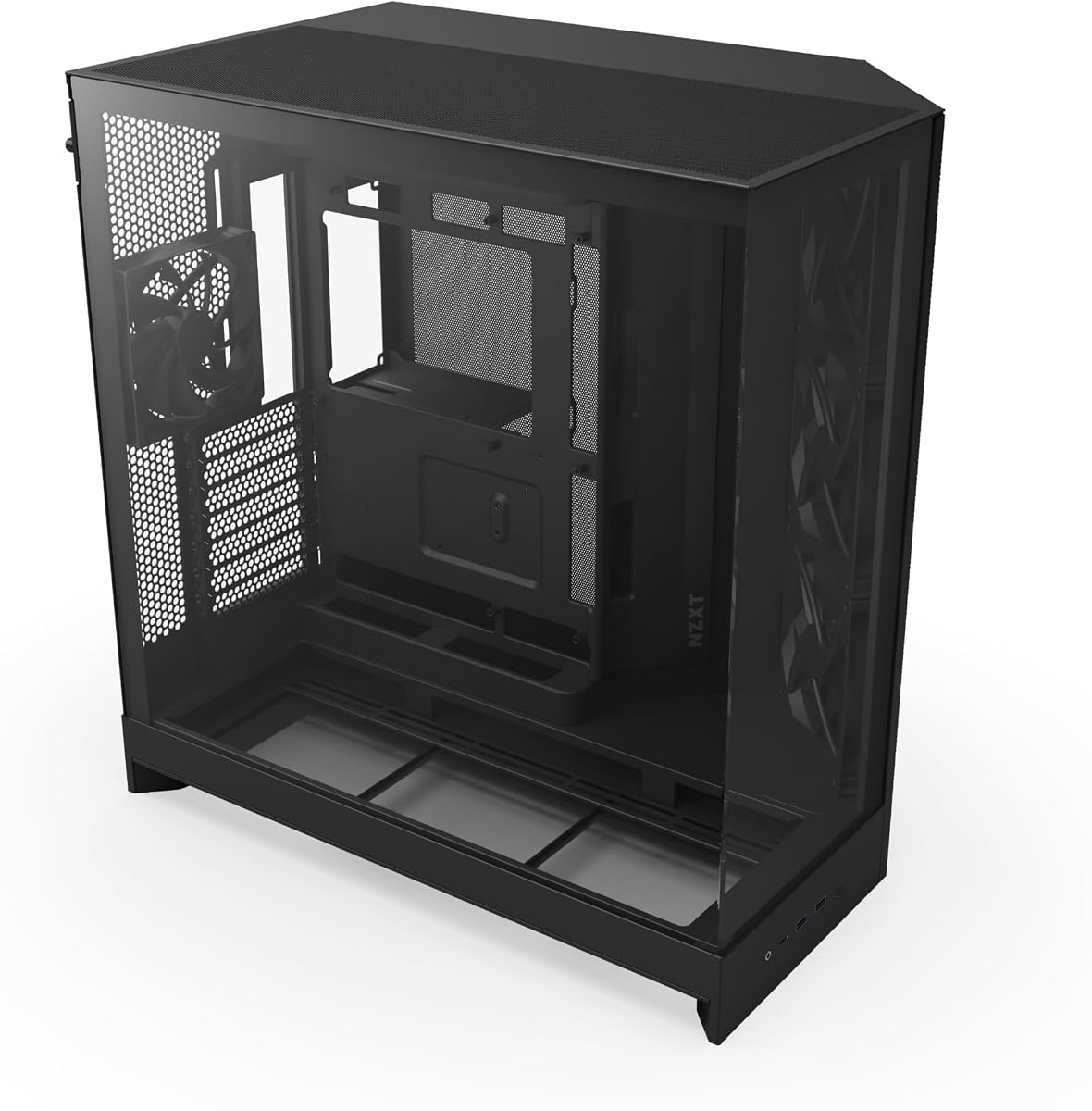
The NZXT H5 Flow offers a compact footprint without sacrificing airflow efficiency. It features a perforated PSU shroud that enables optimal air intake from two 120mm fans not included for dedicated GPU cooling.
We may earn a commission when you buy through this link, at no additional cost to you.
Ultra-fine mesh on the top front and side panels creates maximum airflow while filtering dust effectively. The design supports up to a 360mm radiator in front and 240mm up top for powerful liquid cooling.
While it comes with two 120mm Quiet Airflow fans the shroud fans are separate purchases. The seamless cable management ensures a clean look with wide channels and hooks for routing cables effortlessly.
This case is ideal for users wanting a smaller build that still cools high-performance hardware. It delivers solid out-of-the-box performance with easy upgrades for liquid cooling setups.
PSU shroud is perforated enabling optimal air intake for the graphics card from two 120mm fans.
Ultra-fine mesh on panels creates maximum airflow and filters dust to maintain clean internal conditions.
We may earn a commission when you buy through this link, at no additional cost to you.
The NZXT H6 Flow RGB brings a premium look with wraparound glass panels and three pre-installed 120mm RGB fans. It features a compact dual-chamber design that improves thermal performance while creating a clean uncrowded aesthetic.
We may earn a commission when you buy through this link, at no additional cost to you.
Three pre-installed fans are positioned at an ideal angle for optimal out-of-the-box cooling and vibrant RGB lighting. The top and side panels feature an airflow-optimized perforation pattern to enhance overall performance.
The cable management system simplifies the build process using wide channels and straps to hide wires neatly. While the glass looks great it can show dust more easily than mesh panels requiring regular cleaning.
This model is perfect for white builds where aesthetics are a priority. It balances style and function with excellent RGB lighting and good cooling for a compact footprint.
Seamless edge provides an unobstructed view of the inside to highlight key components and RGB lighting.
Improves overall thermal performance and creates a clean uncrowded aesthetic by separating components.
We may earn a commission when you buy through this link, at no additional cost to you.
Crafted with metal glass and wood the Antec Flux Pro offers a high-quality texture with unique materials. It supports up to 12 fans simultaneously with pre-installed 3 x Tranquil 140 PWM at the front and 2 x P12R PWM reverse fans on the PSU shroud.
We may earn a commission when you buy through this link, at no additional cost to you.
The innovative iShift PSU 90° mount allows for flexible power supply placement. It supports simultaneous installation of 420mm radiator + 360mm radiator for extreme liquid cooling setups.
With removable cooling brackets on top front and PSU shroud you can tailor airflow to your needs. The multi-directional vent design maximizes cooling potential for heavy workstation or gaming hardware.
This case is for those who need maximum capacity and cooling power. It is a top choice for E-ATX systems that require extensive fan support and modular cooling options.
Crafted with a combination of metal glass and wood to create a high-quality texture with different materials.
Supports up to 12 fans simultaneously with pre-installed fans for solid performance.
We may earn a commission when you buy through this link, at no additional cost to you.
The Cooler Master HAF II 500 features an oversized Mighty40 cooling system with two 220 x 40 mm front intake fans and one 180 x 40 mm rear exhaust fan. Its low airflow resistance design uses large openings to improve throughput.
We may earn a commission when you buy through this link, at no additional cost to you.
Split-level cable management optimizes routing space and creates room for oversized rear exhaust cooling. The MasterRail mounting system supports multiple fan and radiator sizes at the front and top of the case.
A Dual-Mode GPU Holder clamps a single GPU or supports two GPUs up to 3.6 slots thick. The flexible storage cage supports 3.5-inch and 2.5-inch drives in orientations based on PSU length.
This model excels at raw airflow performance for extreme cooling needs. It is best for users who want maximum fan size and airflow throughput in their chassis.
Two 220 x 40 mm front intake fans and one 180 x 40 mm rear exhaust fan provide massive airflow.
Uses large front and rear ventilation openings to improve airflow throughput.
We may earn a commission when you buy through this link, at no additional cost to you.
This mid-tower case uses a triple-chamber design for superior cooling performance with isolated chambers for CPU GPU and PSU. An isolated CPU cooling chamber holds a 360mm radiator ensuring none of the heat affects other components.
We may earn a commission when you buy through this link, at no additional cost to you.
The central GPU and motherboard chamber offers massive vertical airflow to cool all components thoroughly and exhaust hot air. A third chamber houses the power supply storage and cables with dedicated intake and exhaust locations.
Airflow ducts accelerate airflow as it is forced into a narrow channel. This increases airflow velocity without requiring increased fan speed improving cooling power without added noise.
This model is perfect for those wanting extreme component separation and airflow. It ensures clean thermal paths and maximizes cooling efficiency through smart engineering.
Superior cooling performance is possible due to isolated chambers for the most powerful hardware including CPU GPU and PSU.
An innovative duct on the bottom fan array accelerates airflow as it is forced into a narrow channel.
We may earn a commission when you buy through this link, at no additional cost to you.
The NZXT H9 Flow separates main components from the PSU and drives for improved thermal performance. It features perforated steel panels and angled front-right fans for efficient cooling of high-performance builds.
We may earn a commission when you buy through this link, at no additional cost to you.
It includes three F140Q fans in the front-right and one F120Q fan in the rear. Support up to nine 140mm fans across the top front-right and bottom plus one 120mm fan in the rear.
The panoramic view showcases every detail of your build with seamless wraparound tempered glass paneling. It fits up to a 420mm radiator on the top and front-right with plenty of clearance for high-end graphics cards.
This case is ideal for a clean build with great airflow and cable management. It supports rear-connecting motherboards for a cable-free look which enhances aesthetics.
Separates main components from the PSU and drives for improved thermal performance and cable management.
Compatible with rear-connecting motherboards like ASUS BTF and MSI Project Zero for a cable-free look.
We may earn a commission when you buy through this link, at no additional cost to you.
This mid-tower case uses a triple-chamber design for superior cooling performance with isolated chambers for CPU GPU and PSU. An isolated CPU cooling chamber holds a 360mm radiator ensuring none of the heat affects other components.
We may earn a commission when you buy through this link, at no additional cost to you.
The central GPU and motherboard chamber offers massive vertical airflow to cool all components thoroughly and exhaust hot air. A third chamber houses the power supply storage and cables with dedicated intake and exhaust locations.
Airflow ducts accelerate airflow as it is forced into a narrow channel. This increases airflow velocity without requiring increased fan speed improving cooling power without added noise.
This model is perfect for those wanting extreme component separation and airflow. It ensures clean thermal paths and maximizes cooling efficiency through smart engineering.
Superior cooling performance is possible due to isolated chambers for the most powerful hardware including CPU GPU and PSU.
An innovative duct on the bottom fan array accelerates airflow as it is forced into a narrow channel.
We may earn a commission when you buy through this link, at no additional cost to you.
Selecting the right chassis involves balancing cooling performance build quality and aesthetics. This guide covers the essential factors to consider for a hybrid airflow PC case.
Look for cases with perforated mesh panels on the front top and sides. These openings allow air to enter freely reducing resistance and heat buildup inside.
Prioritize cases with dedicated intake and exhaust paths to ensure hot air is expelled efficiently while fresh air cools components.
Check the maximum fan count supported at the front top and rear. More fan slots give you flexibility to optimize airflow and noise levels.
Ensure the case supports the fan sizes you prefer whether 120mm 140mm or larger options for better static pressure and airflow.
Confirm the case supports your motherboard form factor like ATX E-ATX or Micro-ATX. Also verify GPU length clearance and PSU space.
Hybrid cases often have specialized layouts so check compatibility with water cooling or large hardware before buying.
Wide channels and tie-down points keep wires hidden for a cleaner look and better airflow. Look for cases with ample behind-tray routing space.
Effective cable management prevents clutter that can block airflow paths and increase internal temperatures.
Steel frames offer durability and better sound dampening compared to thin plastic. Tempered glass panels provide views but add weight.
Invest in sturdy materials that protect your hardware and maintain structural integrity over time.
Some cases allow you to swap parts like front panels or drive cages to fit your needs. This extends the lifespan of your chassis.
Look for modular features that let you adjust airflow or aesthetics without replacing the entire case.
Dual or triple-chamber designs isolate heat sources like CPU and PSU from critical components. This improves cooling efficiency significantly.
Choose a layout that separates heat to prevent hot air from recirculating over your motherboard and RAM.
Consider the visual style and RGB connectivity. Cases with ARGB headers and glass panels showcase your build.
Ensure the case fits your desk space and matches the rest of your PC components and peripherals.
Install fans with intake arrows pointing inward at the front and bottom for optimal airflow. Ensure exhaust fans at the rear and top push hot air out efficiently.
Route cables neatly using provided channels and straps to avoid obstructing airflow paths. A tidy interior helps air move freely around components.
Clean dust filters monthly to maintain high airflow and prevent overheating. Use compressed air to clear filters and internal surfaces regularly.
A hybrid airflow PC case combines traditional cooling layouts with dual-chamber or isolated component designs to improve thermal performance. It balances intake and exhaust to cool CPUs and GPUs effectively.
Yes hybrid cases often provide better cooling by separating heat sources and optimizing airflow paths. They reduce recirculation of hot air and allow for more strategic fan placement.
Many hybrid cases come with pre-installed fans but some may require separate purchases. Always check the product specs to confirm fan inclusion and type.
Most hybrid cases support multiple fan sizes and locations for customization. Check mounting options to ensure they fit your desired fan configuration.
Hybrid cases often support standard ATX boards with room for large GPUs and radiators. Verify compatibility with your specific hardware before purchase.
They can be pricier due to advanced engineering and features but offer better cooling and build quality. The investment often pays off in long-term performance and durability.
The top picks like the CORSAIR 4000D RS ARGB and MONTECH AIR 903 MAX offer excellent balance of cooling and value. Choose based on your build needs and budget.
Prioritize cases with strong airflow features and fan support for optimal thermal performance. Dual-chamber designs are worth considering for extreme builds.
Always check current prices and availability before buying to get the best deal. Prices vary by retailer and may change over time.