
Qanba N3 Drone 2
4.5Editor score
Authentic Qanba components
Full control panel layout
Officially licensed peripheral
Discover the top ten arcade sticks for PS5 with expert comparisons of build quality, controls, and compatibility to help you choose the perfect fighting stick.
Finding the right arcade stick for PS5 transforms your fighting game experience by offering precise inputs and tournament-grade durability. These controllers mimic the layout of classic arcade cabinets, allowing players to execute complex moves with greater speed and accuracy than standard controllers.
We compared ten top-rated fightsticks based on build quality, component reliability, and platform compatibility. Each model was evaluated for its joystick mechanism, button responsiveness, and ease of customization to ensure it meets the demands of both casual players and competitive gamers.
Each pick includes detailed specifications and real-world performance notes to help you decide which stick fits your needs. Keep in mind that pricing and availability can change frequently, so check the current links for the most up-to-date information before making your purchase.
4.5Editor score

4.6Editor score

4.5Editor score
This side-by-side comparison highlights the key differences between each of the ten featured arcade sticks. We focus on their specific compatibility options, included components, and unique features to help you quickly identify which model aligns with your gaming setup and preferences.




The HORI PlayStation 5 Fighting Stick Alpha stands out as a premier choice for serious fighting game enthusiasts seeking reliable performance. With a solid rating from users, it delivers the precision needed for competitive play while maintaining the durability expected from a professional-grade peripheral.
We may earn a commission when you buy through this link, at no additional cost to you.
Its standout quality lies in the inclusion of HORI's proprietary HAYABUSA buttons and joystick, which are engineered for high-speed inputs and longevity. The stick is officially licensed by Sony, ensuring seamless compatibility with PS5 and PS4 systems without the need for additional adapters or workarounds.
While the price is higher than generic alternatives, the investment pays off in consistent performance and build integrity. The top panel is replaceable, allowing for customization, but users may find limited third-party options compared to open-standard layouts.
Buyers looking for a plug-and-play tournament stick should prioritize this model for its balance of official support and high-quality components. It is an excellent final recommendation for those who want a stick that feels ready for the arcades right out of the box.
The HAYABUSA joystick and buttons provide faster actuation and reduced wear over time compared to standard parts.
Official licensing ensures that the stick works natively with PlayStation console authentication and features.
We may earn a commission when you buy through this link, at no additional cost to you.
The Nacon Daija Arcade Fight Stick offers a robust platform for players who value deep customization options alongside tournament-ready hardware. It holds a decent user rating and is designed in collaboration with pro gamers to meet the demands of competitive fighting titles.
We may earn a commission when you buy through this link, at no additional cost to you.
Its key strength is the full button mapping capability via dedicated software on PC and Mac, allowing users to create custom game profiles easily. The stick comes with SANWA joystick and action buttons, which are the gold standard in the fighting community for feel and reliability.
A notable trade-off is that the button mapping software is only available on PC, meaning Mac or console-only users cannot remap directly. Additionally, its size may take up significant desk space compared to compact alternatives.
This stick is best for players who want to fine-tune their control schemes and appreciate SANWA quality. It remains a strong recommendation for those who primarily play on PC or have access to a computer for setup.
Create custom game profiles with intuitive software to tailor control layouts for different games.
Switch between two different joystick heads to choose the best solution for control and precision.
We may earn a commission when you buy through this link, at no additional cost to you.
The MAYFLASH Arcade Stick F700 provides an accessible entry point for players wanting wireless flexibility without a premium price tag. It earns a solid rating for its versatility across multiple platforms, including PS5, PS4, and various PC systems.
We may earn a commission when you buy through this link, at no additional cost to you.
Its standout feature is the inclusion of three connection methods: Bluetooth, 2.4G wireless, and wired USB, offering convenience for different gaming setups. The 2.4G receiver has a hidden compartment for safe storage, and the stick supports standard Sanwa components for easy upgrades.
Users should note that it does not support Xbox consoles wirelessly and is limited to fighting games only. This limitation might reduce its utility for users seeking a multipurpose controller for other genres.
Buyers seeking a versatile and affordable option should consider this stick for its broad compatibility and wireless capabilities. It is a highly recommended choice for budget-conscious gamers who prioritize connection options.
Three ways to connect including Bluetooth and 2.4G receiver offer flexibility for different setups.
Compatible with PS5, PS4, Switch, and Windows, allowing seamless switching between devices.
We may earn a commission when you buy through this link, at no additional cost to you.
The Qanba N3 Drone 2 is designed for users who value authentic arcade components and a premium build experience. It maintains a strong user rating and is officially licensed, ensuring it meets the quality standards expected from a top-tier Sony peripheral.
We may earn a commission when you buy through this link, at no additional cost to you.
Its key strengths include the use of authentic Qanba buttons and a 30-mm B30 joystick with OMRON switches, delivering precise input registration. The full control panel includes a touch pad, which adds unique navigation capabilities not found in standard sticks.
The main trade-off is that it is wired only, which may inconvenience players looking for wireless setups. However, for those prioritizing input fidelity and build quality, this limitation is often acceptable.
Competitive players seeking a high-end wired stick should buy this model for its authentic components and official support. It is a final recommendation for enthusiasts who demand the best tactile feedback from their controller.
Authentic buttons and a 30-mm B30 joystick ensure tournament-level precision and durability.
Officially licensed peripheral ensures seamless integration with PlayStation system features.
We may earn a commission when you buy through this link, at no additional cost to you.
The MAYFLASH F700 Elite elevates the standard F700 experience by including premium Sanwa components for enhanced performance. It holds a high user rating and supports wireless Bluetooth, making it a versatile option for modern fighting game setups.
We may earn a commission when you buy through this link, at no additional cost to you.
Its key strengths are the eight highly responsive Sanwa buttons and a precision 4-way joystick, allowing reliable strikes over long sessions. The included full-size anti-slip rubber mat keeps the stick firmly in place, reducing slippage during intense matches.
A trade-off is the lack of Xbox Series S/X compatibility, limiting its use to non-Microsoft consoles. However, for PS5 and PC players, this is rarely a critical issue given its broad feature set.
Users wanting a high-quality wireless stick with premium parts should buy this model for its performance and stability. It is a strong recommendation for those who want the elite version of a proven design.
Premium quality Sanwa components ensure instant response and peak performance over time.
A full size anti-slip rubber mat holds the fighting stick firmly in place on any surface.
We may earn a commission when you buy through this link, at no additional cost to you.
The MAYFLASH F500 Arcade FightStick Bundle offers extensive compatibility across both PlayStation and Xbox ecosystems. It maintains a solid rating for its ability to work with multiple consoles including Xbox Series S/X through included Magic Boots.
We may earn a commission when you buy through this link, at no additional cost to you.
Its key strengths include plug and play functionality using the Magic Boots for PS5 and PS4 without needing the original controller. It also supports both X input and D input on PC, making it adaptable for different software environments.
The trade-off is that while versatile, the build quality feels more basic compared to specialized sticks, which may be a concern for competitive players. Additionally, Xbox use on older consoles requires a wired controller connection.
Players owning both PlayStation and Xbox consoles should buy this bundle for its unique cross-platform support. It is a recommended option for those who need one stick to cover multiple console libraries.
Magic Boots for PS5 allow plug and play without needing the original controller plugged in.
Compatible with Xbox Series X, PS5, PC, and Switch for a unified gaming setup.
We may earn a commission when you buy through this link, at no additional cost to you.
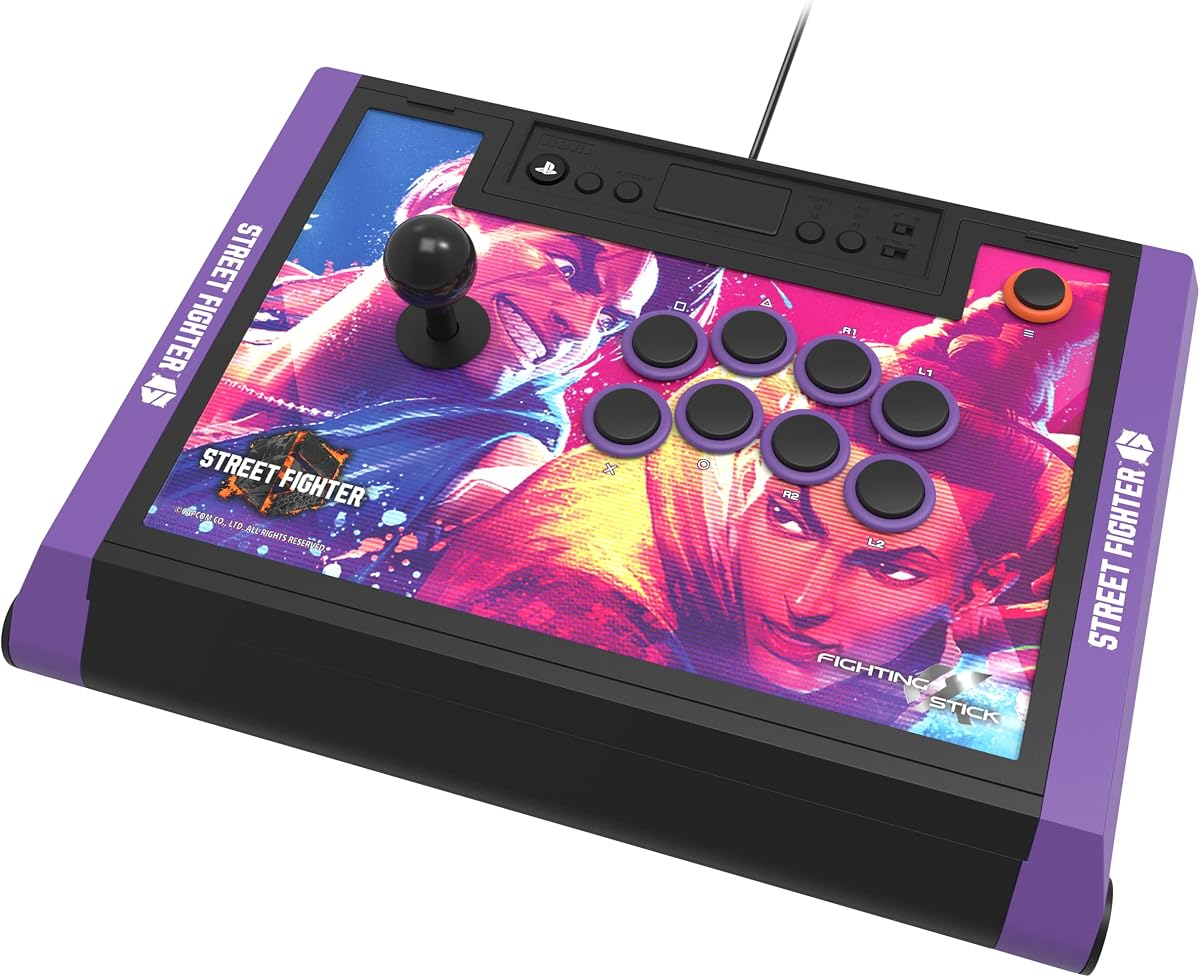
The HORI PlayStation 5 Fighting Stick Alpha (Street Fighter 6 Edition) delivers tournament-grade performance with exclusive visual flair. It is officially licensed by both Sony and Capcom, ensuring quality and thematic authenticity for fans of the franchise.
We may earn a commission when you buy through this link, at no additional cost to you.
Its standout feature is the inclusion of a link to eighteen downloadable high-resolution images of Street Fighter 6 characters for customizing the top panel. The stick retains the same high-end HAYABUSA joystick and buttons as the standard Alpha model.
A trade-off is the higher price point compared to the standard version, which may not be worth it for players who prefer neutral aesthetics. The exclusive artwork might also limit appeal for those who dislike licensed branding.
Street Fighter enthusiasts who value official branding should buy this edition for its unique look and premium build. It is a solid recommendation for collectors and fans looking to show their allegiance to the game.
Includes link to 18 downloadable hi-res images of favorite Street Fighter 6 characters.
Features the same proprietary HAYABUSA buttons and joystick as the standard Alpha.
We may earn a commission when you buy through this link, at no additional cost to you.
The Qanba Q7 Obsidian 2 provides a flexible and officially licensed experience for players who need platform switching. It holds a good rating and includes a physical switch to change between PS5, PS4, and PC modes easily.
We may earn a commission when you buy through this link, at no additional cost to you.
Its key strengths include swappable Sanwa JLF joystick tops, allowing users to customize the feel of the stick without buying a new device. The full control panel includes a touch pad and Qanba OBSF buttons, ensuring a complete arcade-style layout.
The main trade-off is that it is wired only, which may limit setup options for some users. Additionally, the price sits in a mid-range bracket that offers solid value but less exclusivity than top-tier models.
Players who value modular components and platform switching should buy this model for its customization options. It is a practical recommendation for those who want the ability to swap parts easily.
Swappable Sanwa JLF joystick tops allow users to change the feel without soldering.
Has a switch to change between PS5, PS4, and PC modes quickly.
We may earn a commission when you buy through this link, at no additional cost to you.
The HORI TEKKEN 8 Edition brings tournament-grade performance with exclusive visual elements for fans of the latest installment. It is officially licensed by Sony and Bandai Namco Entertainment, ensuring authenticity and high build standards.
We may earn a commission when you buy through this link, at no additional cost to you.
Its standout feature is the special TEKKEN 8 top panel artwork and downloadable alternate artwork for printing, allowing for unique customization. The internals match the standard Alpha model with HAYABUSA joystick and buttons for reliable play.
A trade-off is the higher price compared to the base model, which might not appeal to neutral players. The specific theme limits the aesthetic choice to those who prefer the TEKKEN brand.
TEKKEN 8 fans seeking a premium stick should buy this edition for its exclusive look and proven quality. It is a highly recommended choice for collectors and competitive players of the series.
Features TEKKEN 8 top panel artwork and downloadable alternate artwork to print.
A tournament ready fight stick with proprietary HAYABUSA buttons and joystick.
We may earn a commission when you buy through this link, at no additional cost to you.
The GuileKeys GK-18 leverless arcade stick offers an innovative all-button layout designed to reduce input errors and enhance speed. It holds a solid rating for its competitive edge features, including ultra-low latency and hot-swappable switches.
We may earn a commission when you buy through this link, at no additional cost to you.
Its key strengths include four-direction movement buttons instead of a joystick, which can improve accuracy for complex combinations. The controller features immersive RGB lighting and an integrated OLED screen that displays input mode and button layout clearly.
A trade-off is that it is leverless, which has a steep learning curve for players accustomed to traditional sticks. Also, note that a converter is required for PS5 compatibility, adding a step to setup.
Advanced players seeking unique layouts should buy this stick for its customization and performance features. It is a strong recommendation for those willing to adapt to an all-button control scheme.
Input latency is less than 1ms in all modes for smooth and precise button actions.
Hot swap and high customization allow easy replacement without soldering.
We may earn a commission when you buy through this link, at no additional cost to you.
Selecting the right arcade stick requires evaluating several key factors to ensure compatibility and performance. This guide breaks down the most important considerations to help you narrow down your options effectively.
Ensure the stick supports PS5 specifically, as some older models may require adapters. Check if it also works with other consoles or PC if you plan to switch systems.
Always verify the product listing explicitly states PS5 compatibility to avoid connection issues.
Traditional joysticks are preferred by most players for their classic feel, while leverless designs offer different advantages for specific moves. Look for high-quality mechanisms like Sanwa or proprietary options.
Choose a joystick type that matches your existing muscle memory and gameplay style.
Standard buttons are arranged for ergonomic comfort, but some models offer unique layouts like extra macro keys or touch pads. Ensure the layout suits the fighting games you play most.
A comfortable layout reduces fatigue during long gaming sessions.
Solid construction prevents sliding and adds durability. Look for materials like wood or metal plates and non-slip rubber feet for stability.
A sturdy build ensures the stick remains consistent over years of use.
Wired sticks provide the lowest latency, but wireless models offer convenience for clean setups. Consider your preference for cable management versus wireless freedom.
Prioritize low-latency connections if you compete online regularly.
Open layouts allow you to replace buttons and joysticks easily, which is vital for maintenance and personalization. Check if the top panel can be changed or customized.
Modular designs offer better long-term value by allowing part swaps.
Some sticks include software for button mapping or macro creation. Verify if these features work on your primary device like PC or Mac.
Mapping software can help you tailor controls to your specific needs.
To set up your stick, connect it directly to your PS5 via USB unless it supports wireless pairing. Follow the on-screen prompts to authorize the peripheral as a controller for fighting games.
For maintenance, clean the buttons and joystick regularly to remove dust and grime. Use compressed air and a soft cloth to keep the contact points clear for smooth operation.
Adjust the tightness of your joystick using any included tools if the feel becomes too loose. Store the device in a dry place when not in use to protect the electronics from humidity.
Most arcade sticks are optimized for fighting games and may not support inputs for other genres effectively. You might experience issues with menus or non-standard button mappings in titles like platformers or shooters.
No, modern officially licensed sticks work directly without needing a controller plugged in. However, some generic models may require a controller bridge for authentication.
Sanwa buttons work with sticks that use standard mounting holes, but check the manual for compatibility. Some proprietary designs require specific parts that differ from standard arcade specs.
First, clean around the button to remove debris blocking movement. If the issue persists, you may need to replace the microswitch or the entire button assembly.
Wireless sticks are convenient, but wired sticks generally offer lower latency and reliability for competitive matches. If you compete often, a wired connection is often preferred.
Yes, many sticks allow you to swap faceplates or download custom artwork. Some models come with templates or software to help you design your own look.
Officially licensed sticks typically come with a one-year manufacturer warranty covering defects. Always keep your receipt and check the terms for specific exclusions or repair options.
We covered ten top-tier options ranging from budget-friendly to premium choices. Whether you want official licensing or customizable parts, there is a model here for every player.
Prioritize components and compatibility over minor features to ensure longevity and performance. The HORI Alpha and MAYFLASH F700 offer excellent starting points for most users.
Remember to check the current prices and availability before buying to get the best deal. Your perfect arcade stick awaits to elevate your next fighting game session.