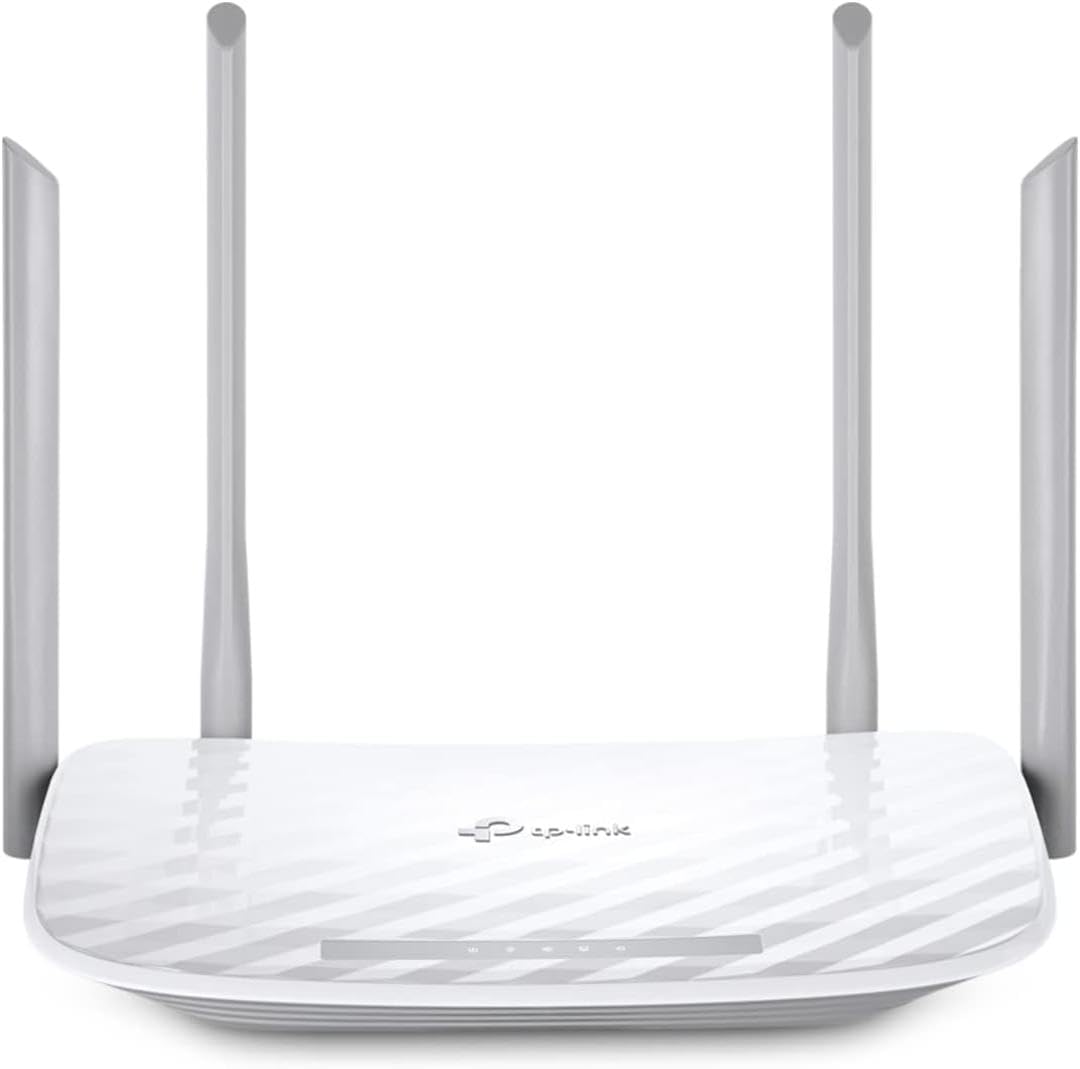
TP-Link AC1200 WiFi Router Dual Band Wireless Internet Router (Archer A54)
4.3Editor score
Dual-band speeds up to 1200 Mbps
Coverage up to 1000 square feet
Advanced WPA3 security protocol included
This guide compares the top ten cheap WiFi routers for 2026, analyzing speed, coverage, and features to help you find the best affordable network solution.
Finding a reliable network connection without breaking the bank is a common challenge for modern households. You need speed and stability for streaming, gaming, and working from home. This article explores budget-friendly options that deliver excellent performance without high costs.
We have evaluated ten top-rated routers based on real-world specifications and user feedback. Our analysis focuses on key aspects like Wi-Fi standards, coverage area, and security features. This ensures you get a device that meets your specific connectivity needs efficiently.
Each pick highlights unique strengths to help you make an informed decision quickly. Prices and availability can fluctuate frequently so checking current listings is always recommended. We hope this guide simplifies your search for the perfect affordable networking device today.
4.3Editor score

4.5Editor score

4.2Editor score
The following table provides a side-by-side comparison of all ten routers reviewed in this guide. It highlights essential specifications like maximum speed, coverage area, and port types to help you compare options at a glance.


The TP-Link AC1200 WiFi Router (Archer A54) offers a fantastic entry point for those seeking reliable connectivity without overspending. It holds a strong rating of 4.3 stars and delivers dual-band performance that handles everyday tasks well.
We may earn a commission when you buy through this link, at no additional cost to you.
This router supports speeds up to 1200 Mbps across two bands ensuring smooth streaming and browsing. The four external antennas provide stable connections up to 1000 square feet making it ideal for small to medium apartments.
While it lacks Gigabit Ethernet ports which might limit wired device speeds, its wireless performance remains robust for most users. The inclusion of WPA3 security ensures your network stays protected against modern threats without extra cost.
This model is best suited for renters or families on a tight budget who need a dependable connection. We recommend it if you prioritize value and ease of setup over advanced wired capabilities or massive range.
Despite its low cost this router handles 4K streaming and general browsing without significant buffering issues.
EasyMesh compatibility allows you to add range extenders later if your coverage needs grow over time.
We may earn a commission when you buy through this link, at no additional cost to you.
The TP-Link AX1800 WiFi 6 Router (Archer AX21 V5) brings modern efficiency to home networks with its AX1800 standard. It boasts a high rating of 4.4 stars and offers significantly better capacity than older generation routers.
We may earn a commission when you buy through this link, at no additional cost to you.
OFDMA technology allows this router to communicate with more devices simultaneously reducing lag during busy hours. With up to 1.8 Gbps total bandwidth it supports high definition streaming and gaming without dropping connections.
One standout feature is the built-in VPN server which lets you secure your network remotely. TP-Link's commitment to cybersecurity ensures this device is built with safety protocols in mind from the start.
This router is ideal for households with many smart devices looking for long-term performance. It is a solid upgrade for anyone wanting to future-proof their network while staying within a reasonable price range.
OFDMA ensures that when multiple phones and TVs are online the network remains stable and fast.
The integrated VPN server allows for advanced connectivity options without needing extra hardware devices.
We may earn a commission when you buy through this link, at no additional cost to you.
The NETGEAR Nighthawk WiFi 6 Router R6700AX stands out for its robust coverage and strong wireless performance in larger spaces. It maintains a 4.2 rating and is designed to handle the demands of modern streaming and workloads.
We may earn a commission when you buy through this link, at no additional cost to you.
Covering up to 1500 square feet this router ensures signals reach into bedrooms and living areas effectively. The four Gigabit Ethernet LAN ports provide fast wired connections for consoles and computers without relying on Wi-Fi.
Setup is simplified through the Nighthawk app which allows you to manage the network from anywhere. While NETGEAR Armor offers extra protection the trial period ends and a subscription is needed for continued advanced security features.
This router is best for families needing reliable coverage across multiple rooms. It is a trustworthy choice if you prefer a dedicated app for network management and robust wired connectivity options for gaming.
The signal strength is focused to reach further distances reducing dead zones in medium-sized homes effectively.
The free app lets you pause devices and run speed tests from your phone conveniently anywhere.
We may earn a commission when you buy through this link, at no additional cost to you.
The Tenda AC1200 Smart WiFi Router AC6 is an incredibly affordable option for those needing basic internet access. It holds a 4.0 rating and delivers adequate speeds for general browsing and streaming in smaller spaces.
We may earn a commission when you buy through this link, at no additional cost to you.
It uses Beamforming technology to direct wireless signals toward connected devices improving stability. The setup process is guided by a dedicated Smart App that makes initial configuration straightforward for any user.
However the four Ethernet ports are limited to 100 Mbps which may bottleneck high-speed internet plans. This lack of Gigabit speeds makes it better suited for wireless connections or slower internet packages.
We recommend this router for users on a strict budget with fewer wired devices. It is a practical choice if you need a basic reliable router for a small home or office setup.
You get dual-band performance at a very low price point which is great for essential browsing needs.
Managing the network settings is intuitive with the mobile app allowing quick access to controls.
We may earn a commission when you buy through this link, at no additional cost to you.
The TP-Link AC1200 Gigabit Dual Band WiFi Router (Archer A6) is the top-rated pick in this review with a 4.5 score. It strikes a perfect balance between performance and price for most households needing reliable Wi-Fi.
We may earn a commission when you buy through this link, at no additional cost to you.
Unlike many budget models this unit includes full Gigabit Ethernet ports allowing wired devices to reach full internet speeds. This is crucial for gamers or streamers who need consistent latency and maximum bandwidth.
Beamforming technology concentrates signals toward devices improving connection stability even at moderate distances. While it lacks the latest Wi-Fi 6 standard it delivers robust performance for everyday tasks and basic gaming needs.
This router is the best choice for users who want a complete package without paying extra for features they won't use. It is highly recommended for anyone needing wired Gigabit speed at a budget-friendly price.
Having full Gigabit ports ensures your wired connections are not limited by the router's internal hardware.
OneMesh compatibility means you can easily extend your network later without buying a new whole system.
We may earn a commission when you buy through this link, at no additional cost to you.
The TP-Link Archer AX1450 WiFi 6 Dual-Band Wireless Router offers a cost-effective way to access modern Wi-Fi technology. With a 4.2 rating this renewed model provides significant performance gains over older AC routers.
We may earn a commission when you buy through this link, at no additional cost to you.
It supports speeds up to 1.45 Gbps and uses OFDMA to handle multiple devices more efficiently. This technology reduces lag when many devices are connected which is common in modern smart homes.
A key feature is Target Wake Time which helps connected devices save battery life by managing when they check for data. This is particularly useful for smart sensors and mobile devices that rely on battery power.
This router is perfect for buyers who want Wi-Fi 6 performance without paying premium prices. Just ensure you check the renewed condition carefully as physical wear may vary between units.
Getting on the Wi-Fi 6 standard ensures your network will handle new devices for years without upgrades.
Target Wake Time helps your smart devices last longer on charge by reducing unnecessary background checks.
We may earn a commission when you buy through this link, at no additional cost to you.
The TP-Link AXE5400 Tri-Band WiFi 6E Router brings powerful performance for demanding users who need speed and reliability. It has a 4.3 rating and supports speeds up to 5400 Mbps with three separate frequency bands.
We may earn a commission when you buy through this link, at no additional cost to you.
The unique 6 GHz band provides near-zero latency making it ideal for competitive gaming and virtual reality. This dedicated band reduces interference significantly ensuring smooth performance even during heavy usage times.
A robust dual-core CPU and 512 MB memory handle complex tasks easily without slowing down the network. EasyMesh compatibility lets you expand coverage across a large home with seamless roaming between access points.
This router is best for tech enthusiasts or households with many high bandwidth devices. While pricier it delivers a premium experience that justifies the cost for serious streaming and gaming applications.
The 6 GHz band eliminates congestion allowing for instant responses during fast paced online gaming.
With extra memory and CPU power this router can handle complex security scans without lagging.
We may earn a commission when you buy through this link, at no additional cost to you.
The TP-Link AC1900 Smart WiFi Router Dual Band Router delivers impressive speed with its Wave 2 technology. It holds a high rating of 4.5 stars and provides a powerful wireless experience for active households.
We may earn a commission when you buy through this link, at no additional cost to you.
It offers total speeds of up to 1900 Mbps ensuring fast downloads and streaming on the 5 GHz band. MU-MIMO technology allows it to send data to multiple devices simultaneously reducing wait times for everyone.
Parental controls are built-in allowing you to set limits on internet usage for children. The router supports OneMesh so you can integrate it with extender devices to grow your network as needed.
This router is ideal for families with high-speed internet plans who need robust performance. It offers a great balance of speed and management features making it a reliable choice for daily use.
The AC1900 standard ensures that even multiple streams of video run smoothly without interruptions.
Built-in parental controls make it easy to manage screen time without needing extra software.
We may earn a commission when you buy through this link, at no additional cost to you.
The TP-Link Dual-Band BE3600 Wi-Fi 7 Router (Archer BE230) represents the cutting edge of wireless technology. It has a 4.2 rating and offers capabilities that are years ahead of standard Wi-Fi 6 routers.
We may earn a commission when you buy through this link, at no additional cost to you.
Wi-Fi 7 enables Multi-Link Operation which allows simultaneous connections to different bands for incredible speed. The dual 2.5Gbps ports mean wired devices can also access ultra fast internet speeds beyond standard Gigabit.
A powerful Quad-Core processor manages high throughput ensuring minimal latency even during heavy data transmissions. It supports voice control via Alexa and Google Assistant adding convenience to network management tasks.
This router is best for early adopters and tech enthusiasts who want the fastest possible network. It is a premium investment that ensures your home network remains relevant for many years to come.
Wi-Fi 7 prepares your home for next generation devices that will become common in the next few years.
The high-end processor ensures that security scans and traffic management do not slow down your speeds.
We may earn a commission when you buy through this link, at no additional cost to you.
The ASUS RT-AX1800S Dual Band WiFi 6 Extendable Router offers exceptional security features without requiring subscriptions. It has a solid 4.3 rating and provides a strong platform for secure and fast home networking.
We may earn a commission when you buy through this link, at no additional cost to you.
AiProtection Classic powered by Trend Micro gives you commercial grade security at no extra cost. This ensures your network is protected against malware and threats automatically without needing extra software licenses.
With five Gigabit ports and AiMesh compatibility it handles wired devices and network expansion well. The 1024-QAM technology increases throughput delivering faster connections compatible modern wireless devices.
This router is best for security conscious users who want advanced features without ongoing costs. It is a robust choice for gamers and households needing strong protection against cyber threats daily.
You get powerful threat protection built into the router without paying monthly fees for subscriptions.
Built-in VPN capabilities allow secure remote access to your home network easily.
We may earn a commission when you buy through this link, at no additional cost to you.
Selecting the right router involves evaluating several technical factors to ensure it meets your specific needs.
The Wi-Fi standard determines maximum speed and capacity. WiFi 6 and WiFi 7 offer better performance for modern devices.
Prioritize WiFi 6 for future proofing unless your plan is strictly basic browsing needs.
Coverage depends on your home size and layout. Larger homes need routers with stronger antennas or mesh compatibility.
Check the square footage rating to ensure your router can cover your space effectively.
Match router speed to your internet plan. Gigabit internet requires a router that supports full Gigabit wired speeds.
Ensure the router is rated for your expected bandwidth to avoid bottlenecks.
Wired connections are vital for consoles and PCs. Look for Gigabit Ethernet ports if you have many wired devices.
Avoid older Fast Ethernet ports if you need high speed wired performance.
Modern routers include WPA3 encryption to protect your data. Additional security suites add layers against threats.
Check if security features require subscriptions or are built-in for free.
Mobile apps simplify installation significantly. A good interface saves time and reduces setup errors for non-technical users.
Choose a model with a reliable app for easy management.
Expansion may be necessary later. Routers that support mesh systems allow you to add range extenders easily.
Verify compatibility if you plan to expand your network coverage later.
Price varies widely based on features. Determine the minimum specs you need to avoid overspending on unused capabilities.
Balance cost against performance to find the best value.
Place your router in a central elevated location to maximize signal strength. Avoid hiding it in cabinets or behind thick walls.
Update the firmware regularly through the manufacturer app. Updates often fix bugs and improve security performance.
Restart the router once a month to clear cached memory. This simple step can restore speed during heavy usage times.
Yes most routers require a separate modem to connect to the internet service provider. The router connects to the modem via Ethernet cable to distribute the signal.
AC routers use older Wi-Fi 5 while AX routers use Wi-Fi 6. AX offers better efficiency and capacity for many devices but AC is often cheaper.
Check the port descriptions. If it says Gigabit Ethernet ports it supports speeds up to 1000 Mbps. Fast Ethernet ports only support up to 100 Mbps.
Yes many routers support Access Point Mode. This lets you connect a cable from your main router to the new unit to create more signal.
This is often due to network congestion as more neighbors use their internet. A router with better filtering or higher capacity helps manage this.
Refurbished routers can be excellent value if they come from a reputable seller. They are tested to work but may show signs of wear.
Most budget routers handle 20 to 50 devices depending on load. Heavy usage like 4K streaming reduces this number compared to light browsing.
Standard routers work for most casual gaming. However a router with low latency features and wired ports is preferred for competitive play.
The TP-Link AC1200 AC100 A6 offers the best balance of features and value for most buyers today.
For those needing faster speeds the AX1800 AX1450 or WiFi 7 BE230 provide excellent performance upgrades.
Prices change frequently so please check the current listings before making your final purchase decision.